Why Every ABAP Cloud Developer Should Master String Functions
Business data is not always stored in the exact format required by users or downstream applications. Customer numbers may require leading zeros, document numbers may need formatting, text values often need trimming, and identifiers frequently need to be extracted or modified before they are displayed in reports or Fiori applications.
Instead of performing these operations in ABAP after retrieving the data, SAP recommends pushing string manipulation to the database whenever possible. ABAP CDS provides several built-in string functions that execute directly in SAP HANA, improving performance while keeping business logic inside the CDS View Entity.
Learning Objectives
After Completing This Lesson You Will Be Able To
| Skill | Description |
|---|---|
| Format Business Data | Pad, trim and format character fields. |
| Manipulate Strings | Extract, replace and search text. |
| Improve Performance | Push string processing to SAP HANA. |
| Avoid Common Mistakes | Understand the behavior and limitations of string functions. |
| Build Better CDS Views | Produce business-ready output directly from CDS. |
String Functions Overview
SAP provides several built-in string functions that can be grouped into four major categories.
Categories of String Functions
| Category | Functions |
|---|---|
| Padding | LPAD(), RPAD() |
| Trimming | LTRIM(), RTRIM() |
| Searching & Extraction | INSTR(), SUBSTRING(), LEFT(), RIGHT(), LENGTH() |
| Modification | REPLACE(), LOWER(), UPPER(), CONCAT() |
Architect Perspective
Architect InsightMost production CDS Views use only a small subset of these functions. LPAD(), SUBSTRING(), REPLACE(), LENGTH(), and CONCAT() are among the most frequently used functions in RAP applications and analytical reporting.
LPAD()
Adds characters to the left side of a string until the specified length is reached.
ABAP CDS Syntax
lpad( source, total_length, pad_character )Returns
Character String
Code Pushdown
✅ Supported
Supported Types
lpad(
    SoldToParty,
    12,
    '0'
) as Customer
Example Result
| Input | Output |
|---|---|
| 12345 | 000000012345 |
| SAP | 000000000SAP |
Real Project Example: Customer Number Formatting
Business Partner, Customer, Vendor, Material and Document numbers are often expected to have a fixed length. LPAD() is commonly used to prepend leading zeros before exposing values to external systems or reports.
💡 SAP Best Practice
Use LPAD() only for presentation purposes. Do not use padded values for joins or business logic because they may no longer match the original database value.
RPAD()
Adds characters to the right side of a string until the required length is reached.
ABAP CDS Syntax
rpad( source, total_length, pad_character )Returns
Character String
Code Pushdown
✅ Supported
Supported Types
rpad(
    SalesOrganization,
    8,
    '_'
) as SalesOrg
Example Result
| Input | Output |
|---|---|
| 1710 | 1710____ |
| SAP | SAP**** |
Real Project Example: Fixed-Length Export Files
Legacy systems often require fixed-width records. RPAD() allows shorter values to be extended to the required length while preserving the original content.
LTRIM()
Removes the specified character from the left side of a string until a different character is encountered.
ABAP CDS Syntax
ltrim( source, character )Returns
Character String
Code Pushdown
✅ Supported
Supported Types
ltrim(
    SalesDocument,
    '0'
) as SalesDocument
Example Result
| Input | Output |
|---|---|
| 0000123456 | 123456 |
| 0000001000 | 1000 |
| 000120030 | 120030 |
Architect Perspective
ImportantLTRIM() removes matching characters only from the beginning of the string.
Characters appearing later in the string remain unchanged.
RTRIM()
Removes the specified character from the right side of a string.
ABAP CDS Syntax
rtrim( source, character )Returns
Character String
Code Pushdown
✅ Supported
Supported Types
rtrim(
    'SAP****',
    '*'
)
Example Result
| Input | Output |
|---|---|
| SAP**** | SAP |
| ABC___ | ABC |
Real Project Example: Cleaning Imported Data
Imported files sometimes contain trailing filler characters or padding. RTRIM() removes these characters before exposing the data to applications or reports.
SUBSTRING()
Extracts a portion of a string beginning at a specified position.
ABAP CDS Syntax
substring( source, start_position, length )Returns
Character String
Code Pushdown
✅ Supported
Supported Types
substring(
    SalesDocument,
    1,
    6
) as SalesDocPrefix
Example Result
| Input | Start | Length | Output |
|---|---|---|---|
| 9000123456 | 1 | 6 | 900012 |
| ABCDEFGHIJ | 4 | 3 | DEF |
Real Project Example: Document Number Prefix
Many organizations encode business information within document numbers. SUBSTRING() allows a CDS View to extract prefixes, suffixes, company identifiers, or fiscal information directly in SAP HANA.
LEFT()
Returns the specified number of characters from the beginning of a string.
ABAP CDS Syntax
left( source, length )Returns
Character String
Code Pushdown
✅ Supported
Supported Types
left(
    SalesDocument,
    4
) as Prefix
Example Result
| Input | Output |
|---|---|
| 9000123456 | 9000 |
| ABCDEFGHIJ | ABCD |
Real Project Example: Company Prefix
LEFT() is commonly used when document numbers or business partner IDs contain meaningful prefixes that need to be reported independently.
RIGHT()
Returns the specified number of characters from the end of a string.
ABAP CDS Syntax
right( source, length )Returns
Character String
Code Pushdown
✅ Supported
Supported Types
right(
    SalesDocument,
    4
) as Suffix
Example Result
| Input | Output |
|---|---|
| 9000123456 | 3456 |
| ABCDEFGHIJ | GHIJ |
Real Project Example: Fiscal Year or Sequence Number
RIGHT() is frequently used when the last few characters represent sequence numbers, fiscal years, or regional identifiers embedded within business keys.
INSTR()
Returns the position of the first occurrence of a substring.
ABAP CDS Syntax
instr( source, search_string )Returns
Integer
Code Pushdown
✅ Supported
Supported Types
instr(
    SalesDocument,
    '1'
) as Position
Example Result
| Input | Search | Result |
|---|---|---|
| 9000123456 | '1' | 5 |
| ABCDABC | 'C' | 3 |
| ABCDEFG | 'X' | 0 |
Architect Perspective
ImportantCharacter positions begin at 1, not zero.
If the search text is not found, INSTR() returns 0.
Real Project Example: Reference Number Validation
A CDS View can quickly determine whether a separator, prefix, or identifier exists inside a reference number before exposing it to reporting applications.
LENGTH()
Returns the number of characters contained in a string.
ABAP CDS Syntax
length( source )Returns
Integer
Code Pushdown
✅ Supported
Supported Types
length(
    CustomerName
) as NameLength
Example Result
| Input | Output |
|---|---|
| SAP | 3 |
| CloudABAP | 10 |
| Sales Order | 11 |
Real Project Example: Data Quality Checks
LENGTH() is commonly used in validation CDS Views to identify values that do not meet the expected business format, such as customer IDs, material numbers, or external reference numbers.
REPLACE()
Replaces every occurrence of one string with another.
ABAP CDS Syntax
replace( source, search_string, replace_string )Returns
Character String
Code Pushdown
✅ Supported
Supported Types
replace(
    SalesDocument,
    '0',
    'X'
) as FormattedDocument
Example Result
| Input | Output |
|---|---|
| 9000123456 | 9XXX123456 |
| SAP Cloud | SAP RAP |
Real Project Example: Data Transformation
REPLACE() is useful when transforming imported values, standardizing separators, masking sensitive data, or preparing text for downstream applications.
💡 SAP Best Practice
REPLACE() substitutes every matching occurrence. If only the first occurrence should change, additional logic is required because REPLACE() does not stop after the first match.
LOWER()
Converts all alphabetic characters to lowercase.
ABAP CDS Syntax
lower( source )Returns
Character String
Code Pushdown
✅ Supported
Supported Types
lower(
    CustomerName
) as CustomerName
Example Result
| Input | Output |
|---|---|
| SAP | sap |
| CloudABAP | cloudabap |
Real Project Example: Search Optimization
LOWER() helps normalize text before comparisons or search operations, ensuring consistent behavior regardless of the original letter casing.
UPPER()
Converts all alphabetic characters to uppercase.
ABAP CDS Syntax
upper( source )Returns
Character String
Code Pushdown
✅ Supported
Supported Types
upper(
    CustomerName
) as CustomerName
Example Result
| Input | Output |
|---|---|
| sap | SAP |
| CloudAbap | CLOUDABAP |
Real Project Example: Standardized Reporting
Reports often require values to be displayed in a consistent uppercase format regardless of how they were originally entered into the system.
Architect Perspective
Architect InsightAlthough all of these functions manipulate strings, they serve very different purposes.
Use SUBSTRING(), LEFT(), andRIGHT() for extraction, INSTR() for searching, LENGTH() for validation, REPLACE() for transformation, and LOWER()/UPPER() for normalization.
Choosing the right function keeps your CDS View easier to understand and avoids unnecessary complexity.
CONCAT()
Concatenates two character strings into a single string.
ABAP CDS Syntax
concat( source1, source2 )Returns
Character String
Code Pushdown
✅ Supported
Supported Types
concat(
    SalesOrganization,
    DistributionChannel
) as SalesArea
Example Result
| Input | Output |
|---|---|
| 1710 + 10 | 171010 |
| SAP + Cloud | SAPCloud |
Real Project Example: Building Composite Business Keys
CONCAT() is frequently used to combine multiple business fields into a single identifier for reporting or integration scenarios.
💡 SAP Best Practice
CONCAT() joins only two expressions. For longer strings, CONCAT_WITH_SPACE() or nested CONCAT() expressions provide better readability.
CONCAT_WITH_SPACE()
Concatenates two strings while inserting the specified number of spaces between them.
ABAP CDS Syntax
concat_with_space( source1, source2, spaces )Returns
Character String
Code Pushdown
✅ Supported
Supported Types
concat_with_space(
    FirstName,
    LastName,
    1
) as FullName
Example Result
| Input | Output |
|---|---|
| John + Smith | John Smith |
| SAP + Cloud | SAP Cloud |
Real Project Example: Employee and Business Partner Names
Instead of nesting multiple CONCAT() functions, CONCAT_WITH_SPACE() creates readable display names for employees, customers, suppliers, and business partners with minimal code.
Architect Perspective
Architect InsightWhenever you simply need to insert spaces between two values, CONCAT_WITH_SPACE() is much easier to read and maintain than nested CONCAT() expressions.
Common Mistakes
❌ Common Mistakes
- Using LPAD() or RPAD() for business logic instead of presentation formatting.
- Assuming SUBSTRING() starts at position 0 instead of 1.
- Expecting INSTR() to return -1 when text is not found. It returns 0.
- Using REPLACE() when only the first occurrence should be modified.
- Writing nested CONCAT() expressions where CONCAT_WITH_SPACE() is clearer.
- Performing string manipulation in ABAP that could be pushed down to SAP HANA.
Performance Considerations
String functions execute directly in SAP HANA as part of the generated SQL statement. This allows formatting and transformation to benefit from code pushdown while reducing application server processing.
Performance Recommendations
| Recommendation | Reason |
|---|---|
| Perform formatting in CDS whenever possible. | Supports code pushdown. |
| Avoid unnecessary nested functions. | Improves readability and maintainability. |
| Use CONCAT_WITH_SPACE() instead of nested CONCAT(). | Cleaner and easier to maintain. |
| Keep presentation formatting separate from business logic. | Makes CDS Views easier to understand. |
Interview Questions
What is the difference between LPAD() and RPAD()?
Answer: LPAD() adds characters to the left of a string, while RPAD() adds characters to the right until the specified length is reached.
What does SUBSTRING() return?
Answer: It extracts a portion of a string beginning at the specified position for the requested length.
What value does INSTR() return if the search string is not found?
Answer: INSTR() returns 0.
Does SUBSTRING() use zero-based indexing?
Answer: No. Character positions begin at 1.
When should CONCAT_WITH_SPACE() be preferred over CONCAT()?
Answer: Whenever two values simply need to be joined with spaces, such as building employee names or business partner display texts.
Does REPLACE() modify only the first occurrence?
Answer: No. REPLACE() substitutes every matching occurrence within the source string.
Why are string functions recommended inside CDS View Entities?
Answer: Because they execute directly in SAP HANA, reducing ABAP post-processing and supporting code pushdown.
Which string functions are most commonly used in production RAP projects?
Answer: LPAD(), SUBSTRING(), LENGTH(), REPLACE(), CONCAT(), CONCAT_WITH_SPACE(), LOWER(), and UPPER().
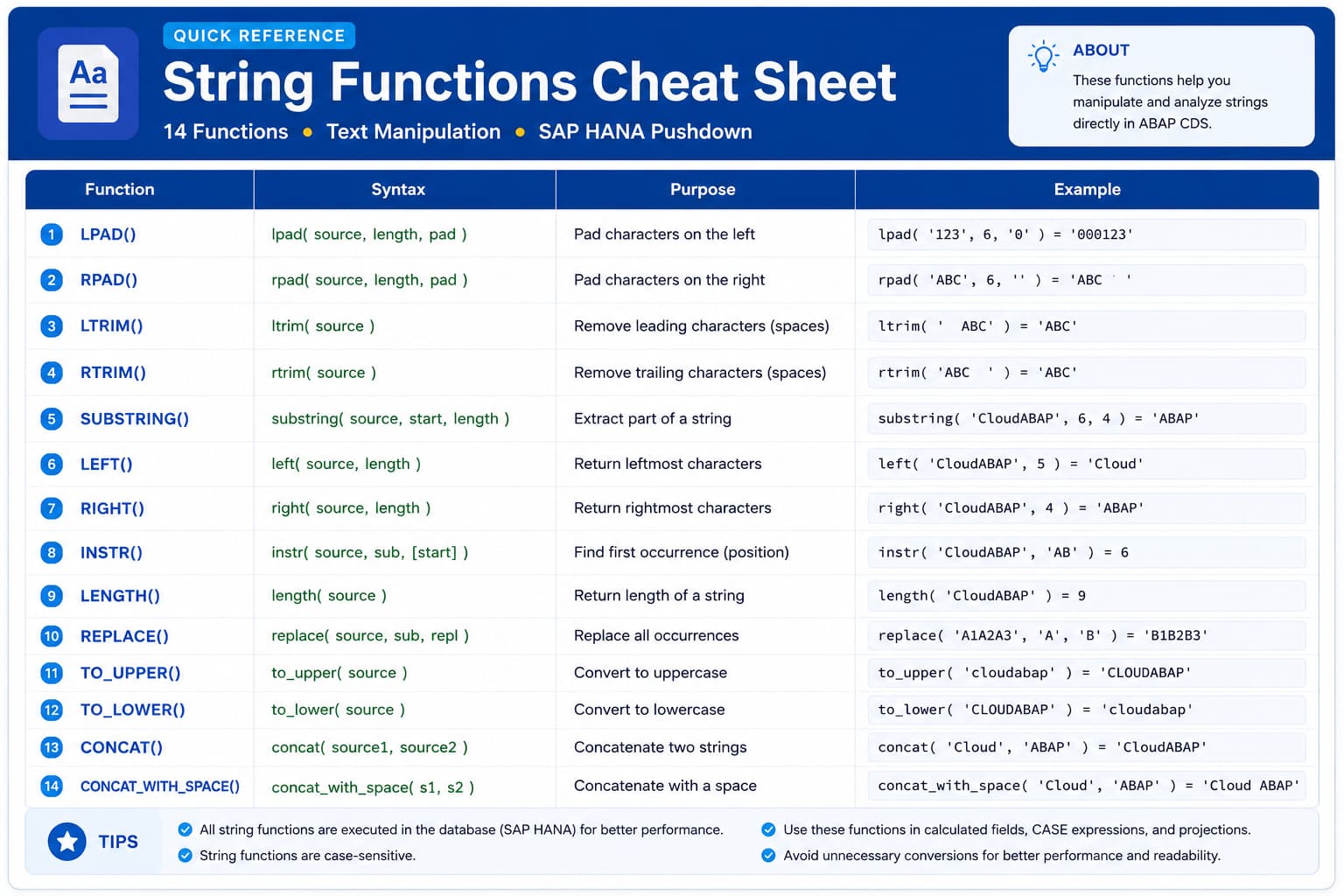
String Functions Cheat Sheet
This quick reference summarizes the most commonly used string functions in ABAP CDS. Keep it handy while building CDS View Entities, RAP applications, or preparing for technical interviews.
| Function | Purpose |
|---|---|
| LPAD() | Pad characters on the left |
| RPAD() | Pad characters on the right |
| LTRIM() | Remove leading characters |
| RTRIM() | Remove trailing characters |
| SUBSTRING() | Extract part of a string |
| LEFT() | Return leftmost characters |
| RIGHT() | Return rightmost characters |
| INSTR() | Find first occurrence |
| LENGTH() | Return string length |
| REPLACE() | Replace all matching text |
| LOWER() | Convert to lowercase |
| UPPER() | Convert to uppercase |
| CONCAT() | Join two strings |
| CONCAT_WITH_SPACE() | Join two strings with spaces |
💡 Key Takeaway
String functions enable CDS View Entities to format, transform, and manipulate character data directly in SAP HANA. This reduces ABAP post-processing while producing business-ready output for RAP applications, analytical reports, and APIs.
Understanding when to use functions such as LPAD(), SUBSTRING(), REPLACE(), LENGTH(), CONCAT(), and CONCAT_WITH_SPACE() allows you to build cleaner, more maintainable, and production-ready CDS Views.
Whenever string manipulation can be performed in CDS, prefer database execution over application-layer processing to fully leverage code pushdown in SAP HANA.
Watch the Complete ADT Walkthrough
In the accompanying video, we'll implement every string function covered in this lesson using Eclipse ADT and SAP S/4HANA Public Cloud. We'll build practical examples, discuss common mistakes, and demonstrate production-ready scenarios used in RAP applications.