Why Every ABAP Cloud Developer Should Master Numeric Functions
Business applications constantly perform numeric calculations. Whether you're calculating discounts, taxes, quantities, averages, percentages, exchange rates, or analytical KPIs, numeric operations are an essential part of almost every CDS View Entity.
Instead of retrieving raw data and performing calculations in ABAP, SAP recommends pushing these calculations to the database whenever possible. This approach allows SAP HANA to execute the logic directly, improving performance and reducing application server processing.
ABAP CDS provides several built-in numeric functions for rounding, division, absolute values, and mathematical calculations. Understanding when and how to use these functions is an important skill for every RAP and ABAP Cloud developer.
Learning Objectives
After completing this lesson, you'll understand the purpose, behavior, and limitations of the most commonly used numeric functions available in ABAP CDS View Entities.
After Completing This Lesson You Will Be Able To
| Skill | Description |
|---|---|
| Understand Numeric Functions | Explain the purpose of each built-in numeric function. |
| Round Values | Use CEIL(), FLOOR(), and ROUND() appropriately. |
| Perform Division | Choose between DIV(), DIVISION(), and MOD(). |
| Avoid Compiler Errors | Understand supported data types for each function. |
| Build Better CDS Views | Push mathematical calculations to SAP HANA. |
Numeric Functions Overview
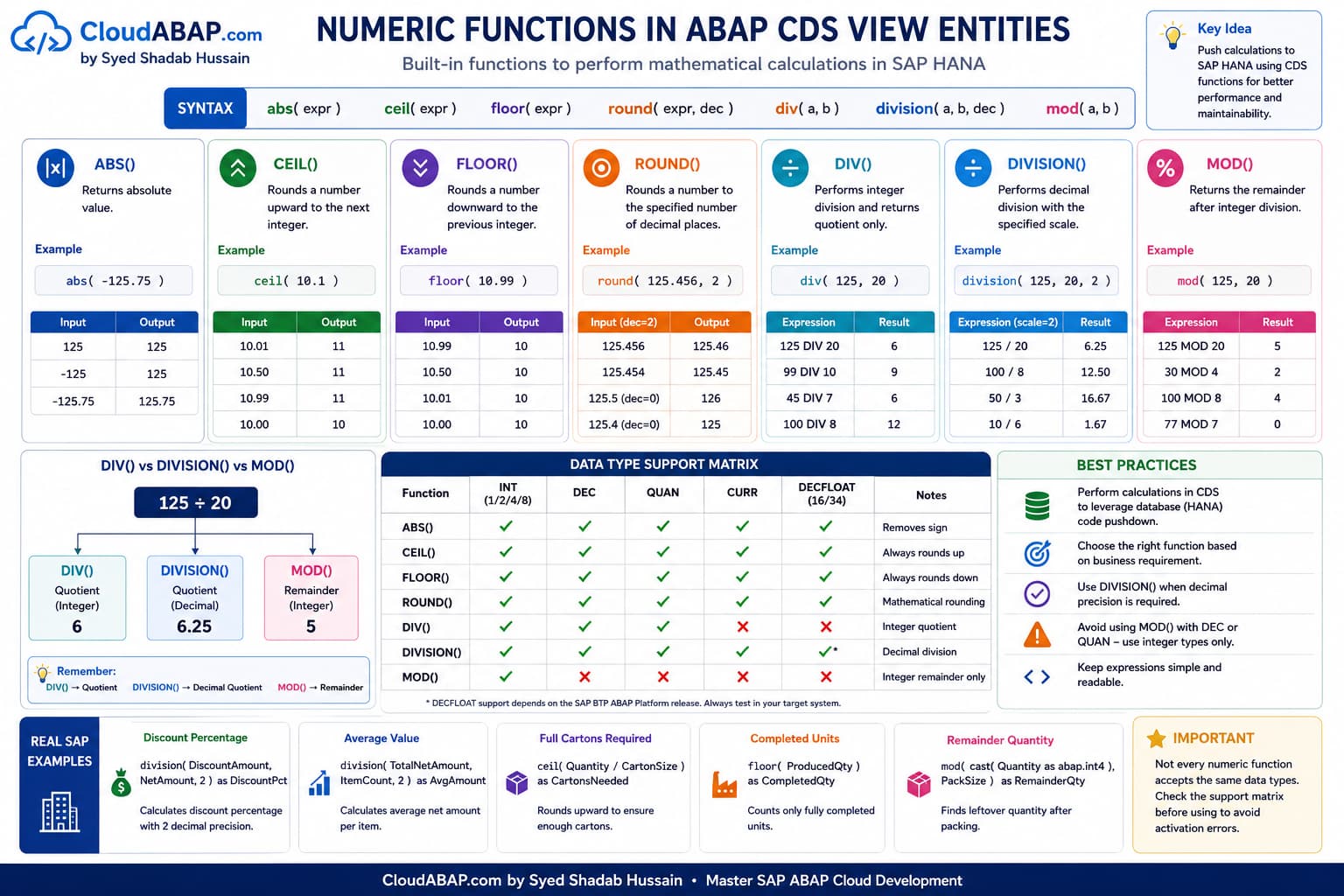
SAP provides several built-in numeric functions for performing common mathematical operations. Each function is designed for a specific purpose and supports a defined set of data types.
Numeric Functions
| Function | Purpose | Typical Usage |
|---|---|---|
| ABS() | Returns absolute value | Financial calculations |
| CEIL() | Rounds upward | Packaging calculations |
| FLOOR() | Rounds downward | Inventory calculations |
| ROUND() | Rounds to specified decimals | Currency reporting |
| DIV() | Integer division | Business calculations |
| DIVISION() | Decimal division | Ratios and percentages |
| MOD() | Returns remainder | Grouping and scheduling |
Architect Perspective
Architect InsightAlthough these functions appear similar to their ABAP counterparts, they execute directly in SAP HANA as part of the SQL statement. Understanding their supported data types is essential because not every numeric function accepts the same operand types.
ABS() - Absolute Value
The ABS() function returns the absolute value of a numeric expression by removing its sign.
abs( numeric_expression )abs( TotalNetAmount ) as AbsoluteAmountExample Results
| Input | Output |
|---|---|
| 100 | 100 |
| -100 | 100 |
| 250.75 | 250.75 |
| -250.75 | 250.75 |
Real Project Example: Financial Reporting
Credit memos are often stored as negative amounts, while invoices are stored as positive amounts. When preparing analytical reports, businesses sometimes want to compare transaction values regardless of their sign.
Using ABS() allows both invoices and credit memos to be displayed as positive values for reporting purposes.
CEIL() - Round Up
The CEIL() function always rounds a numeric value upward to the next whole integer.
ceil( numeric_expression )ceil( GrossWeight ) as RoundedWeightExample Results
| Input | Output |
|---|---|
| 10.01 | 11 |
| 10.50 | 11 |
| 10.99 | 11 |
| 10.00 | 10 |
Real Project Example: Packaging Calculation
A warehouse ships products in full cartons. If one carton can hold 10.5 kilograms, shipping 10.1 kilograms still requires one complete carton.
CEIL() ensures that fractional values are always rounded upward so enough packaging is allocated.
FLOOR() - Round Down
The FLOOR() function rounds a numeric value downward to the nearest whole integer.
floor( numeric_expression )floor( GrossWeight ) as RoundedWeightExample Results
| Input | Output |
|---|---|
| 10.99 | 10 |
| 10.50 | 10 |
| 10.01 | 10 |
| 10.00 | 10 |
Real Project Example: Inventory Reporting
A manufacturing report may need to display only completed units produced during a shift. Any partially completed unit should not be counted.
FLOOR() removes the fractional component and returns only the completed quantity.
💡 SAP Best Practice
Remember the difference:
CEIL() always rounds upward.
FLOOR() always rounds downward.
Neither function follows traditional mathematical rounding rules.
ROUND() - Round to a Specified Number of Decimal Places
The ROUND() function rounds a numeric value to the specified number of decimal places. Unlike CEIL() andFLOOR(), ROUND follows normal mathematical rounding rules.
round( numeric_expression, decimal_places )round(
TotalNetAmount,
2
) as RoundedAmountExample Results
| Input | Decimal Places | Output |
|---|---|---|
| 125.456 | 2 | 125.46 |
| 125.454 | 2 | 125.45 |
| 125.5 | 0 | 126 |
| 125.4 | 0 | 125 |
Real Project Example: Financial Reporting
Currency amounts are commonly stored with greater precision during calculations but displayed with two decimal places in reports and Fiori applications.
ROUND() ensures that values are presented using the required business precision.
DIV() - Integer Division
The DIV() function performs integer division and returns only the quotient. Any fractional part of the result is discarded.
div( operand1, operand2 )div(
cast( TotalNetAmount as abap.dec(13,2) ),
20
) as QuotientExample Results
| Expression | Result |
|---|---|
| 125 DIV 20 | 6 |
| 99 DIV 10 | 9 |
| 45 DIV 7 | 6 |
Architect Perspective
ImportantAlthough DIV performs integer division, it supports more than just integer operands. It also accepts certain decimal business types such as DEC and QUAN.
Supported Data Types for DIV()
| Supported | Not Supported |
|---|---|
| INT1 | DECFLOAT16 |
| INT2 | DECFLOAT34 |
| INT4 | |
| INT8 | |
| DEC | |
| QUAN |
DIVISION() - Decimal Division
While DIV() returns only the integer quotient, the DIVISION() function preserves decimal precision.
division(
    operand1,
    operand2,
    decimal_places
)division(
TotalNetAmount,
20,
2
) as AverageValueExample Results
| Expression | Result |
|---|---|
| 125 / 20 | 6.25 |
| 100 / 8 | 12.50 |
| 50 / 3 | 16.67 |
Real Project Example: Percentage Calculation
Financial reports often calculate ratios, percentages, and average values where decimal precision is essential.
DIVISION() is the preferred function because it preserves the fractional component instead of truncating the result.
MOD() - Remainder After Integer Division
The MOD() function returns the remainder after integer division.
mod( operand1, operand2 )mod(
cast( TotalNetAmount as abap.int4 ),
20
) as RemainderExample Results
| Expression | Result |
|---|---|
| 125 MOD 20 | 5 |
| 30 MOD 4 | 2 |
| 100 MOD 8 | 4 |
Architect Perspective
Architect InsightMOD() is strictly an integer arithmetic function. Unlike DIV(), it does not accept DEC, QUAN, or DECFLOAT data types.
A Common Compiler Error with MOD()
Many developers assume that DIV() and MOD() support the same operand types. This assumption leads to one of the most common activation errors in CDS development.
mod(
    cast( TotalNetAmount as abap.dec(13,2) ),
    20
) as ModAmountFunction MOD:
Type DEC not supported by parameter 1.
Expected:
INT1
INT2
INT4
INT8Although TotalNetAmount is numeric, MOD() accepts only integer data types. Therefore, the expression fails during CDS activation.
mod(
    cast( TotalNetAmount as abap.int4 ),
    20
) as ModAmount
Why Doesn't MOD() Support DEC?
This restriction is intentional and often discussed in architect interviews.
Consider the following calculation:
25.75 MOD 4 = ?Should the answer be:
- 1.75
- 1
- Another value?
Different databases and programming languages interpret decimal modulo operations differently. To avoid ambiguity and ensure consistent behavior, ABAP CDS restricts MOD() to integer operands.
Architect Perspective
Architect SummaryRemember this simple rule:
DIV() → Integer quotient
DIVISION() → Decimal division
MOD() → Integer remainder
DIV() vs DIVISION() vs MOD()
Comparison
| Function | Purpose | Accepts DEC | Accepts QUAN | Accepts DECFLOAT |
|---|---|---|---|---|
| DIV() | Integer Quotient | ✅ | ✅ | ❌ |
| DIVISION() | Decimal Division | ✅ | ✅ | ✅* |
| MOD() | Integer Remainder | ❌ | ❌ | ❌ |
💡 SAP Best Practice
Don't assume that DIV() and MOD() support the same operand types. Although both are related to division, they serve different purposes and have different type restrictions.
Common Mistakes
Numeric functions are easy to use, but developers frequently make mistakes because they assume every numeric function supports the same data types and behaves identically.
❌ Common Mistakes
- Assuming DIV() and MOD() support the same operand types.
- Using MOD() with DEC or QUAN values.
- Using DIV() when decimal precision is required.
- Using CEIL() or FLOOR() instead of ROUND() for financial calculations.
- Ignoring the supported data types of individual numeric functions.
- Performing calculations in ABAP that can be pushed down to SAP HANA.
Common Compiler Errors
The following compiler errors are frequently encountered while working with numeric functions in CDS View Entities.
Function MOD:
Type DEC not supported by parameter 1.
Reason: MOD() accepts only integer data types (INT1, INT2,INT4, and INT8).
mod(
    cast( TotalNetAmount as abap.dec(13,2) ),
    20
)mod(
cast( TotalNetAmount as abap.int4 ),
20
)Function DIV:
Type DECFLOAT34 not supported.Reason: DIV() supports integer, DEC, and QUAN data types but does not support DECFLOAT operands.
Architect Perspective
Architect InsightAlways verify the supported operand types in the CDS documentation or ADT code completion before assuming two numeric functions behave the same way.
Choosing the Right Numeric Function
Function Selection Guide
| Requirement | Recommended Function |
|---|---|
| Remove negative sign | ABS() |
| Round upward | CEIL() |
| Round downward | FLOOR() |
| Normal mathematical rounding | ROUND() |
| Integer quotient | DIV() |
| Decimal division | DIVISION() |
| Integer remainder | MOD() |
💡 SAP Best Practice
Choose the function based on the required business result rather than simply selecting the first function that compiles.
Performance Considerations
Numeric functions are executed directly in SAP HANA as part of the generated SQL statement. This allows calculations to benefit from code pushdown and minimizes application server processing.
Performance Recommendations
| Recommendation | Reason |
|---|---|
| Perform calculations in CDS whenever possible. | Reduces ABAP processing. |
| Avoid duplicate calculations. | Improves maintainability. |
| Use DIVISION() when decimal precision matters. | Prevents unnecessary post-processing. |
| Keep expressions readable. | Makes CDS Views easier to maintain. |
Interview Questions
What is the difference between CEIL() and FLOOR()?
Answer: CEIL() always rounds upward to the next integer, whereas FLOOR() always rounds downward to the previous integer.
Which function returns the absolute value of a number?
Answer: ABS() removes the sign and returns the absolute value.
What is the difference between DIV() and DIVISION()?
Answer: DIV() returns only the integer quotient, whereas DIVISION() performs decimal division and preserves the fractional part.
Why does MOD() reject DEC values?
Answer: MOD() is defined as an integer arithmetic function. To avoid ambiguity in decimal remainder calculations, ABAP CDS restricts it to integer operands.
Can DIV() and MOD() be used interchangeably?
Answer: No. Although both relate to division, DIV() returns the quotient while MOD() returns the remainder, and they support different operand types.
When would you choose DIVISION() over DIV()?
Answer: Whenever decimal precision is required, such as ratios, percentages, averages, or financial calculations.
Why are numeric functions recommended in CDS instead of ABAP?
Answer: They execute directly in SAP HANA, enabling code pushdown, reducing data transfer, and improving performance.
What is one common misconception about MOD()?
Answer: Many developers assume MOD() supports DEC and QUAN because DIV() does. In reality, MOD() supports only integer data types.
Numeric Functions Cheat Sheet
7 Functions • Mathematical Operations • SAP HANA Pushdown
This quick reference summarizes the most commonly used numeric functions in ABAP CDS. Keep it nearby while performing calculations, financial processing, analytical reporting, or preparing for technical interviews.
| Function | Syntax | Purpose | Returns |
|---|---|---|---|
| ABS() | abs(number) | Returns the absolute value | Numeric |
| CEIL() | ceil(number) | Rounds upward to the next integer | Integer |
| FLOOR() | floor(number) | Rounds downward to the previous integer | Integer |
| ROUND() | round(number, decimals) | Rounds to the specified decimal places | Rounded Numeric |
| DIV() | div(dividend, divisor) | Returns the integer quotient | Integer |
| DIVISION() | division(dividend, divisor, scale) | Performs decimal division with precision | Decimal |
| MOD() | mod(dividend, divisor) | Returns the integer remainder | Integer |
💡 Key Takeaway
Numeric functions allow SAP HANA to perform mathematical calculations directly inside CDS View Entities, reducing the need for ABAP post-processing and improving application performance.
Understanding the differences between DIV(), DIVISION(), and MOD() is particularly important because they solve different mathematical problems and support different operand types.
Always choose the function that best matches the business requirement, verify the supported data types, and push calculations to the database whenever possible to build clean and production-ready RAP applications.
Watch the Complete ADT Walkthrough
In the accompanying video, we'll implement every numeric function discussed in this lesson using Eclipse ADT and SAP S/4HANA Public Cloud. We'll also reproduce common compiler errors, explain why they occur, and demonstrate the correct production-ready solutions.