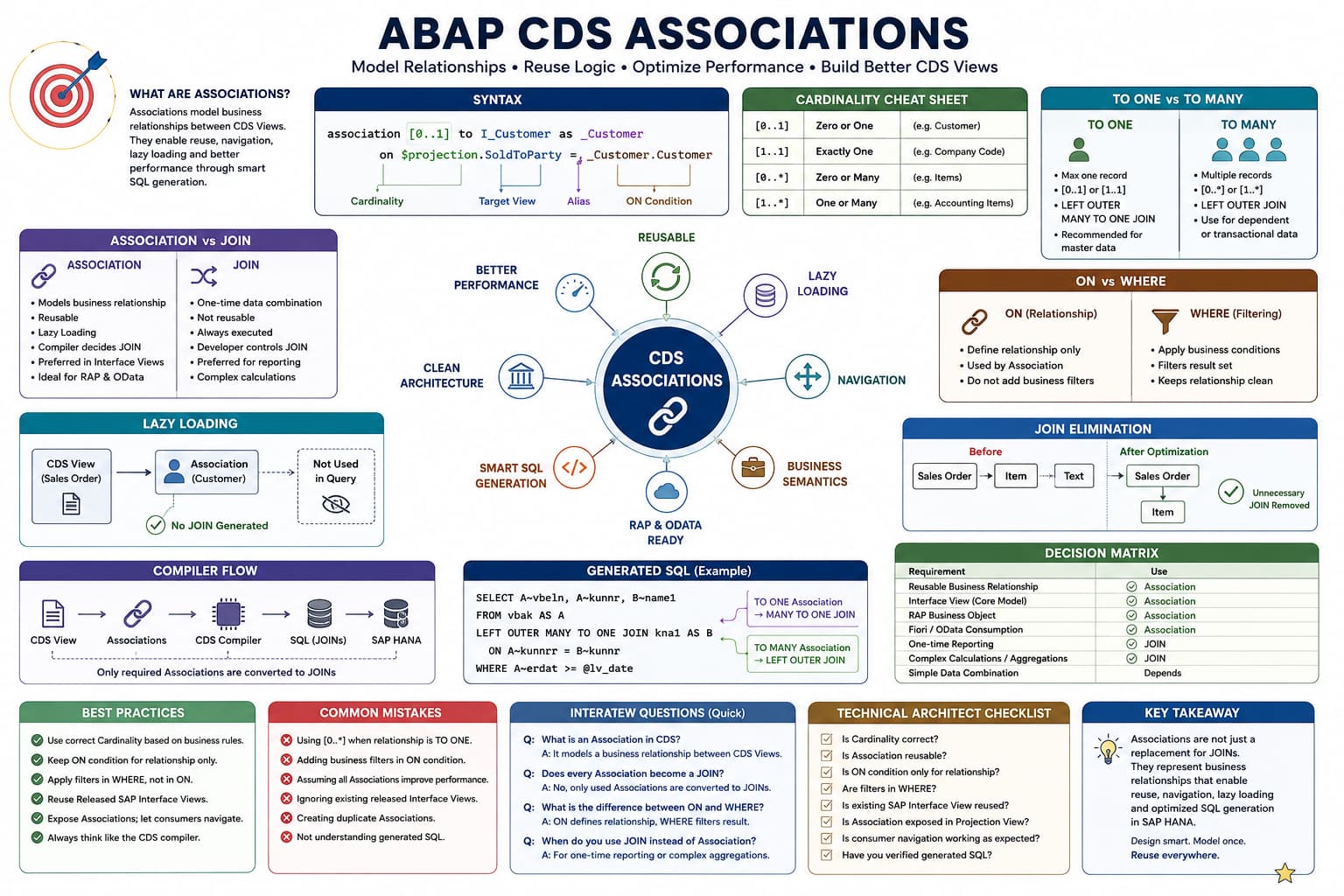
Association Masterclass
Lesson 7 of 15 – Association vs SQL JOIN
This is one of the most important lessons in the entire Association Masterclass.
Almost every developer asks the same question.
"If Associations eventually become SQL JOINs, why doesn't SAP simply ask us to write JOINs?"
The answer lies in how the CDS compiler understands business relationships, generates SQL and eliminates unnecessary JOINs.
Learning Objectives
- Understand the difference between Associations and SQL JOINs.
- Learn how the CDS compiler generates SQL.
- Understand why SAP prefers Associations in Interface Views.
- Understand Join Elimination.
- Prepare for ON vs WHERE in the next lesson.
Introduction
One of the biggest misconceptions in ABAP CDS is believing that an Association is simply another way of writing a SQL JOIN.
Although Associations eventually become SQL JOINs during execution, they are fundamentally different concepts.
A SQL JOIN tells the database exactly how data should be retrieved.
An Association tells the CDS compiler how business objects are related.
The compiler then decides whether a SQL JOIN is actually required.
Architect Perspective
This is the biggest mindset shift in ABAP CDS.SQL JOIN is an implementation.
Association is business metadata.
The CDS compiler converts business metadata into SQL only when required.
Association vs SQL JOIN
| Association | SQL JOIN |
|---|---|
| Defines business relationships. | Retrieves data. |
| Lazy by design. | Executed immediately. |
| Reusable by many consumers. | Specific to one query. |
| Compiler decides SQL. | Developer decides SQL. |
Let's Think Like the CDS Compiler
Consider the following CDS View.
define view entity ZC_SalesOrderOverview

  as select from ZI_SalesOrder

{

    key SalesDocument,

    SalesDocumentType,

    SalesOrganization,

    CreationDate,

    SoldToParty,

    _Customer.Customer,

    _Item.Material,

    _Item._Text.ProductName

}
Most developers read this from top to bottom.
The CDS compiler does not.
It first builds a graph of business relationships and then determines which branches of that graph are actually required.
INSIDE THE CDS COMPILER
Compiler Step 1
💭 Compiler Thought Process
The compiler starts from the root CDS View and builds a graph of all requested Associations.
Compiler Decision Flow
Read the root CDS View.
Locate every requested Association.
Build the association graph.
Ignore unused Associations.
Prepare SQL generation.
✅ Final Compiler Decision
The compiler does not generate SQL in the order fields are written. It traverses the association graph.
⚡ SQL Optimization Insight
This graph-based approach allows SAP to eliminate unnecessary JOINs before SQL reaches SAP HANA.
The Association Graph
ZI_SalesOrder
   │
   ├── _Customer
   │
   └── _Item
          │
          └── _Text
This graph represents business relationships—not SQL.
The compiler traverses only the branches required by the current consumer.
For example, if the Product Text is never requested, the _Text branch disappears completely before SQL is generated.
Step 1 - The Root Object
Every CDS View starts from a single root data source.
define view entity ZC_SalesOrderOverview

as select from ZI_SalesOrder
The compiler first reads only the root object.
At this moment, the generated SQL is conceptually equivalent to:
SELECT

    SalesDocument,
    SalesDocumentType,
    SalesOrganization,
    CreationDate,
    SoldToParty

FROM ZI_SALESORDER
Notice that no JOIN has been generated yet because the compiler has not encountered any navigated Associations.
Step 2 - Navigating the Customer Association
The compiler now encounters:
_Customer.CustomerIt immediately asks two questions:
- Where does
_Customercome from? - Which Association defines this relationship?
The compiler opens the Association definition.
association [0..1] to I_Customer as _Customer

on $projection.SoldToParty = _Customer.Customer
Because the Association is [0..1], the compiler knows that each Sales Order can match at most one Customer.
LEFT OUTER MANY TO ONE JOIN I_CUSTOMER

ON

ZI_SALESORDER.SOLDTOPARTY = I_CUSTOMER.CUSTOMER
Why MANY TO ONE?
This is one of the most misunderstood topics in ABAP CDS.
Many developers incorrectly think the compiler generates a simple LEFT OUTER JOIN.
Think from the perspective of the left side of the relationship.
Sales Orders

Order 100

↓

Customer 100

Order 101

↓

Customer 100

Order 102

↓

Customer 100
Notice what is happening.
- Many Sales Orders
- One Customer
From the SQL optimizer's perspective, this is a MANY TO ONE relationship.
Step 3 - Navigating the Item Association
Next, the compiler encounters:
_Item.MaterialIt now opens the second Association.
association [0..*] to ZI_SalesOrderItem as _Item

on $projection.SalesDocument = _Item.SalesDocument
Unlike the Customer Association, this relationship is TO MANY.
LEFT OUTER JOIN ZI_SALESORDERITEM

ON

ZI_SALESORDER.SALESDOCUMENT

=

ZI_SALESORDERITEM.SALESDOCUMENT
Notice that the compiler no longer generates a MANY TO ONE JOIN because multiple Item records may exist for a single Sales Order.
Step 4 - Nested Association Navigation
Finally, the compiler encounters:
_Item._Text.ProductNameThis is not a direct navigation from Sales Order to Product Text.
Instead, the compiler follows the Association graph.
Sales Order

↓

Item

↓

Product Text
It first materializes the Item Association and only then navigates the Product Text Association.
This exactly mirrors the business relationships defined in the Virtual Data Model.
INSIDE THE CDS COMPILER
Compiler Step 2
💭 Compiler Thought Process
The compiler traverses the Association graph one relationship at a time. It never jumps directly to nested business objects.
Compiler Decision Flow
Resolve _Customer.
Generate Customer JOIN.
Resolve _Item.
Generate Item JOIN.
Resolve _Text from Item.
Generate Product Text JOIN.
✅ Final Compiler Decision
The compiler generates JOINs by traversing the Association graph, not by following the visual order of fields in the SELECT list.
⚡ SQL Optimization Insight
Nested Associations are resolved incrementally. Each JOIN is generated only when its branch of the graph is actually required.
Step 5 - Session Variables Become Native HANA Functions
One of the most interesting compiler optimizations happens when you use session variables inside an Association.
Consider the following Association:
association [0..1] to I_ProductText as _Text

on  $projection.Material = _Text.Product
and _Text.Language = $session.system_language
You never wrote any HANA-specific SQL. However, during SQL generation, the CDS compiler converts the session variable into the corresponding native HANA function.
LEFT OUTER MANY TO ONE JOIN I_PRODUCTTEXT

ON

ITEM.MATERIAL = PRODUCTTEXT.PRODUCT

AND PRODUCTTEXT.LANGUAGE =
SESSION_CONTEXT('LOCALE_SAP')
This transformation is completely automatic and allows CDS Views to remain database independent while still executing efficiently on SAP HANA.
Automatic Client Handling
Another optimization performed by the CDS compiler is automatic client handling.
Notice that none of the Associations defined earlier contain theMANDT field.
Yet the generated SQL automatically includes client conditions similar to the following:
ON

HEADER.MANDT = CUSTOMER.MANDT

...

WHERE

HEADER.MANDT = SESSION_CONTEXT('CDS_CLIENT')
The compiler injects these conditions automatically, ensuring that the query retrieves data only from the current client.
Architect Perspective
As an ABAP Cloud developer, you should never manually add client conditions to Associations. Client handling is managed automatically by the CDS compiler.Join Elimination - One of the Biggest Advantages of Associations
Now let's look at one of the most powerful optimizations performed by the CDS compiler.
Consider the following CDS View:
{

key SalesDocument,

_Customer.Customer,

_Item.Material,

_Item._Text.ProductName

}
The compiler generates JOINs for Customer, Item and Product Text because all three Associations are navigated.
Now remove only one field.
{

key SalesDocument,

_Customer.Customer,

_Item.Material

}
Since _Item._Text.ProductName is no longer requested, the compiler removes the entire Product Text branch before SQL is generated.
No unnecessary JOIN is executed.
The Association Graph Shrinks Automatically
Initially, the compiler builds the following graph:
ZI_SalesOrder
   │
   ├── _Customer
   │
   └── _Item
          │
          └── _Text
After removing _Item._Text.ProductName, the graph becomes:
ZI_SalesOrder
   │
   ├── _Customer
   │
   └── _Item
Remove _Item.Material as well.
ZI_SalesOrder
   │
   └── _Customer
Finally, remove the Customer field.
ZI_SalesOrderAt this point, every Association has disappeared from the generated SQL because none of them are required by the consumer.
INSIDE THE CDS COMPILER
Join Elimination
💭 Compiler Thought Process
Only Associations that contribute requested fields should become SQL JOINs.
Compiler Decision Flow
Build the complete Association graph.
Identify every navigated path expression.
Discard unused branches.
Generate SQL only for remaining branches.
Optimize the final execution plan.
✅ Final Compiler Decision
Unused Associations never become SQL JOINs.
⚡ SQL Optimization Insight
This optimization is known as Join Elimination and is one of the primary reasons SAP recommends Associations for reusable Interface Views.
Real Project Example: One CDS View, Many Consumers
• A Fiori List Report displays only Sales Order Number and Customer.
• A RAP service additionally requires Item information.
• An Analytical Query requires Product Text as well.
All three consumers use the same CDS View.
The difference is that each consumer navigates a different part of the Association graph.
The CDS compiler generates only the JOINs required for that specific consumer, making the Virtual Data Model highly reusable.
Architect Perspective
Technical Architect InsightAssociations model a graph of business relationships.
The CDS compiler traverses only the branches required by the current consumer.
This is fundamentally different from writing a SQL statement where every JOIN is fixed by the developer.
This graph-based architecture is one of the key design principles behind SAP's Virtual Data Model (VDM).
💡 SAP Best Practice
Define business relationships once and allow different consumers to navigate only the data they require.
This improves maintainability, readability and allows the CDS compiler to perform optimizations such as Join Elimination automatically.
❌ Common Mistakes
- Thinking the compiler generates JOINs in the order fields appear in the SELECT list.
- Assuming every Association always becomes a SQL JOIN.
- Manually adding client handling conditions.
- Believing Associations are just another syntax for SQL JOINs.
What is Join Elimination in ABAP CDS?
Answer: Join Elimination is a compiler optimization in which unused Association branches are removed before SQL is generated. Only Associations that contribute requested fields become SQL JOINs.
Why does SAP recommend Associations instead of explicit JOINs in Interface Views?
Answer: Associations model reusable business relationships rather than fixed SQL. Different consumers can navigate different Association branches, allowing the CDS compiler to generate only the required JOINs and optimize the execution plan.
💡 Key Takeaway
Associations and SQL JOINs serve different purposes.
Associations describe business relationships, while SQL JOINs retrieve data.
The CDS compiler transforms Associations into SQL only when required, injects session and client handling automatically, and eliminates unnecessary JOINs before execution.
This compiler-driven approach is one of the biggest advantages of SAP's Virtual Data Model and explains why Associations are preferred over explicit JOINs in reusable Interface Views.
In the next lesson, we'll explore one of the most misunderstood topics in ABAP CDS: ON Condition vs WHERE Clause, including how filters change the generated SQL and why TO MANY Associations cannot be used in certain WHERE conditions.