Why Every ABAP Cloud Developer Should Master CASE Expressions
Almost every production CDS View contains some form of business logic. Users expect reports to display meaningful descriptions instead of technical codes, classify customers into categories, identify high value sales orders, highlight overdue deliveries, and calculate business statuses.
Implementing these requirements in ABAP after retrieving the data is certainly possible, but it prevents the application from fully benefiting from SAP HANA's code pushdown capabilities.
This is where CASE Expressions become one of the most powerful features available in ABAP CDS.
CASE allows business decisions to be evaluated directly inside the database, enabling RAP applications, Fiori apps, analytical reports, and APIs to return business-ready information without additional ABAP processing.
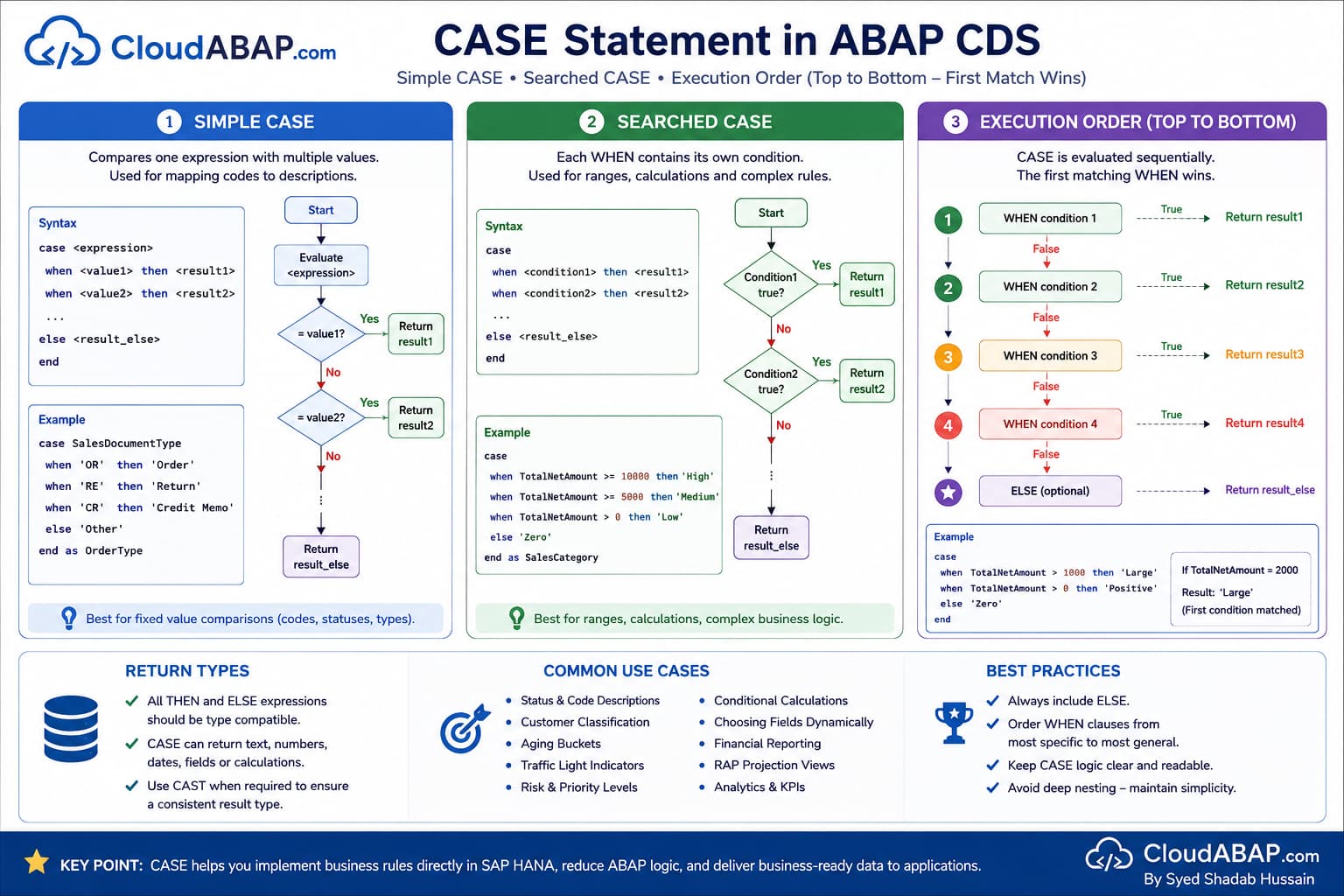
Learning Objectives
By the end of this lesson, you'll understand how CASE expressions work, when to use Simple CASE versus Searched CASE, and how experienced SAP developers implement business logic directly inside CDS View Entities.
After Completing This Lesson You Will Be Able To
| Skill | Description |
|---|---|
| Understand CASE | Explain how CASE expressions work in ABAP CDS. |
| Use Simple CASE | Map technical codes to meaningful business descriptions. |
| Use Searched CASE | Implement complex business rules using conditional expressions. |
| Build Better CDS Views | Push business logic to SAP HANA instead of ABAP. |
| Avoid Common Mistakes | Understand evaluation order, NULL handling, and compatible return types. |
💡 SAP Best Practice
Think of CASE as a business rule engine running inside SAP HANA. Whenever the logic can be evaluated at the database level, prefer implementing it in CDS rather than writing additional ABAP code after retrieving the data.
What is a CASE Expression?
A CASE expression evaluates one or more conditions and returns a value based on the first matching condition.
Instead of displaying technical values exactly as they are stored in the database, CASE enables CDS View Entities to return meaningful, business-friendly information that can be consumed directly by RAP applications, Fiori apps, analytical reports, and external APIs.
case SalesDocumentType
    when 'OR' then 'Standard Order'
    when 'RE' then 'Return'
    else 'Other'
end as OrderType
Rather than exposing technical document type codes such as OR and RE, the CDS View now returns descriptive values that are immediately understandable to business users.
CASE is an Expression, Not a Control Statement
Developers coming from classical ABAP often compare CDS CASE with the familiar CASE...ENDCASE statement.
Although their syntax appears similar, they solve different problems.
ABAP CASE vs CDS CASE
| ABAP | ABAP CDS |
|---|---|
| Control statement | Expression |
| Executes procedural logic | Returns a value |
| Runs in the ABAP application server | Runs inside SAP HANA |
| Cannot be embedded in SQL | Can be used inside CDS expressions |
Architect Perspective
Architect InsightThis is one of the biggest conceptual differences between ABAP and CDS.
A CASE expression always returns a value. That value immediately becomes part of the CDS projection and can be consumed by calculations, RAP Projection Views, OData Services, analytical queries, and Fiori applications.
How CASE is Evaluated
CASE expressions are evaluated sequentially from top to bottom.
As soon as one WHEN condition evaluates to true, CDS immediately returns the corresponding THEN value and stops evaluating the remaining conditions.
case SalesDocumentType
    when 'OR' then 'Order'
    when 'OR' then 'Duplicate'
    else 'Other'
end
If the Sales Document Type is OR, the result will be Order.
The second WHEN condition is never evaluated because the first matching condition terminates the CASE expression.
💡 SAP Best Practice
Always arrange WHEN conditions from the most specific to the most general. Incorrect ordering can produce unexpected business results because later conditions may never be evaluated.
ELSE is Optional, but Strongly Recommended
Technically, the ELSE clause is optional. However, experienced SAP developers almost always include it.
case SalesDocumentType
    when 'OR' then 'Order'
    when 'RE' then 'Return'
end
If none of the WHEN conditions match, the result of the expression is NULL.
Real Project Example: Production Scenario
Imagine SAP introduces a new Sales Document Type after an upgrade or your organization creates a custom document type.
Since the CDS View doesn't contain a matching WHEN clause or an ELSE branch, every new document suddenly returns NULL, resulting in blank values in reports and Fiori applications.
Architect Perspective
Senior Architect RecommendationUnless NULL is an intentional business requirement, always provide an ELSE branch.
This makes your CDS View future-proof against newly introduced business values and produces more predictable application behavior.
Simple CASE vs Searched CASE
ABAP CDS supports two different forms of CASE expressions: Simple CASE and Searched CASE.
Although both return a value, they solve different types of business problems. Understanding when to use each form is one of the most frequently discussed topics during ABAP Cloud and RAP interviews.
Simple CASE vs Searched CASE
| Simple CASE | Searched CASE |
|---|---|
| Compares one expression with multiple values. | Each WHEN contains its own condition. |
| Ideal for mapping codes to descriptions. | Ideal for business rules and numeric ranges. |
| Simpler syntax. | More flexible syntax. |
| Frequently used for status mapping. | Frequently used for classifications and validations. |
Simple CASE
Simple CASE evaluates a single expression and compares it against multiple possible values.
case SalesDocumentType
    when 'OR' then 'Standard Order'
    when 'RE' then 'Return Order'
    when 'CR' then 'Credit Memo'
    else 'Other'
end as OrderType
In this example, every WHEN compares the value of SalesDocumentType.
Conceptually, CDS evaluates something similar to:
SalesDocumentType = 'OR'
SalesDocumentType = 'RE'
SalesDocumentType = 'CR'
Real Project Example: Production Scenario
SAP applications frequently store technical status codes while business users expect descriptive values.
Simple CASE is ideal for converting technical codes into meaningful business descriptions before the data reaches Fiori applications or APIs.
Searched CASE
Searched CASE does not compare a single expression.
Instead, each WHEN contains its own logical condition, making it much more flexible than Simple CASE.
case
    when TotalNetAmount >= 10000 then 'High'
    when TotalNetAmount >= 5000 then 'Medium'
    else 'Low'
end as SalesCategory
Every WHEN clause is evaluated independently until the first condition returns true.
Architect Perspective
Architect InsightWhenever your business rule involves ranges, comparisons, mathematical expressions, multiple fields, or complex conditions, Searched CASE is almost always the correct choice.
Evaluation Order Matters
CASE expressions are evaluated sequentially from top to bottom.
Once a condition matches, evaluation stops immediately.
case
    when TotalNetAmount > 0 then 'Positive'
    when TotalNetAmount > 1000 then 'Large'
    else 'Zero'
end
Suppose:
TotalNetAmount = 2000Many developers expect the result to be Large.
The actual result is:
PositiveThe first condition already matches, so the remaining WHEN clauses are never evaluated.
case
    when TotalNetAmount > 1000 then 'Large'
    when TotalNetAmount > 0 then 'Positive'
    else 'Zero'
end
💡 SAP Best Practice
Always arrange WHEN conditions from the most specific to the most general. Otherwise, broader conditions can unintentionally mask more specific business rules.
CASE Can Return More Than Text
Many developers believe CASE is only useful for returning descriptive text.
In reality, CASE can return any compatible expression, including numbers, dates, fields, arithmetic expressions, and function results.
CASE Return Values
| Return Type | Example |
|---|---|
| Character | 'Completed' |
| Integer | 1 |
| Decimal | NetAmount * 0.18 |
| Date | CreationDate |
| Field | SalesDocument |
case Currency
    when 'USD' then 1
    when 'EUR' then 2
    else 0
end as CurrencyPrioritycase SalesOrganization
when '1710' then SalesDocument
else SoldToParty
end as BusinessReferenceReturn Types Must Be Compatible
Every THEN and ELSE branch should return compatible data types.
This allows the CDS compiler to determine the final type of the projected field.
case
when NetAmount > 1000 then 'High'
else 'Low'
endcase
when NetAmount > 1000 then 'High'
else 100
endIn the second example, one branch returns character data while the other returns a numeric value. Depending on the involved data types, CDS may reject the expression or perform implicit conversions that make the code harder to understand.
Architect Perspective
Senior Architect RecommendationAlways make the result type obvious.
If necessary, combine CASE with CAST so every branch returns the same technical data type. This improves readability and avoids activation issues.
Real-World CASE Scenarios
In production SAP systems, CASE expressions are rarely used to return simple text values. They are commonly used to classify business data, implement reporting logic, derive statuses, calculate categories, and expose business-friendly information to Fiori applications.
Let's look at some practical scenarios that you'll encounter while developing RAP applications and CDS View Entities.
Scenario 1: Convert Technical Status Codes into Business Descriptions
Real Project Example: Sales Order Processing Status
SAP stores many business statuses as short technical codes. Business users, however, expect meaningful descriptions instead of values such as C, B, orA.
case OverallSDProcessStatus
when 'C' then 'Completed'
when 'B' then 'In Process'
when 'A' then 'Not Started'
else 'Unknown'
end as OverallProcessStatusThe CDS View now exposes user-friendly values that can be displayed directly in Fiori applications without additional ABAP logic.
💡 SAP Best Practice
Whenever SAP stores technical codes, convert them into meaningful business descriptions as close to the database as possible.
Scenario 2: Customer Classification
Businesses often classify customers based on their purchasing value. Since these rules are evaluated for every record, implementing them directly in CDS improves performance and keeps the business logic centralized.
case
when TotalNetAmount >= 100000 then 'Premium'
when TotalNetAmount >= 50000 then 'Gold'
when TotalNetAmount >= 10000 then 'Silver'
else 'Standard'
end as CustomerCategoryArchitect Perspective
Architect InsightNumeric ranges should almost always be implemented using Searched CASE rather than Simple CASE because each condition performs its own comparison.
Scenario 3: Traffic Light Indicators
Many SAP Fiori applications display records using traffic light indicators to help users identify critical situations at a glance.
case
when DeliveryDelayDays > 10 then 'Red'
when DeliveryDelayDays > 5 then 'Yellow'
else 'Green'
end as TrafficLightThe UI simply consumes the calculated field and displays the appropriate icon or color.
Scenario 4: Aging Buckets
Real Project Example: Accounts Receivable Reporting
Finance departments frequently group invoices into aging buckets such as 0–30 days, 31–60 days, and over 90 days.
case
when DaysOutstanding <= 30 then '0 - 30 Days'
when DaysOutstanding <= 60 then '31 - 60 Days'
when DaysOutstanding <= 90 then '61 - 90 Days'
else 'Over 90 Days'
end as AgingBucketPerforming this classification in CDS keeps reporting logic inside the database and avoids repeating the same calculation in multiple applications.
Scenario 5: CASE Returning Calculated Values
The THEN expression is not limited to literal values. It can also return calculations.
case TransactionCurrency
when 'USD' then NetAmount * 83
when 'EUR' then NetAmount * 95
else NetAmount
end as EstimatedAmountEvery branch performs a different calculation depending on the business condition.
Architect Perspective
ImportantThis example demonstrates conditional calculations only. In production systems, actual currency conversion should always usecurrency_conversion() rather than fixed exchange rates.
Scenario 6: CASE Returning Database Fields
CASE can return entire fields instead of literals.
case SalesOrganization
    when '1710' then SalesDocument
    else SoldToParty
end as BusinessReferenceThis allows the projected value to depend dynamically on business conditions while keeping the CDS View simple and readable.
Scenario 7: Combining CASE with CAST
CASE and CAST are frequently used together to ensure every branch returns a compatible data type.
case
    when NetAmount >= 10000
        then cast( 'High' as abap.char(10) )
    when NetAmount >= 5000
        then cast( 'Medium' as abap.char(10) )
    else
        cast( 'Low' as abap.char(10) )
end as SalesCategory
Explicit CAST expressions remove ambiguity and clearly define the resulting data type of the CASE expression.
Scenario 8: Nested CASE Expressions
CASE expressions can be nested, allowing one CASE to return another CASE expression.
case SalesDocumentType
    when 'OR'
        then case TransactionCurrency
                 when 'USD' then 'US Order'
                 else 'Domestic Order'
             end
    else 'Other'
end as OrderCategory
Nested CASE is supported, but excessive nesting can reduce readability.
💡 SAP Best Practice
If CASE expressions become deeply nested or contain extensive business rules, consider moving the logic into a lower CDS View, customizing table, or application layer to improve maintainability.
Production Design Guidelines
Architect Recommendations
| Recommendation | Reason |
|---|---|
| Prefer Searched CASE for numeric ranges. | More flexible and easier to maintain. |
| Always include ELSE. | Avoid unexpected NULL values. |
| Order conditions from most specific to most general. | Prevents earlier conditions from masking later ones. |
| Use CASE for business logic, not presentation formatting. | Keeps responsibilities clearly separated. |
| Combine CASE with CAST when necessary. | Ensures predictable result data types. |
| Avoid deeply nested CASE expressions. | Improves readability and maintainability. |
Common Mistakes
CASE expressions are straightforward to write, but small mistakes can lead to incorrect business results, activation errors, or unexpected NULL values. Understanding these common pitfalls will help you build more reliable CDS View Entities.
❌ Common Mistakes
- Omitting the ELSE clause and unintentionally returning NULL values.
- Placing general WHEN conditions before more specific ones.
- Mixing incompatible return data types in THEN and ELSE branches.
- Using Simple CASE when Searched CASE is more appropriate.
- Creating deeply nested CASE expressions that reduce readability.
- Implementing presentation formatting instead of business logic inside CASE.
Performance Considerations
CASE expressions are executed directly in SAP HANA as part of the SQL statement. This allows business rules to benefit from code pushdown and reduces the need for post-processing in ABAP.
Performance Recommendations
| Recommendation | Reason |
|---|---|
| Implement business rules in CDS whenever possible. | Reduces ABAP processing and supports code pushdown. |
| Keep CASE expressions simple. | Improves readability and maintainability. |
| Use Searched CASE for complex conditions. | Provides greater flexibility for production scenarios. |
| Move complex business logic into layered CDS Views. | Avoids very long and difficult-to-maintain projection lists. |
| Avoid unnecessary nesting. | Makes CDS Views easier to understand and optimize. |
Architect Perspective
Architect InsightCASE expressions themselves are generally inexpensive because they are evaluated by SAP HANA.
If a CASE expression becomes difficult to read, the issue is usually maintainability rather than performance.
Interview Questions
What is the purpose of a CASE expression in ABAP CDS?
Answer: CASE returns a value based on one or more conditions, allowing business logic to be evaluated directly in SAP HANA.
What happens if no WHEN condition matches and ELSE is omitted?
Answer: The CASE expression returns NULL.
What is the difference between Simple CASE and Searched CASE?
Answer: Simple CASE compares one expression against multiple values, whereas Searched CASE evaluates independent logical conditions in each WHEN clause.
Why should WHEN clauses be ordered carefully?
Answer: CASE is evaluated from top to bottom. Once a condition matches, the remaining WHEN clauses are ignored.
Can CASE return numbers or database fields?
Answer: Yes. CASE can return compatible literals, fields, calculations, dates, numeric values, and expressions.
Why is Searched CASE preferred for numeric classifications?
Answer: Because each WHEN clause contains its own logical condition, making it ideal for ranges such as revenue bands, aging buckets, and risk classifications.
Can CASE be combined with CAST?
Answer: Yes. CAST is frequently used inside CASE expressions to ensure every branch returns a compatible data type.
When should complex CASE logic be moved out of a CDS View?
Answer: If the business rules become difficult to understand or maintain, move the logic into a lower CDS View, a customizing table, or the application layer instead of creating deeply nested CASE expressions.
Why are CASE expressions well suited for RAP applications?
Answer: Because they evaluate business rules directly in SAP HANA, allowing RAP services and Fiori applications to consume business-ready data without additional ABAP processing.
CASE Expression Cheat Sheet
Simple CASE • Searched CASE • Evaluation Order • SAP HANA Pushdown
This quick reference summarizes the key concepts of the CASE expression in ABAP CDS. It covers evaluation order, NULL handling, return type compatibility, and best practices for building production-ready CDS View Entities.
| Topic | Syntax / Value | Summary |
|---|---|---|
| Simple CASE | CASE field WHEN value THEN ... | Compares a single expression against multiple values. |
| Searched CASE | CASE WHEN condition THEN ... | Evaluates independent logical conditions and is more flexible. |
| Evaluation Order | Top → Bottom | The first matching WHEN condition is returned. Remaining conditions are ignored. |
| ELSE Clause | Recommended | Always provide ELSE to avoid unexpected NULL values. |
| No Matching WHEN | NULL | If ELSE is omitted and no condition matches, the result is NULL. |
| Return Types | Compatible Types | All THEN and ELSE branches should return compatible data types. |
| Nested CASE | Supported | Useful for complex logic but should be kept to a minimum for readability. |
| Typical Usage | Classification | Frequently used for status mapping, document categorization, risk levels, and business rules. |
| Performance | SAP HANA | CASE expressions execute directly in the database as part of code pushdown. |
| Architect Recommendation | Prefer Searched CASE | Use searched CASE for ranges and business rules; use simple CASE only for direct value comparisons. |
💡 Key Takeaway
CASE expressions are among the most powerful and frequently used features of ABAP CDS View Entities. They allow business rules to be evaluated directly in SAP HANA, enabling RAP applications, analytical reports, and OData services to consume business-ready information without additional ABAP processing.
Throughout this lesson, you learned the difference between Simple CASE and Searched CASE, understood why evaluation order is important, explored production-ready scenarios, and discovered best practices used by experienced SAP developers.
When combined with expressions such as CAST, aggregate functions, and CDS calculations, CASE becomes one of the foundational building blocks for developing clean, maintainable, and production-ready RAP applications.
Watch the Complete ADT Walkthrough
Follow the complete implementation in Eclipse ADT as we build practical CDS View Entities using both Simple CASE and Searched CASE, discuss common activation errors, and implement real business scenarios used in SAP S/4HANA Public Cloud projects.