Why Every ABAP Cloud Developer Must Master CAST
As CDS View Entities become more powerful, developers frequently work with calculated fields, CASE expressions, string functions, aggregations, arithmetic operations, RAP projections, and analytical queries. Almost all of these features eventually introduce situations where different data types need to work together.
This is where CAST becomes one of the most important expressions available in ABAP CDS.
Unfortunately, CAST is also one of the most misunderstood concepts. Many developers believe it converts business values such as currencies or units of measure, while others use it simply to remove compiler errors without understanding why those errors occurred in the first place.
In reality, CAST performs a very specific task—it changes the technical data type of an expression during query execution. Understanding this distinction is essential for building clean, maintainable, and production-ready CDS View Entities in SAP S/4HANA Public Cloud.
Learning Objectives
By the end of this lesson, you will have a complete understanding of how CAST works inside ABAP CDS View Entities and when it should be used in real RAP projects.
After Completing This Lesson You Will Be Able To
| Skill | Description |
|---|---|
| Understand CAST | Explain the purpose of CAST in ABAP CDS. |
| Choose Correct Data Types | Identify when explicit datatype conversion is required. |
| Avoid Common Mistakes | Recognize situations where CAST should not be used. |
| Model Better CDS Views | Use semantic data elements instead of generic technical types. |
| Design Production Solutions | Apply CAST correctly in RAP and S/4HANA Public Cloud development. |
💡 SAP Best Practice
Do not think of CAST as a function that fixes compiler errors. Instead, think of it as a design tool that allows you to explicitly communicate your intent to the CDS compiler and the SAP HANA database.
The Problem CAST Solves
Imagine you are building a reporting CDS View that combines data from Sales Orders, Billing Documents, Business Partners, and Financial Accounting.
Some fields contain numbers, some represent business identifiers, while others are amounts, quantities, dates, or character strings. Although many of these values may look similar when displayed on the screen, they are represented internally using completely different data types.
When CDS evaluates expressions, the database engine expects compatible data types. If two operands are incompatible, activation fails with a compiler error before the view can even be executed.
Real Project Example: Real Project Scenario
A reporting application displays Billing Amount, Exchange Rate, Customer Number, Company Code, and Sales Order Number in a single CDS View.
The Billing Amount participates in calculations, the Exchange Rate requires high precision, while the Sales Order Number is simply an identifier that must preserve leading zeros.
Although these values may all appear as numbers on the screen, they represent completely different business concepts and therefore use different data types internally.
Understanding these differences is the first step toward using CAST correctly.
Before Learning CAST, Understand This Important Principle
One of the biggest mistakes developers make is assuming that data types are determined by how values look on the screen.
Consider the following examples.
Looks Similar, Behaves Completely Differently
| Displayed Value | Business Meaning | Typical CDS Type |
|---|---|---|
| 5000001234 | Sales Order | NUMC / Character-Based Identifier |
| 1000 | Company Code | CHAR / BUKRS |
| 12500.75 | Billing Amount | CURR |
| 250.500 | Quantity | QUAN |
| 20260715 | Posting Date | DATS |
Although all of these values may contain digits, they should never be treated as the same kind of data.
Some values identify business objects, while others represent monetary amounts, quantities, or dates. Each category follows different rules, supports different operations, and requires different handling inside CDS expressions.
Architect Perspective
Architect InsightOne of the defining characteristics of experienced SAP developers is that they think in terms of business semantics rather than simply looking at the displayed value.
A Sales Order is not a number—it is an identifier.
A Company Code is not an integer—it represents an organizational entity.
A Currency Amount is more than a decimal value—it carries monetary semantics.
Once you begin thinking this way, deciding when to use CAST becomes significantly easier.
What is CAST?
CAST is a built-in ABAP CDS expression that converts an expression from one technical data type to another during query execution.
It tells the CDS compiler and SAP HANA database how a particular expression should be interpreted while evaluating the query. CAST does not modify the data stored in the underlying database table—it only changes the data type of the result returned by the expression.
cast( expression as target_type )The expression can be a database field, a literal value, a calculation, another CDS expression, or the result of a built-in function.
Components of the CAST Expression
| Component | Description |
|---|---|
| expression | The source value whose data type needs to be changed. |
| target_type | The built-in data type or semantic data element to which the expression will be converted. |
Simple CAST Examples
Let's begin with a few simple examples before looking at real-world business scenarios.
cast( Material as abap.char(40) ) as Materialcast( ExchangeRate as abap.decfloat34 ) as ExchangeRatecast( TaxPercent as abap.dec(5,2) ) as TaxPercentageIn each example, only the technical data type changes. The business meaning of the value remains exactly the same.
How CAST Works Internally
Many developers imagine that CAST physically changes the value stored in the database. This is not what happens.
During activation, the CDS compiler validates every expression in the projection list and determines whether the participating operands are compatible. When a CAST expression is encountered, the compiler treats the source expression as the specified target data type before passing the statement to the SAP HANA database.
The original database column is never modified. Only the result of the expression is returned using the requested data type.
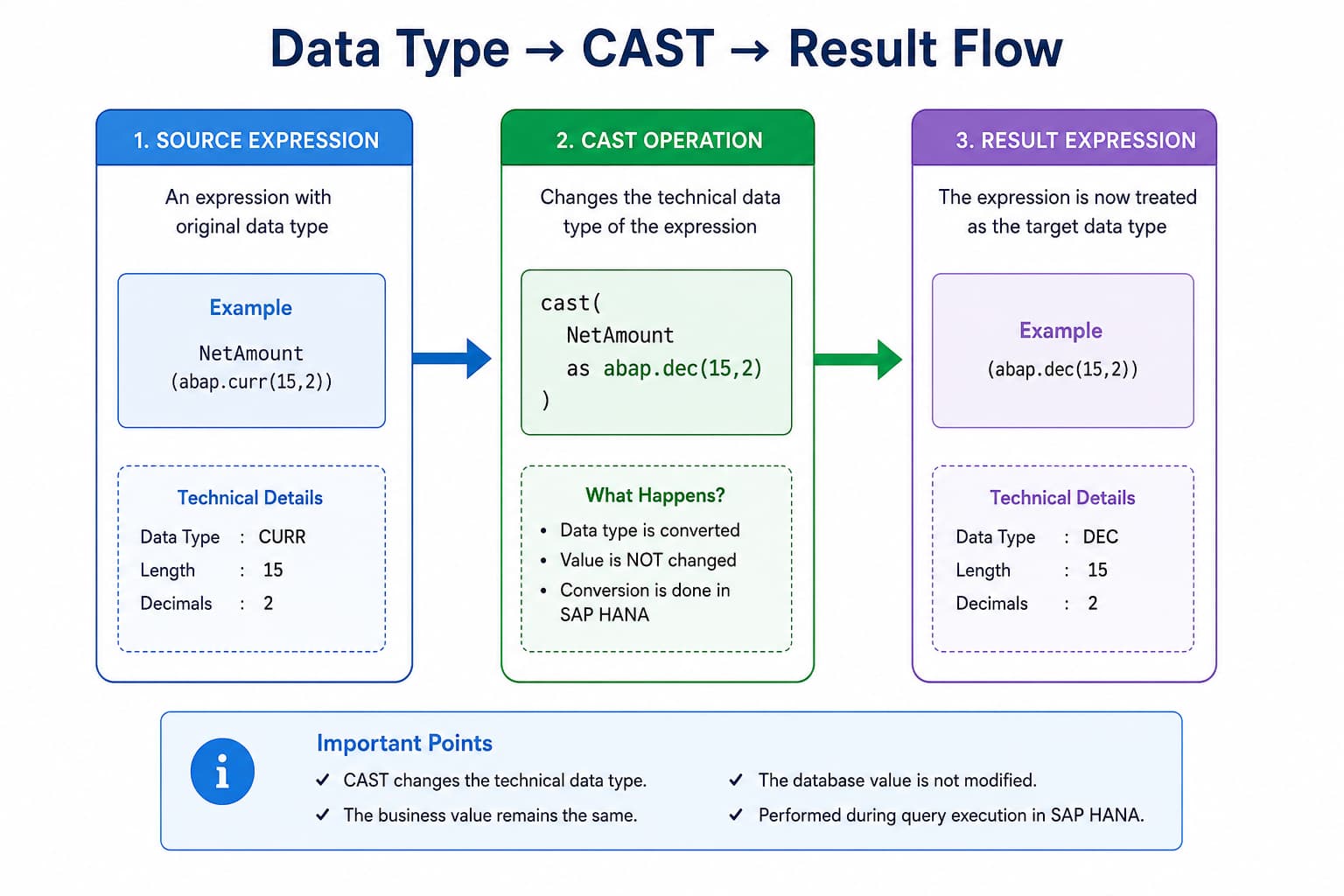
CAST Evaluation Flow
The following simplified flow illustrates what happens when a CAST expression is executed.
Database Field
      │
      ▼
CDS Expression
      │
      ▼
CAST Applies Target Data Type
      │
      ▼
Expression Evaluation
      │
      ▼
Result Returned
Notice that the CAST operation happens while the database evaluates the expression. It is not a post-processing step performed after the query has finished.
Architect Perspective
Architect InsightBecause CAST is evaluated inside the database engine, it fully participates in SAP HANA's code pushdown strategy. Instead of fetching data into the ABAP application server and performing conversions there, the conversion is executed directly where the data resides.
This keeps RAP applications scalable and minimizes unnecessary data transfer between the database and application layer.
CDS CAST vs ABAP Assignment
Developers coming from classical ABAP often compare CAST with moving a value from one variable to another using different data types.
Although the intention is similar, there is an important difference: CDS CAST is part of the SQL expression executed by SAP HANA, whereas ABAP assignments are executed in the ABAP application server after the database has already returned the data.
CDS CAST vs ABAP Variable Assignment
| ABAP CDS | ABAP Class |
|---|---|
| Executed inside the database | Executed in the application server |
| Part of the SQL statement | Part of ABAP program logic |
| Supports code pushdown | Occurs after data retrieval |
| Optimized by SAP HANA | Processed by the ABAP runtime |
💡 SAP Best Practice
Whenever a data type conversion is required as part of a CDS expression, perform it inside the CDS View Entity using CAST rather than retrieving the data first and converting it later in ABAP. This follows SAP's code pushdown principle and typically results in better performance.
Why Do We Need CAST?
At first glance, CAST may seem like a feature that is only required in complex CDS Views. In reality, almost every production-grade RAP application eventually uses CAST somewhere in its data model.
As CDS Views become more sophisticated, developers begin combining fields with different technical data types inside calculations, conditional logic, string functions, aggregate expressions, and UNION statements. These operations require compatible data types, and that is precisely where CAST becomes essential.
Common Situations Where CAST is Used
| Scenario | Why CAST is Required |
|---|---|
| CASE Expressions | Ensure all branches return compatible data types. |
| Arithmetic Calculations | Convert operands into compatible numeric types. |
| String Functions | Convert values into character-based data types. |
| Aggregate Functions | Prepare expressions for SUM(), AVG(), and similar functions. |
| UNION | Both SELECT statements must return compatible data types. |
| RAP Projection Views | Expose the required data type to consuming applications. |
| OData Services | Return values using the expected technical type. |
💡 SAP Best Practice
Treat CAST as part of your CDS design rather than a workaround for compiler errors. Well-designed CAST expressions make your intent explicit and improve the readability of your data model.
Real SAP Example: Sales Order Number
One of the most common misconceptions among new SAP developers is assuming that a Sales Order is a numeric value simply because it contains only digits.
5000001234Although it looks like an integer, a Sales Order is not intended for mathematical calculations.
It is a business identifier. Its purpose is to uniquely identify a business document—not to participate in arithmetic expressions.
Real Project Example: Production Scenario
Imagine a Fiori application displaying thousands of Sales Orders.
The application filters, searches, sorts, and navigates using the Sales Order number, but it never performs calculations such as:
SalesOrder + 1Such an operation has no business meaning because document numbers are identifiers rather than measurable values.
Architect Perspective
Architect InsightA useful habit is to ask yourself one simple question whenever you encounter a field:
"Does this value identify something, or does it measure something?"
If it identifies a business object, it is usually character-based. If it measures something such as an amount, quantity, percentage, or exchange rate, it is generally numeric.
Real SAP Example: Company Code
Consider another value that often causes confusion.
1000Again, the value consists entirely of digits, yet Company Code is not an integer.
It represents an organizational unit within SAP and is modeled using the semantic data element BUKRS, whose underlying technical representation is character-based.
Business Meaning vs Technical Representation
| Business Object | Looks Like | Actually Represents |
|---|---|---|
| Sales Order | Number | Business Identifier |
| Purchase Order | Number | Business Identifier |
| Company Code | Number | Organizational Identifier |
| Material Number | Number | Business Identifier |
| Customer | Number | Business Partner Identifier |
| Supplier | Number | Business Partner Identifier |
Treating these fields as numeric values can introduce incorrect assumptions into your CDS design and often results in unnecessary CAST expressions later in the development process.
Real SAP Example: Monetary Amount
Now compare the previous examples with a billing amount.
12500.75 INRUnlike a Sales Order or Company Code, this value represents a measurable amount of money. It participates in calculations, aggregations, currency conversion, and financial reporting.
Because it represents a measurable quantity, numeric operations make perfect sense.
NetAmount * ExchangeRateThis distinction is extremely important because developers often assume that every value containing digits behaves the same way. Business semantics determine how a field should be treated—not its appearance.
💡 SAP Best Practice
Before introducing a CAST expression, first understand the business meaning of the field. CAST should solve a technical compatibility problem—not compensate for an incorrect understanding of the data.
The Most Important Rule: CAST Changes the Data Type, Not the Business Value
If you remember only one concept from this lesson, make it this one:
Architect Perspective
CAST changes the technical data type of an expression.CAST does NOT change the business value.
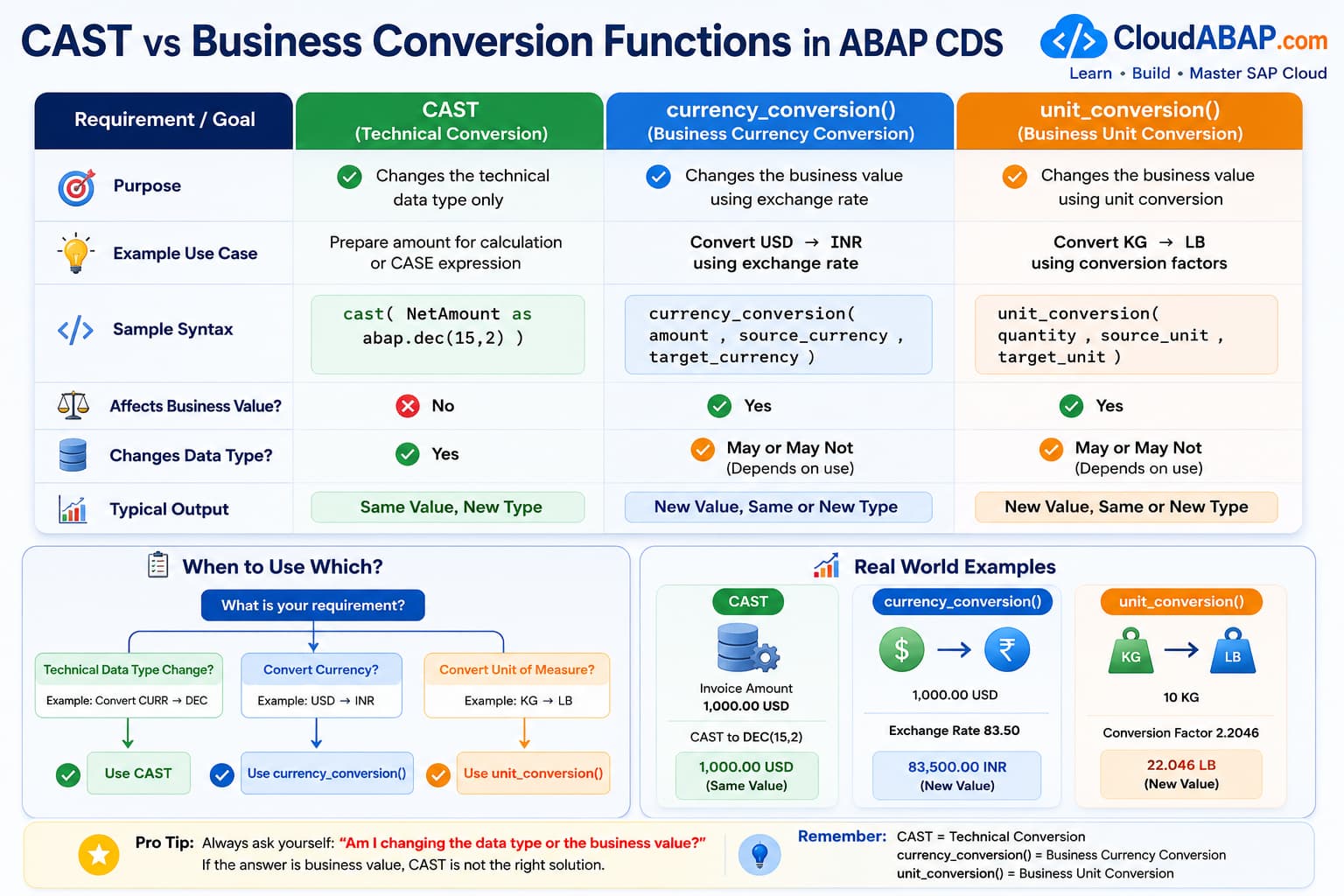
This distinction is frequently misunderstood. Many developers assume that CAST performs business conversions such as changing one currency into another or converting kilograms into pounds.
It does not.
CAST simply tells the CDS compiler and SAP HANA how the expression should be interpreted while the SQL statement is being executed.
Example: Currency Amount
Consider the following billing document.
Net Amount : 1,000.00
Currency   : USD
A common misconception is that the following expression converts the amount into another currency.
cast(
    NetAmount
    as abap.curr(15,2)
) as NetAmount
This expression does not convert USD into INR.
What Actually Happens?
| Before CAST | After CAST |
|---|---|
| 1,000.00 USD | Exactly the same business value |
| Same Currency | Same Currency |
| Only the technical type changes | Business meaning remains unchanged |
Architect Perspective
Architect InsightThink of CAST as changing the shape of the container—not the contents inside it.
The value remains exactly the same. Only its technical representation changes during expression evaluation.
Business Conversion Requires Dedicated CDS Functions
Business conversions involve calculations based on business rules, exchange rates, or unit conversion tables. These operations are far more complex than simply changing a data type.
Choose the Correct Function
| Requirement | Correct Solution | Purpose |
|---|---|---|
| Change technical data type | CAST | Technical conversion only |
| Convert USD to INR | currency_conversion() | Business currency conversion |
| Convert KG to LB | unit_conversion() | Business unit conversion |
| Prepare Amount for Calculation | CAST (when required) | Data type compatibility |
| Prepare Quantity for Mathematical Expression | CAST (when required) | Data type compatibility |
💡 SAP Best Practice
Always ask yourself whether you are trying to change the data type or the business value.
If the business value itself must change, CAST is almost certainly the wrong solution.
Real-World Example: Finance Reporting
Real Project Example: Financial Dashboard
A finance dashboard displays invoice amounts in the company code currency while also calculating tax percentages and profit margins.
During these calculations, developers may need compatible numeric data types for arithmetic expressions.
cast(
    NetAmount
    as abap.dec(15,2)
) as NetAmount
Here, CAST prepares the expression for calculation.
The invoice amount remains exactly the same. No currency conversion takes place.
Real-World Example: Warehouse Management
Real Project Example: Inventory Reporting
Suppose a warehouse report stores inventory quantities in kilograms.
250.500 KGThe following CAST expression:
cast(
    Quantity
    as abap.quan(13,3)
) as Quantity
does not convert kilograms into pounds.
If the business requirement is to display quantities in pounds, SAP provides the dedicated CDS function:
unit_conversion(
    quantity    => Quantity,
    source_unit => BaseUnit,
    target_unit => cast( 'LB' as abap.unit )
)
Decision Guide: Which Function Should You Use?
Technical Conversion vs Business Conversion
| Business Requirement | Use CAST | Use Conversion Function |
|---|---|---|
| Change data type | ✅ | |
| Prepare values for CASE | ✅ | |
| Prepare values for arithmetic | ✅ | |
| Convert USD to EUR | ✅ currency_conversion() | |
| Convert KG to LB | ✅ unit_conversion() | |
| Apply exchange rate | ✅ currency_conversion() | |
| Convert units of measure | ✅ unit_conversion() |
❌ Common Mistakes
- Assuming CAST converts business values.
- Using CAST instead of currency_conversion().
- Using CAST instead of unit_conversion().
- Thinking CAST modifies the database value.
- Confusing technical conversion with business conversion.
Built-in Data Types vs Semantic Data Elements
Up to this point, we have used built-in data types such as abap.char(), abap.dec(), and abap.int4 as CAST targets. Although these types are perfectly valid, they are not always the best choice.
SAP provides thousands of predefined semantic data elementsthat represent real business concepts such as Company Code, Material, Customer, Supplier, Currency, and Unit of Measure.
Whenever your expression represents one of these business concepts, using the corresponding semantic data element makes your CDS model easier to understand and aligns it with SAP's Virtual Data Model (VDM).
Built-in Types vs Semantic Data Elements
| Business Concept | Built-in Type | Preferred Semantic Data Element |
|---|---|---|
| Company Code | abap.char(4) | BUKRS |
| Plant | abap.char(4) | WERKS_D |
| Storage Location | abap.char(4) | LGORT_D |
| Material | abap.char(40) | MATNR |
| Customer | abap.char(10) | KUNNR |
| Supplier | abap.char(10) | LIFNR |
| Currency | abap.cuky | WAERS |
| Unit of Measure | abap.unit | MEINS |
| Quantity | abap.quan(13,3) | MENGE_D |
| Sales Order | abap.numc(10) | VBELN_VA |
| Purchase Order | abap.numc(10) | EBELN |
Why Semantic Data Elements Are Preferred
Consider the following two CAST expressions.
cast(
    CompanyCode
    as abap.char(4)
) as CompanyCodecast(
CompanyCode
as BUKRS
) as CompanyCodeTechnically, both expressions may produce values with the same length. However, they communicate very different intentions.
The first expression simply states that the result is a four-character field.
The second clearly communicates that the value represents a Company Code, preserving the business semantics of the data.
Architect Perspective
Architect InsightExperienced SAP developers model business concepts—not just technical data types.
A developer reading BUKRS immediately understands the purpose of the field.
A developer reading abap.char(4) only knows the field contains four characters.
Real-World Example: Financial Reporting
Real Project Example: Invoice Analytics CDS
A finance reporting CDS View exposes Company Code, Billing Amount, Currency, Customer, and Material information to a Fiori analytical application.
Although Company Code could technically be exposed using abap.char(4), using BUKRS immediately tells every developer, consultant, and architect what the field represents.
This makes the CDS View easier to understand, easier to maintain, and more consistent with SAP standard interface views.
💡 SAP Best Practice
Whenever SAP already provides a semantic data element that matches your business concept, prefer it over a generic built-in data type.
CDS Type Syntax vs ABAP Class Syntax
Developers frequently move between CDS View Entities and ABAP Classes. Although the concepts are similar, the syntax differs significantly.
CDS vs ABAP Type Declaration
| Business Type | CDS View Entity | ABAP Class |
|---|---|---|
| Character | abap.char(10) | TYPE c LENGTH 10 |
| Numeric Character | abap.numc(10) | TYPE n LENGTH 10 |
| Integer | abap.int4 | TYPE int4 |
| Packed Decimal | abap.dec(15,2) | TYPE p LENGTH 8 DECIMALS 2 |
| Decimal Float | abap.decfloat34 | TYPE decfloat34 |
| String | abap.string | TYPE string |
| Date | abap.dats | TYPE d |
| Time | abap.tims | TYPE t |
| Currency | abap.cuky | TYPE waers |
| Unit | abap.unit | TYPE meins |
Understanding both syntaxes is important because RAP development regularly alternates between CDS View Entities and ABAP implementation classes.
Choosing the Right CAST Target
Selecting the target type is not simply about making the compiler happy. The chosen type should accurately reflect the business meaning of the resulting value.
Recommended CAST Targets
| Scenario | Recommended Target | Reason |
|---|---|---|
| Company Code | BUKRS | Preserves business semantics |
| Material | MATNR | Matches SAP standard data model |
| Currency Key | WAERS | Clearly represents currency |
| Unit of Measure | MEINS | Maintains unit semantics |
| Generic Character Data | abap.char() | When no semantic element exists |
| Numeric Calculation | abap.dec() / abap.decfloat34 | Suitable for arithmetic operations |
❌ Common Mistakes
- Casting every character field to abap.char() even when a semantic data element exists.
- Choosing target types purely based on length instead of business meaning.
- Ignoring SAP's standard semantic data elements.
- Assuming semantic data elements behave differently from their technical types during execution.
Real-World CAST Scenarios
In real projects, CAST is rarely used in isolation. It usually appears inside calculations, conditional expressions, reporting views, RAP projections, analytical queries, and OData services.
Let's look at some common scenarios where experienced SAP developers use CAST to create clean and production-ready CDS View Entities.
Scenario 1: Financial Reporting
Real Project Example: Billing Analytics
A finance reporting CDS View displays invoice amounts together with calculated tax percentages and profit margins.
Before participating in arithmetic calculations, the amount may need to be represented using a compatible numeric data type.
cast(
NetAmount
as abap.dec(15,2)
) as NetAmountNotice that the invoice amount itself does not change. CAST simply prepares the expression so it can safely participate in subsequent calculations.
💡 SAP Best Practice
Use CAST to make arithmetic expressions compatible—not to perform financial calculations themselves.
Scenario 2: CASE Expressions
Every branch of a CASE expression must return compatible data types. If different branches return different types, the CDS compiler cannot determine the final result type.
case
when OverallSDProcessStatus = 'C'
then cast( 'Completed' as abap.char(15) )
when OverallSDProcessStatus = 'B'
then cast( 'In Process' as abap.char(15) )
else
cast( 'Open' as abap.char(15) )
end as StatusTextExplicitly casting each branch makes the result predictable and avoids data type inconsistencies.
Architect Perspective
Architect InsightCAST is commonly used inside CASE expressions because the compiler must determine a single result type for the entire expression before activation.
Scenario 3: Preparing Values for String Functions
String functions expect character-based input. If the source expression is not already compatible, CAST may be required before the function can be evaluated.
upper(
cast(
Supplier
as abap.char(10)
)
) as SupplierUpperHere, CAST ensures that the input expression is treated as character data before the UPPER() function is applied.
Scenario 4: UNION Compatibility
Both SELECT statements participating in a UNION must expose compatible data types for corresponding columns.
If one side returns a different technical type, CAST can be used to align the structures.
cast(
    CompanyCode
    as BUKRS
) as CompanyCodeThis ensures that both branches of the UNION expose identical technical definitions.
💡 SAP Best Practice
Whenever UNION reports data type incompatibility, review the data model first. Use CAST only after confirming that both columns represent the same business concept.
Scenario 5: RAP Projection Views
Real Project Example: Exposing Business Data
Interface CDS Views are often reused by multiple RAP Business Objects. Projection Views expose only the fields required by the consuming application.
During this projection, CAST can be used to expose the desired technical representation without modifying the underlying interface view.
cast(
    CompanyCode
    as BUKRS
) as CompanyCodeArchitect Perspective
Architect InsightAvoid using CAST to compensate for incorrect Interface CDS design. If the source model itself is incorrect, fixing it at the Interface View level is usually preferable to repeatedly casting fields in every consuming Projection View.
Scenario 6: Preparing Data for OData Services
CDS View Entities frequently serve as the foundation for RAP services and OData APIs.
The exposed metadata depends on the data types defined in the CDS projection. CAST can therefore influence how client applications interpret the returned values.
Real Project Example: API Development
An external consumer expects a field to be exposed using a specific technical type. Instead of changing the underlying persistence object, the Projection View can expose the required representation using CAST.
Summary of Common Production Scenarios
Where CAST is Commonly Used
| Scenario | Purpose of CAST | Typical Usage |
|---|---|---|
| Financial Reporting | Prepare numeric calculations | Tax, Margin, Discounts |
| CASE Expressions | Return compatible result types | Status Descriptions |
| String Functions | Provide character input | UPPER(), LOWER(), CONCAT() |
| UNION | Align compatible columns | Combined Reports |
| Projection Views | Expose desired technical type | RAP |
| OData Services | Control exposed metadata | API Development |
💡 SAP Best Practice
CAST should improve the clarity and compatibility of your CDS View. If you find yourself adding CAST to almost every field, it's often a sign that the underlying data model should be reviewed.
Advanced CAST Usage
Up to this point, we have used CAST in relatively simple expressions. In production CDS Views, however, CAST is frequently combined with arithmetic operations, aggregate functions, CASE expressions, and layered VDM models.
Understanding these advanced scenarios helps you design CDS View Entities that are easier to maintain, easier to extend, and better optimized for SAP HANA.
Using CAST in Arithmetic Expressions
Arithmetic expressions require compatible numeric data types. Depending on the source fields, CAST may be required before the calculation can be evaluated correctly.
cast(
    NetAmount
    as abap.dec(15,2)
) * ExchangeRate as ConvertedAmount
In this example, CAST ensures that the first operand participates in the multiplication using the required numeric representation.
Real Project Example: Financial Analytics
A reporting CDS View calculates gross profit, discounts, taxes, and profit margins. These calculations often combine values originating from different business objects and technical types.
Explicit CAST expressions make the calculation easier to understand and reduce the likelihood of compiler errors caused by incompatible operand types.
Using CAST with Aggregate Functions
Aggregate functions such as SUM(), AVG(), MIN(), and MAX() operate on compatible data types.
Depending on the source expression, CAST may be used before applying the aggregate function.
sum(
    cast(
        NetAmount
        as abap.dec(15,2)
    )
) as TotalNetAmount
Architect Perspective
Architect InsightCAST is generally applied before the aggregation so that the database performs the calculation using the intended data type.
Using CAST with GROUP BY and HAVING
CAST is often used together with aggregated CDS Views. However, developers should remember that CAST does not remove the normal SQL rules governing GROUP BY and HAVING clauses.
Real Project Example: Sales Summary Report
A CDS View groups Billing Documents by Company Code and calculates the total billing amount for each company.
sum(
    cast(
        NetAmount
        as abap.dec(15,2)
    )
) as TotalAmount
The CAST expression prepares the amount for aggregation, while the GROUP BY clause still controls how the records are grouped.
💡 SAP Best Practice
Think of CAST and GROUP BY as solving two different problems. CAST controls the data type of an expression, whereas GROUP BY determines how rows are aggregated.
Why Can't You Reuse an Alias?
One of the most common questions asked by CDS developers is why an alias defined earlier in the projection list cannot be referenced by another expression in the same SELECT statement.
cast(
    NetAmount
    as abap.dec(15,2)
) as Amount,

cast(
    Amount
    as abap.char(20)
) as AmountText
Although this looks perfectly reasonable, CDS activation fails because aliases are not available to other expressions within the same projection list.
Architect Perspective
Architect InsightCDS evaluates all projection expressions in parallel rather than sequentially.
Since every expression is evaluated independently, the alias Amount does not yet exist when the second CAST expression is parsed.
Recommended Solution: Layer Your CDS Views
Instead of creating long projection lists with complex nested expressions, SAP recommends breaking the logic into multiple CDS layers.
Interface View
        │
        ▼
Composite View
        │
        ▼
Projection View
        │
        ▼
Consumption / RAP Service
The first layer performs calculations and creates reusable aliases. Subsequent layers consume those aliases without repeating complex expressions.
Real Project Example: Production Design
An Interface CDS calculates the billing amount once. A Composite CDS performs additional calculations. Finally, the Projection View exposes the required fields to the RAP Business Object.
This layered approach keeps every CDS View focused on a single responsibility and significantly improves readability.
💡 SAP Best Practice
Whenever you find yourself repeating the same CAST expression multiple times, consider moving that calculation into a lower CDS layer instead of duplicating logic throughout the model.
Performance Considerations
CAST participates in SAP HANA's code pushdown mechanism and is generally inexpensive when used appropriately.
Nevertheless, unnecessary CAST expressions can make a CDS View more difficult to read and may indicate opportunities to simplify the underlying model.
Performance Recommendations
| Recommendation | Reason |
|---|---|
| Cast only when necessary | Avoid unnecessary complexity. |
| Prefer semantic target types | Improves readability and maintainability. |
| Layer complex calculations | Reduces duplicated logic. |
| Keep calculations in CDS | Supports SAP HANA code pushdown. |
| Review the source model first | Repeated CAST expressions often indicate modelling issues. |
Common Compiler Errors and How to Fix Them
Every SAP developer eventually encounters compiler errors while building CDS View Entities. Most of these errors are not caused by incorrect syntax—they occur because the participating expressions use incompatible data types.
Rather than memorizing individual error messages, it's much more useful to understand why the compiler rejects a particular expression. Once you understand the underlying type system, most CAST-related errors become straightforward to resolve.
Error 1: Function DIV - Type DECFLOAT34 Not Supported
Real Project Example: Compiler Error
div(
    cast(
        NetAmount
        as abap.decfloat34
    ),
    10
)
Activating this CDS View results in a compiler error similar to:
Function DIV:
Type DECFLOAT34 is not supported.
The DIV() function performs integer division and only supports specific numeric data types. Although DECFLOAT34 is numeric, it is intentionally excluded because DIV is designed for integer-style arithmetic.
Architect Perspective
Why does this happen?Developers often assume that every numeric type can be used with every mathematical function.
In reality, each CDS function defines its own supported input types.
💡 SAP Best Practice
If decimal precision is required, use DIVISION() instead of DIV().
Error 2: Function MOD - Type DEC Not Supported
Real Project Example: Compiler Error
mod(
    cast(
        NetAmount
        as abap.dec(15,2)
    ),
    10
)Function MOD:
Type DEC is not supported.MOD() calculates the remainder after integer division. Since decimal values can produce fractional remainders, CDS restricts MOD to integer-compatible data types.
Supported by MOD()
| Supported | Not Supported |
|---|---|
| INT1 | DEC |
| INT2 | CURR |
| INT4 | QUAN |
| INT8 | DECFLOAT16 |
Error 3: CASE Branches Return Different Data Types
Every branch of a CASE expression must return a compatible data type.
case
    when OverallSDProcessStatus = 'C'
         then 'Completed'
    else
         NetAmount
end
In this example, one branch returns character data while the other returns a numeric amount. Since CDS cannot determine a single result type, activation fails.
💡 SAP Best Practice
Ensure every branch returns the same or a compatible data type. CAST can be used when necessary to make the result type explicit.
Error 4: CAST Combination Not Supported
Not every source type can be converted into every target type.
cast(
    UUID
    as abap.char(20)
)
Depending on the source and target types, CDS may reject the conversion because no valid conversion rule exists.
Architect Perspective
Architect InsightAlways verify that the requested conversion is supported.
Just because two values can be displayed similarly does not mean CDS allows direct conversion between their technical data types.
Error 5: Alias Cannot Be Referenced
cast(
    NetAmount
    as abap.dec(15,2)
) as Amount,

cast(
    Amount
    as abap.char(20)
) as AmountText
CDS evaluates every projection expression independently. Therefore, aliases are not available to other expressions within the same projection list.
💡 SAP Best Practice
Move the first calculation into a lower CDS View and reference it from a higher layer instead of repeating the same expression.
Error 6: Confusing CAST with Currency Conversion
Real Project Example: Common Mistake
cast(
    NetAmount
    as abap.curr(15,2)
)
Developers sometimes expect this expression to convert one currency into another.
Correct Solution
| Requirement | Correct Function |
|---|---|
| Change technical data type | CAST |
| Convert USD to EUR | currency_conversion() |
| Convert KG to LB | unit_conversion() |
Checklist Before Using CAST
Developer Checklist
| Question | Recommendation |
|---|---|
| Am I changing the data type or the business value? | If the business value changes, CAST is probably not the correct solution. |
| Does SAP already provide a semantic data element? | Prefer semantic types such as BUKRS, MATNR, WAERS, and MEINS. |
| Can the calculation be moved into a lower CDS layer? | Avoid repeating complex CAST expressions. |
| Are all participating expressions compatible? | Review the source data types before introducing CAST. |
| Am I solving the actual problem? | Don't use CAST simply to suppress compiler errors. |
❌ Common Mistakes
- Using CAST as a workaround without understanding the compiler error.
- Expecting CAST to perform currency or unit conversion.
- Casting every field instead of reviewing the underlying data model.
- Ignoring semantic data elements.
- Creating overly complex expressions instead of layering CDS Views.
Interview Questions
The following questions are commonly asked in interviews for ABAP Cloud, RAP, S/4HANA Public Cloud, and Senior Technical Consultant roles. They test not only your understanding of CAST syntax but also your ability to make correct architectural decisions.
What is the purpose of CAST in ABAP CDS?
Answer: CAST changes the technical data type of an expression during query execution. It enables compatible calculations, comparisons, CASE expressions, UNION operations, and other CDS expressions without modifying the underlying database value.
Does CAST modify the value stored in the database?
Answer: No. CAST affects only the result of the expression during query execution. The original value stored in the database remains unchanged.
Can CAST be used to convert USD into EUR?
Answer: No. CAST changes only the technical data type. Business conversions such as currency conversion must use the CDS function currency_conversion().
Why do CASE expressions frequently use CAST?
Answer: Every branch of a CASE expression must return compatible data types. CAST explicitly defines the result type and avoids compiler errors caused by incompatible branches.
Why can't an alias be reused in another expression within the same CDS projection?
Answer: CDS evaluates all projection expressions in parallel. Since aliases are created only after the projection list has been evaluated, they are not available to other expressions in the same SELECT list.
When should you CAST to a semantic data element instead of a built-in data type?
Answer: Whenever SAP provides a semantic data element representing the business concept. For example, prefer BUKRS over abap.char(4), MATNR over abap.char(40), and WAERS over abap.cuky because they preserve business semantics and improve readability.
Why is a Sales Order not considered a numeric value even though it contains only digits?
Answer: A Sales Order is a business identifier rather than a measurable quantity. Although it appears numeric, it represents a document key and should not participate in arithmetic calculations.
What is the difference between CAST and currency_conversion()?
Answer: CAST changes only the technical data type of an expression. currency_conversion() changes the business value by applying exchange rates and converting between currencies.
Can every source data type be CAST to every target data type?
Answer: No. CDS supports only specific conversion combinations. Unsupported source and target combinations result in compiler errors during activation.
Why is CAST commonly used before aggregate functions such as SUM()?
Answer: CAST ensures that the expression participates in the aggregation using the intended data type, especially when calculations involve different numeric representations.
Would you use CAST to fix every compiler error related to incompatible data types?
Answer: No. CAST should never be used as a workaround. First determine whether the underlying CDS model is correct. Repeated CAST expressions often indicate that the data model or layering strategy should be improved.
How would you avoid repeating the same CAST expression throughout a RAP application?
Answer: Move the calculation into a lower CDS layer such as an Interface or Composite View and expose the calculated field through higher Projection Views. This avoids duplicated logic and improves maintainability.
How does CAST support SAP HANA code pushdown?
Answer: CAST is executed inside the database as part of the SQL statement. This allows SAP HANA to perform the conversion during query execution instead of transferring raw data to the ABAP application server for post-processing.
What is the biggest misconception developers have about CAST?
Answer: Many developers believe CAST changes business values such as currencies or units of measure. In reality, CAST changes only the technical data type. Business conversions require dedicated CDS conversion functions.
Architect Checklist Before Using CAST
Production Readiness Checklist
| Question | Recommendation |
|---|---|
| Am I solving a technical compatibility issue? | If yes, CAST may be appropriate. |
| Am I trying to change the business value? | Use currency_conversion() or unit_conversion() instead. |
| Does a semantic data element already exist? | Prefer semantic data elements over generic built-in types. |
| Can this calculation be moved to a lower CDS layer? | Layer Interface, Composite, and Projection Views whenever possible. |
| Will another developer immediately understand this CAST expression? | Prioritize readability over clever implementations. |
| Am I introducing CAST only to silence a compiler error? | Review the underlying data model before adding CAST. |
Architect Perspective
Architect InsightProduction-quality CDS Views are not judged by how many advanced expressions they contain.
They are judged by how easy they are to understand, extend, and maintain.
CAST should improve the clarity of your data model—not increase its complexity.
CAST Expression Cheat Sheet
Type Conversion • Data Compatibility • SAP HANA Pushdown
This quick reference summarizes the most important concepts of the CAST expression in ABAP CDS. Use it as a quick guide when converting data types, building calculations, or preparing CDS Views for RAP applications and technical interviews.
| Topic | Syntax / Value | Summary |
|---|---|---|
| Purpose | cast( expression as type ) | Converts an expression from one data type to another. |
| Changes Database Value? | ❌ No | CAST only changes how the value is interpreted; the stored database value remains unchanged. |
| Changes Business Meaning? | ❌ No | Business semantics remain unchanged after the conversion. |
| Typical Usage | CASE, UNION, Calculations | Commonly used for type compatibility, arithmetic expressions, projections, and OData exposure. |
| Currency Conversion | currency_conversion() | Use the dedicated conversion function instead of CAST for currency conversion. |
| Unit Conversion | unit_conversion() | Use the dedicated conversion function instead of CAST for unit conversion. |
| Amount Conversion | curr_to_decfloat_amount() | Preferred when performing calculations on CURR fields. |
| Preferred Target Type | Semantic Data Element | Whenever possible, cast to a semantic ABAP data element rather than a primitive type. |
| Performance | SAP HANA | CAST is executed directly in the database as part of code pushdown. |
| Common Mistake | CAST ≠ Business Conversion | CAST changes only the technical data type, not the business meaning or value. |
💡 Key Takeaway
CAST is one of the most frequently used expressions in ABAP CDS, but it is often misunderstood.
Throughout this lesson, we learned that CAST is responsible only for changing the technical data type of an expression. It does not modify the stored value, perform currency conversion, or change the business meaning of the data.
We also explored why understanding SAP business semantics is just as important as understanding technical data types. Choosing semantic data elements such as BUKRS, MATNR, WAERS, and MEINS results in CDS models that are easier to read, easier to maintain, and more closely aligned with SAP's Virtual Data Model.
Finally, we examined how CAST is used in production CDS View Entities—including calculations, CASE expressions, RAP Projection Views, OData Services, analytical reporting, and SAP HANA code pushdown—along with common compiler errors and architectural best practices.
Watch the Complete ADT Walkthrough
In the accompanying video, we'll implement every concept covered in this lesson using Eclipse ADT and SAP S/4HANA Public Cloud.
We'll build real CDS View Entities, explore common compiler errors, understand why they occur, and apply CAST correctly in practical RAP development scenarios.
What's Next?
Now that you understand how to work with different data types and use CAST effectively, you're ready to learn one of the most powerful expression constructs available in ABAP CDS: CASE Expressions.
In the next lesson, you'll learn how to implement conditional logic directly in CDS View Entities using both Simple CASE and Searched CASE, create business-friendly calculated fields, combine CASE with CAST, and apply these techniques to real-world reporting and RAP applications.
💡 SAP Best Practice
Before continuing, make sure you're comfortable identifying SAP business identifiers, semantic data elements, and the distinction between technical and business conversions. These concepts form the foundation for many advanced CDS expressions you'll encounter later in this learning path.