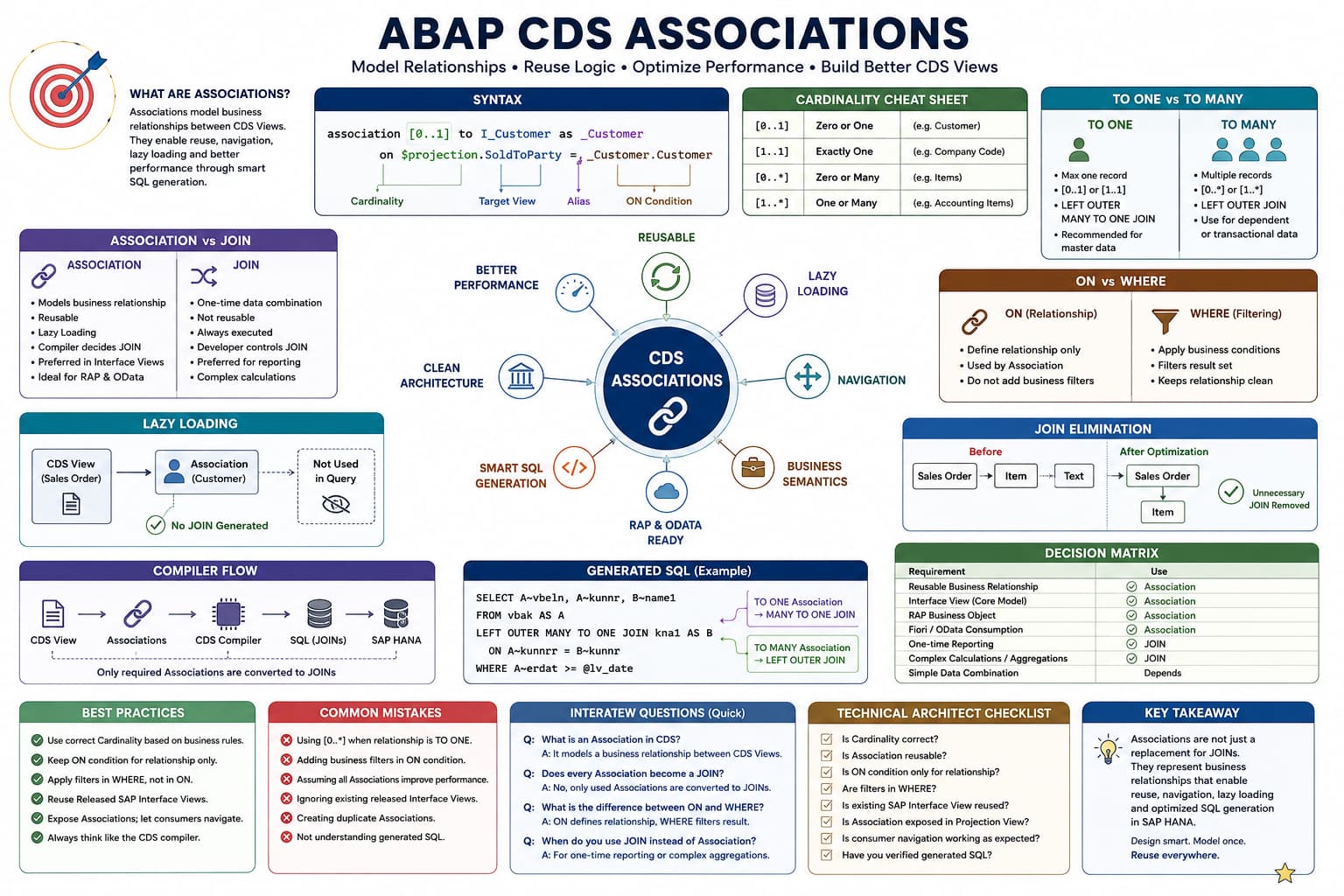
Association Masterclass
Lesson 2 of 15 – Creating Your First Association
In Lesson 1, we learned why SAP introduced Associations and how they differ from traditional SQL JOINs. In this lesson, you'll write your first Association and understand every keyword that makes up an Association definition.
Learning Objectives
By the end of this lesson, you will be able to:
- Create your first Association in a CDS View Entity.
- Understand every keyword used in the Association syntax.
- Explain the purpose of the ON condition.
- Understand why Associations require an alias.
- Prepare for advanced topics such as path expressions, cardinality, and generated SQL.
Prerequisites
- Basic SQL JOIN concepts.
- ABAP CDS View Entity fundamentals.
- Completion of Lesson 1 of this Association Masterclass.
Introduction
Almost every released Interface View delivered by SAP contains one or more Associations. Whether you're working with Sales Orders, Purchase Orders, Business Partners, Products, or Journal Entries, Associations are the mechanism SAP uses to connect business objects throughout the Virtual Data Model (VDM).
Although the syntax may initially appear unfamiliar, it is actually very logical. Each keyword has a single responsibility, and once you understand those responsibilities, reading and writing Associations becomes straightforward.
In this lesson, we won't focus on advanced concepts such as cardinality, generated SQL, or lazy loading. Instead, we'll build a solid foundation by understanding how an Association is written before exploring how the CDS compiler uses it.
Architect Perspective
Most developers try to memorize the complete Association syntax.A much better approach is to understand what each keyword represents.
Once you know the purpose of every keyword, you can read almost any SAP Interface View without referring to documentation.
General Association Syntax
Every Association follows the same structure regardless of the source or target business object.
association [min..max] to Target_CDS_View as _Association

on <relationship condition>
Although this statement contains only a few keywords, each one plays an important role in defining the relationship between two business objects.
Before writing our first real Association, let's understand the responsibility of every keyword.
Breaking Down the Association Syntax
Understand each keyword before writing your first Association.
Complete Syntax
association [0..1] to I_Customer as _Customer on $projection.SoldToParty = _Customer.CustomerassociationStarts an Association definition.
Every reusable relationship between two business objects begins with the association keyword.
[0..1]Defines the cardinality.
It specifies how many target records may exist for one source record. We'll study cardinality in detail in a dedicated lesson.
toSpecifies the target CDS View.
I_CustomerThe released Interface View representing the target business object.
asIntroduces an alias for the Association.
_CustomerThe Association name used later for navigation through path expressions.
onDefines the relationship condition.
$projectionRepresents the current CDS View.
Fields from the current view are compared with fields from the target view to establish the relationship.
Understanding the syntax is the first step toward writing better ABAP CDS.
Reading an Association Like a Sentence
One of the easiest ways to understand Associations is to read the syntax as if it were an English sentence rather than a programming statement.
association [0..1] to I_Customer as _Customer
on $projection.SoldToParty = _Customer.CustomerThis CDS View has an Association to the business object I_Customer, known as _Customer, where the current Sales Order's SoldToParty matches the Customer field in the target business object.
Creating Your First Association
Now that you understand the syntax, let's create a real Association using SAP released Interface Views. We'll create a relationship between a Sales Document and its Sold-To Customer.
define view entity ZI_SalesOrder

  as select from I_SalesDocument

  association [0..1] to I_Customer as _Customer

    on $projection.SoldToParty = _Customer.Customer

{

    key SalesDocument,

    SoldToParty

}
Notice that although the Association has been defined, no customer fields are selected. At this stage, we've only described the business relationship between the two business objects.
Understanding the ON Condition
Every Association requires an ON condition. This condition tells the CDS compiler how records from the source business object relate to records in the target business object.
$projection.SoldToParty = _Customer.CustomerRead this condition as:
Match the SoldToParty field from the current CDS View with the Customer field of the target Interface View.
This relationship definition is stored inside the CDS View. The CDS compiler later uses it whenever the Association is navigated.
Understanding $projection
One keyword that often confuses beginners is $projection.
Simply remember this rule:
Easy Rule to Remember
$projection always refers to the current CDS View that you are building.
$projection.SoldToPartymeans:
Use the SoldToParty field from the current CDS View.
Architect Perspective
Although direct field references are sometimes possible, $projection is SAP's recommended approach because it clearly indicates that the field belongs to the current CDS View and improves readability.Why Does the Alias Start with an Underscore?
SAP follows a naming convention where Association aliases begin with an underscore (_).
association [0..1] to I_Customer as _Customer| Alias | Purpose |
|---|---|
| _Customer | Association used later for navigation through path expressions. |
| Customer | Could easily be confused with a normal element in the CDS View. |
Although the underscore is technically a naming convention, SAP uses it consistently throughout all released Interface Views and it is considered a best practice for custom development as well.
Previewing the CDS View
After activating the CDS View, you can preview the data in ADT.
You'll notice something interesting:
- Sales Document is displayed.
- Sold-To Party is displayed.
- No customer information appears.
This is expected because defining an Association does not automatically retrieve data from the target business object.
INSIDE THE CDS COMPILER
Association Created Successfully
💭 Compiler Thought Process
The CDS View defines a relationship to I_Customer, but no fields from the Association are requested.
Compiler Decision Flow
Read the Association metadata.
Validate the ON condition.
Store the relationship definition.
Check whether any path expression is used.
No navigation found.
Skip SQL JOIN generation.
✅ Final Compiler Decision
Execute the query using only I_SalesDocument. The Association is stored for future use but no JOIN is generated.
⚡ SQL Optimization Insight
Associations are lazy. Defining them has almost no runtime cost until a consumer actually navigates the relationship.
Real Project Example: Standard SAP Interface Views
You'll notice that SAP defines dozens of Associations even though many of them are not immediately used. This allows different applications to navigate only the relationships they require while keeping the Interface Views reusable.
💡 SAP Best Practice
Define reusable relationships once and allow different consumers to decide whether those relationships should be navigated.
❌ Common Mistakes
- Trying to retrieve data immediately after defining an Association.
- Assuming the ON condition executes like a SQL JOIN.
- Using inconsistent alias names instead of SAP's underscore convention.
- Memorizing the syntax instead of understanding each keyword.
What is the purpose of the ON condition in an Association?
Answer: The ON condition defines how records from the source business object relate to records in the target business object.
Why is $projection used inside an Association?
Answer: It refers to fields of the current CDS View and is used to build the relationship condition with the target business object.
Why does SAP recommend naming Association aliases with an underscore?
Answer: The underscore clearly distinguishes Associations from normal CDS elements, improves readability, and follows SAP's standard naming convention across released Interface Views.
💡 Key Takeaway
An Association consists of only a few keywords, but each has a specific responsibility. Understanding those responsibilities is far more valuable than memorizing the syntax.
At this stage, we've defined a business relationship but haven't yet retrieved any data from the target business object. In the next lesson, we'll learn how to navigate an Association using path expressions and see how the CDS compiler automatically generates SQL JOINs only when related fields are accessed.