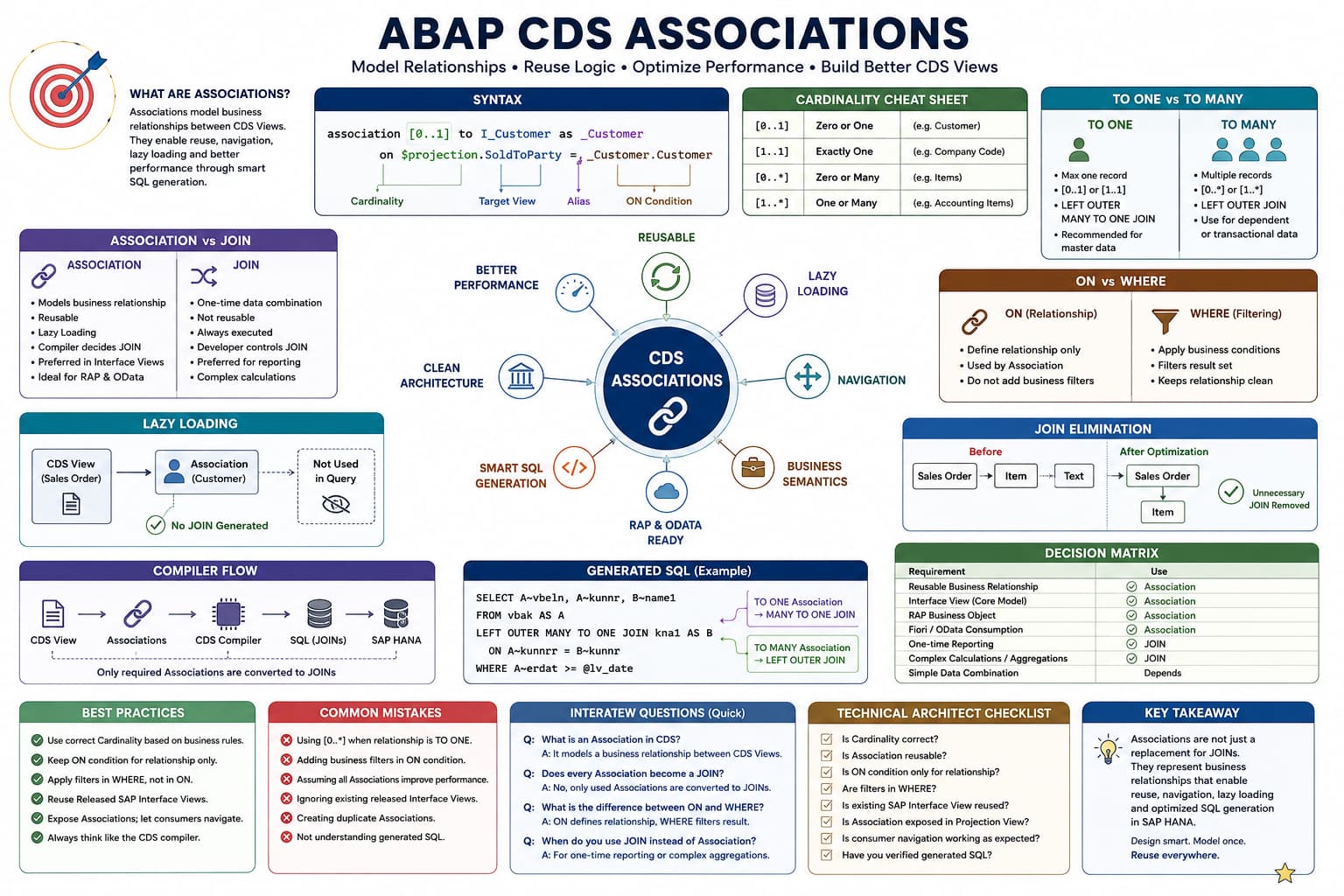
Association Masterclass
Lesson 9 of 10 – Advanced Association Patterns
By now you've learned almost every fundamental concept behind Associations.
This lesson focuses on how SAP actually builds the Virtual Data Model using Associations.
Real SAP Interface Views rarely contain one Association.
Most contain dozens of interconnected Associations forming a large business object graph.
Learning Objectives
- Create multiple Associations inside a CDS View.
- Navigate nested Associations.
- Understand Association reuse.
- Expose Associations for downstream CDS Views.
- Understand Association graphs used by SAP VDM.
Introduction
Most beginner examples show a CDS View containing only one Association.
That is useful for learning the syntax, but it is not how SAP models business objects.
Open almost any released Interface View and you'll find numerous Associations connecting Customers, Materials, Plants, Company Codes, Sales Organizations, Items, Texts, Addresses and many other business objects.
Rather than thinking in terms of SQL tables, SAP models an entire business domain as a graph of reusable relationships.
Architect Perspective
A CDS View is not simply a SELECT statement.Think of it as a business object with relationships to other business objects.
Those relationships are Associations.
Together they form SAP's Virtual Data Model.
A CDS View with Multiple Associations
define view entity ZI_SalesOrder

  as select from I_SalesDocument

  association [0..1] to I_Customer as _Customer

    on $projection.SoldToParty = _Customer.Customer

  association [0..1] to I_Plant as _Plant

    on $projection.ShippingPoint = _Plant.Plant

  association [0..*] to I_SalesDocumentItem as _Item

    on $projection.SalesDocument = _Item.SalesDocument

{

    key SalesDocument,

    SalesOrganization,

    SoldToParty,

    ShippingPoint

}
Three different business relationships have been defined.
None of them retrieves data until a consumer navigates the required Association.
Visualizing the Business Object Graph
Sales Order
     │
     ├── Customer
     │
     ├── Plant
     │
     └── Items
The compiler stores these relationships as metadata.
Every consumer may navigate a different branch of this graph.
INSIDE THE CDS COMPILER
Building the Association Graph
💭 Compiler Thought Process
The compiler first discovers every Association before deciding which branches are required.
Compiler Decision Flow
Read the root CDS View.
Register every Association.
Build the relationship graph.
Wait for consumer navigation.
Generate JOINs only for navigated branches.
✅ Final Compiler Decision
Multiple Associations increase reusability without forcing unnecessary SQL JOINs.
⚡ SQL Optimization Insight
The number of Associations in a CDS View has little impact by itself. What matters is which Associations are actually navigated.
Nested Associations
One of the biggest strengths of Associations is that they can be chained together to navigate across multiple business objects without writing additional JOIN statements.
This is known as Nested Association Navigation.
_Item._Material._Plant.PlantNameRead this expression from left to right.
Sales Order → Item → Material → Plant → Plant Name
Every step navigates one Association.
Real SAP Example
Imagine the following Interface Views.
I_SalesDocument

↓

I_SalesDocumentItem

↓

I_Product

↓

I_ProductText
A consumer can navigate directly to the Product Description.
_Item._Product._Text.ProductNameNotice that the Sales Order CDS View never directly joins the Product Text.
The compiler follows the Association chain one relationship at a time.
How the CDS Compiler Traverses Nested Associations
The compiler never jumps directly to the last business object.
Sales Order

↓

Item

↓

Product

↓

Product Text
Internally, the compiler resolves the graph sequentially.
Step 1

Sales Order

↓

Step 2

Resolve Item

↓

Step 3

Resolve Product

↓

Step 4

Resolve Product Text

↓

Generate SQL
Each Association is validated before moving to the next one.
INSIDE THE CDS COMPILER
Resolving Nested Associations
💭 Compiler Thought Process
Every path expression represents a traversal through the Association graph.
Compiler Decision Flow
Start from the root CDS View.
Resolve the first Association (_Item).
Resolve the second Association (_Product).
Resolve the third Association (_Text).
Generate JOINs only for traversed Associations.
✅ Final Compiler Decision
Nested Associations are resolved level by level. There is never a direct jump to the deepest business object.
⚡ SQL Optimization Insight
Each additional Association represents another potential JOIN. If a branch isn't navigated, the compiler removes it before SQL generation.
Association Reuse
One of SAP's primary design goals was to avoid repeatedly writing the same JOIN logic across hundreds of CDS Views.
Instead of defining Customer relationships everywhere, SAP defines the Association once and allows every consumer to reuse it.
association [0..1] to I_Customer as _Customer

on $projection.SoldToParty = _Customer.Customer
Any Projection View, Consumption View or RAP Business Object built on top of this Interface View can simply navigate the existing Association.
The relationship is defined once and reused throughout the Virtual Data Model.
Exposing Associations
Associations are not only meant for the current CDS View.
They can also be exposed so that downstream CDS Views continue to use the same business relationship.
define view entity ZC_SalesOrder

  as projection on ZI_SalesOrder

{

    key SalesDocument,

    SalesOrganization,

    _Customer,

    _Item

}
Notice that the Projection View does not redefine the Associations.
It simply exposes the existing relationships defined by the Interface View.
Why SAP Encourages Association Reuse
| Without Associations | With Associations |
|---|---|
| JOIN logic repeated in every CDS View. | Relationship defined once. |
| Difficult maintenance. | Centralized relationship management. |
| High duplication. | Maximum reuse. |
| Every CDS owns its JOIN logic. | Virtual Data Model shares relationships. |
Architect Perspective
Technical Architect InsightOne of the biggest mistakes developers make is thinking Associations are created only for the current CDS View.
In reality, SAP designs Interface Views so that dozens of downstream Projection Views, Consumption Views, Analytical Queries and RAP Business Objects can all reuse the same Associations.
This reuse is one of the foundations of SAP's Virtual Data Model.
Association Filters Using Path Expressions
One of the most powerful features of Associations is the ability to filter data while navigating an Association instead of filtering the entire result set.
This is known as a Path Expression Filter.
_Item[SalesDocumentItem='000010'].MaterialInstead of navigating every Sales Order Item, the navigation itself is restricted to Item 000010.
This is fundamentally different from writing a global WHERE condition.
Path Expression Filter vs WHERE Clause
| Path Expression Filter | WHERE Clause |
|---|---|
| Filters the Association being navigated. | Filters the final CDS result. |
| Acts only on one navigation path. | Acts on every returned record. |
| Preserves the overall business graph. | Reduces the final result set. |
Real Example Using Sales Orders
Suppose a Sales Order contains four items.
Sales Order

↓

Item 10

↓

Item 20

↓

Item 30

↓

Item 40
Now navigate only Item 20.
_Item[SalesDocumentItem='000020'].MaterialThe Association itself remains TO MANY.
Only this particular navigation path is filtered.
Consumer-Specific Navigation
One of the major reasons SAP prefers Associations over explicit JOINs is that different consumers rarely require the same business data.
Consider three applications consuming the same Interface View.
| Consumer | Required Navigation |
|---|---|
| Fiori List Report | _Customer |
| RAP Service | _Customer + _Item |
| Analytical Query | _Customer + _Item + _Text |
Every consumer starts from exactly the same Interface View.
The only difference is which Association branches are navigated.
The Compiler Generates Different SQL for Different Consumers
This is perhaps the biggest advantage of Associations.
Sales Order

↓

Customer
Only the Customer JOIN is generated.
Sales Order

↓

Customer

↓

Items

↓

Product Text
Additional JOINs are generated because more Associations are navigated.
The CDS View remains exactly the same.
Only the generated SQL changes.
INSIDE THE CDS COMPILER
Consumer Driven SQL Generation
💭 Compiler Thought Process
Every consumer requests a different subset of the Association graph.
Compiler Decision Flow
Read the Interface View.
Determine the requested path expressions.
Discard unused branches.
Generate JOINs only for requested Associations.
Optimize the final SQL statement.
✅ Final Compiler Decision
The generated SQL depends on the consumer—not merely on the CDS definition.
⚡ SQL Optimization Insight
This is why one reusable Interface View can efficiently support Fiori apps, RAP services and analytical queries without modification.
Exposed Association vs Navigated Association
Developers often confuse exposing an Association with navigating an Association.
| Exposed Association | Navigated Association |
|---|---|
| Makes the relationship available to downstream CDS Views. | Retrieves data from the target business object. |
| No JOIN required. | JOIN may be generated. |
| Metadata only. | Runtime navigation. |
Architect Perspective
Technical Architect InsightOne Interface View may be consumed by dozens of applications.
Some consumers expose Associations for future reuse.
Others immediately navigate those Associations.
Understanding this distinction is essential when designing reusable CDS Views for RAP and SAP's Virtual Data Model.
Putting Everything Together
Throughout this masterclass we've explored Associations from multiple perspectives:
- Business relationships
- Cardinality
- Navigation
- Lazy Loading
- Generated SQL
- Compiler optimization
- Nested Associations
- Association reuse
These concepts are not independent.
Together they form the foundation of SAP's Virtual Data Model (VDM), where business objects are connected through reusable Associations instead of repeatedly writing JOIN logic.
A Typical SAP Virtual Data Model
Sales Order
     │
     ├── Customer
     │
     ├── Company Code
     │
     ├── Sales Organization
     │
     ├── Items
     │      │
     │      ├── Product
     │      │      │
     │      │      └── Product Text
     │      │
     │      └── Plant
     │
     └── Billing Document
This is much closer to what you'll find in SAP-delivered Interface Views.
Every node represents a business object.
Every connection represents an Association.
How an Architect Thinks
Junior developers often think:
Which JOIN should I write?
Experienced ABAP Cloud developers think:
Which business objects are related?
SAP Technical Architects go one step further.
How can I model these relationships once so every application can reuse them?
That mindset is exactly what the SAP Virtual Data Model encourages.
INSIDE THE CDS COMPILER
The Complete Compiler Journey
💭 Compiler Thought Process
The compiler transforms business relationships into executable SQL while removing everything that isn't needed.
Compiler Decision Flow
Read the root CDS View.
Register every Association.
Validate Cardinality.
Build the Association graph.
Identify navigated path expressions.
Discard unused branches.
Generate optimized SQL.
Send SQL to SAP HANA.
✅ Final Compiler Decision
The final SQL depends on the consumer's navigation—not simply on the CDS definition.
⚡ SQL Optimization Insight
This architecture allows a single Interface View to support dozens of applications without duplicating JOIN logic.
Real Project Example: A Typical SAP S/4HANA Public Cloud Scenario
That single Interface View may be consumed by:
• Fiori List Reports
• Object Pages
• RAP Business Objects
• OData Services
• Analytical CDS Queries
• Custom Projection Views
None of these applications rewrite the JOIN logic.
Instead, each application navigates the Associations it requires, while the CDS compiler generates optimized SQL specifically for that consumer.
Architect Perspective
Technical Architect RecommendationWhen designing Interface Views, don't think about today's requirement.
Think about the next five applications that will consume your CDS View.
If business relationships are modeled correctly using Associations, future Projection Views, RAP services and analytical models can reuse them without modifying the original Interface View.
This is exactly how SAP designs its released Virtual Data Model.
💡 SAP Best Practice
Define reusable Associations once.
Choose the correct Cardinality.
Keep ON conditions limited to relationship logic.
Allow downstream consumers to navigate only the Associations they require.
Let the CDS compiler optimize SQL generation automatically.
❌ Common Mistakes
- Thinking Associations are simply another syntax for SQL JOINs.
- Using explicit JOINs everywhere instead of reusable Associations.
- Choosing Cardinality without understanding the business relationship.
- Confusing exposed Associations with navigated Associations.
- Designing Interface Views for one application instead of multiple consumers.
Why does SAP recommend Associations over repeatedly writing JOINs?
Answer: Associations model reusable business relationships. Different consumers navigate only the Associations they need, allowing the CDS compiler to generate optimized SQL automatically.
What is the biggest architectural advantage of Associations?
Answer: Associations separate business relationships from SQL implementation. This improves reuse, maintainability and allows the CDS compiler to perform optimizations such as lazy loading and join elimination.
How would you design an Interface View intended to be reused across RAP, Fiori and analytical applications?
Answer: Model the Interface View around the core business object, define reusable Associations with correct Cardinality, expose those Associations for downstream reuse, and allow each consumer to navigate only the business relationships it requires.
💡 Key Takeaway
Associations are one of the most important innovations introduced by ABAP CDS.
They replace repetitive JOIN logic with reusable business relationships, allowing SAP's Virtual Data Model to remain modular, extensible and consumer-driven.
Once you begin thinking in terms of business objects and Association graphs instead of SQL tables and JOIN statements, you'll understand why almost every SAP-delivered Interface View is built around Associations.
Congratulations!
🎉 You've Completed the Association Masterclass
Across these lessons you've learned:
- Why SAP introduced Associations
- Creating your first Association
- Navigation and Path Expressions
- Lazy Loading
- Cardinality
- TO ONE vs TO MANY
- Association vs SQL JOIN
- ON vs WHERE
- Advanced Association Patterns
You now have the knowledge required to understand, design and build reusable CDS Views following SAP's Virtual Data Model principles in S/4HANA Public Cloud.