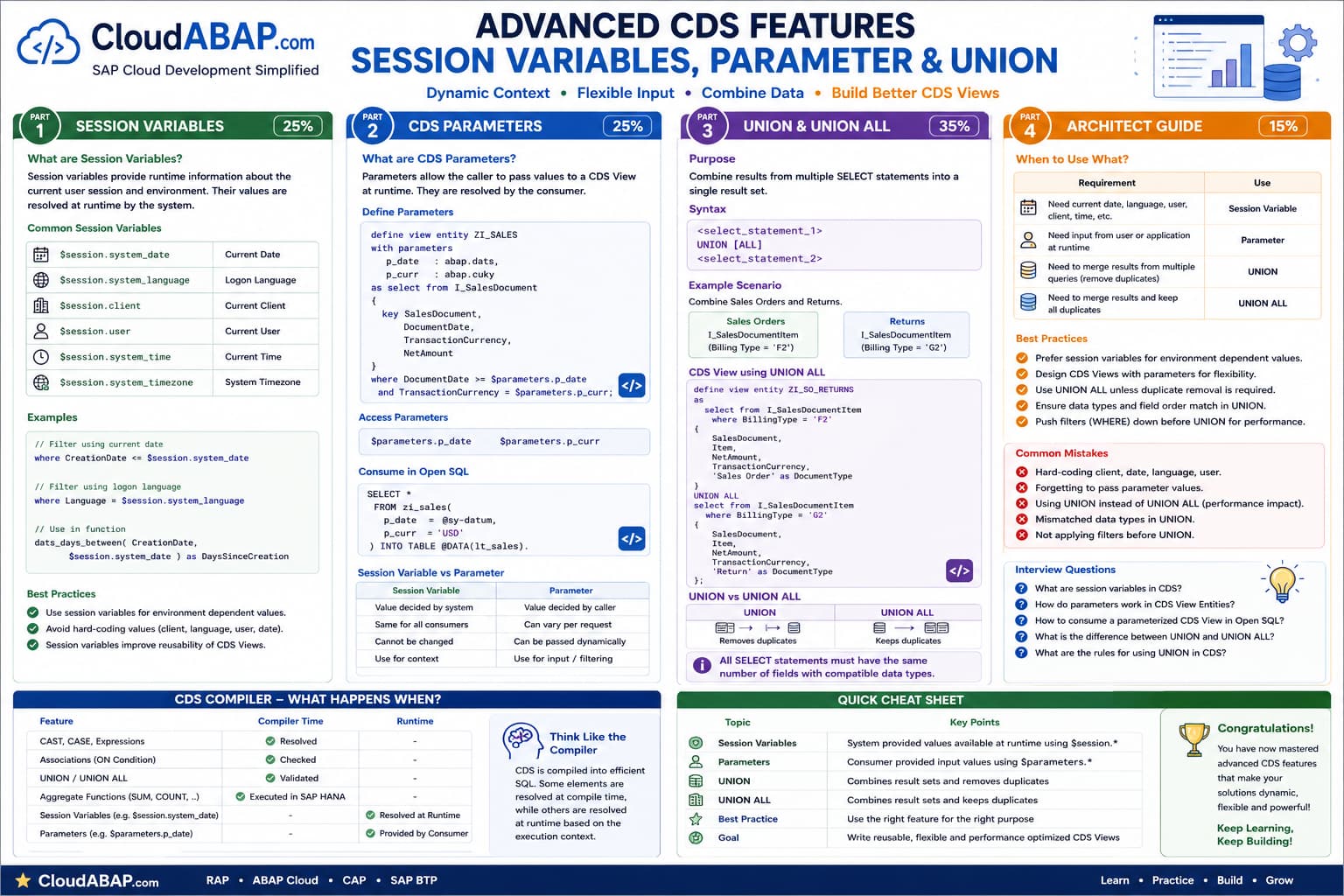
Why Do Session Variables Exist?
Imagine you want your CDS View to always return data based on today's date, the current logon language or the current client.
Should these values be hard-coded?
Absolutely not.
Every user logs into the SAP system with a different runtime context.
Instead of hard-coding these values, SAP provides Session Variables.
Session Variables provide information about the current SAP session at runtime.
Common Session Variables
| Session Variable | Description |
|---|---|
| $session.system_date | Current system date. |
| $session.system_time | Current system time. |
| $session.system_language | Current logon language. |
| $session.client | Current client. |
| $session.user | Current business user. |
Example 1 — Current Date
A common requirement is to display only documents created up to the current date.
define view entity ZI_SALES

  as select from I_SalesDocument
{
    key SalesDocument,

    CreationDate
}
where

    CreationDate <= $session.system_date;
Every time this CDS View is executed, the system automatically substitutes $session.system_date with the current date.
Example 2 — Current Language
Text tables usually contain multiple languages.
Instead of hard-coding a language, use the current logon language.
where

Language = $session.system_language
If the user logs on in English, English texts are returned.
If another user logs on in German, German texts are returned without changing the CDS View.
Example 3 — Date Functions
Session Variables can also be passed directly to built-in functions.
dats_days_between(

    CreationDate,

    $session.system_date

) as DaysSinceCreation
The function calculates the number of days between the document's creation date and today's date.
INSIDE THE CDS COMPILER
Runtime Evaluation
💭 Compiler Thought Process
Unlike literals, session variables are not fixed values. Their contents are determined only when the CDS View is executed.
Compiler Decision Flow
Compile the CDS View.
Detect the session variable.
Wait until execution.
Read the current session context.
Replace the variable with the runtime value.
✅ Final Compiler Decision
Session Variables are resolved at runtime, not during CDS compilation.
⚡ SQL Optimization Insight
Use Session Variables whenever a value depends on the current SAP session instead of hard-coding constants.
Architect Perspective
Session Variables make CDS Views reusable.Instead of creating separate CDS Views for different dates, languages or clients, a single CDS View adapts automatically to the current runtime context.
This is one of the key principles behind SAP's Virtual Data Model and ABAP Cloud development.
Deep Dive into Common Session Variables
Although Session Variables look like ordinary fields, they are special runtime variables provided by the ABAP runtime environment.
Every execution of a CDS View may produce different results depending on the current user's session.
| Variable | Typical Usage |
|---|---|
| $session.system_date | Current business date. |
| $session.system_time | Current system time. |
| $session.system_language | Language-dependent text selection. |
| $session.client | Client-dependent data. |
| $session.user | Current logged-on business user. |
Example — Current Client
Most SAP tables are client-dependent.
If required, the current client can be referenced using the session variable.
where

Client = $session.client
During execution, the runtime automatically substitutes the current client value.
Example — Current User
Some business scenarios require filtering records that belong to the current user.
where

CreatedByUser = $session.user
This allows a single CDS View to behave differently for different users without any code changes.
Session Variables Are Evaluated at Runtime
Consider the following CDS View.
where

CreationDate <= $session.system_date
Suppose today is:
15-Jul-2026Internally, the runtime evaluates the expression as if it were:
CreationDate <= '20260715'Tomorrow, the same CDS View automatically behaves as:
CreationDate <= '20260716'No transport or code modification is required.
INSIDE THE CDS COMPILER
How the Runtime Handles Session Variables
💭 Compiler Thought Process
The compiler stores the reference to the Session Variable but cannot determine its value during activation.
Compiler Decision Flow
Compile the CDS View.
Leave the Session Variable unresolved.
Wait for execution.
Read the current SAP session.
Replace the Session Variable with the runtime value.
Execute the SQL statement.
✅ Final Compiler Decision
Session Variables are resolved dynamically every time the CDS View executes.
⚡ SQL Optimization Insight
Because Session Variables are evaluated by the runtime, the same CDS View can be reused across users, clients and languages.
Hard-coded Value vs Session Variable
| Hard-coded Value | Session Variable |
|---|---|
| Fixed after transport. | Changes automatically at runtime. |
| Difficult to maintain. | Dynamic and reusable. |
| Environment-specific. | Works across all systems. |
| Requires code changes. | No code changes required. |
Best Practices
❌ Common Mistakes
- Do not hard-code today's date when $session.system_date can be used.
- Use $session.system_language for language-dependent texts.
- Avoid creating multiple CDS Views for different clients or users.
- Remember that Session Variables are evaluated at runtime, not during activation.
- Prefer Session Variables whenever the value depends on the current SAP session.
Architect Perspective
Session Variables are one of the reasons CDS Views remain highly reusable.A single CDS View can automatically adapt to different users, languages, clients and dates without requiring multiple copies of the same logic.
This aligns perfectly with SAP's Virtual Data Model (VDM) philosophy and is considered a best practice in ABAP Cloud development.
CDS Parameters
Session Variables are provided automatically by the SAP runtime.
But sometimes the runtime doesn't know what value should be used.
For example:
- Show Sales Orders for a specific date.
- Show Billing Documents for a particular Company Code.
- Show Purchase Orders for a selected Plant.
These values must be supplied by the application executing the CDS View.
CDS Parameters allow the caller to provide values at runtime.
Defining Parameters
define view entity ZI_SALES

with parameters

    p_creation_date : abap.dats

as select from I_SalesDocument
{
    key SalesDocument,

    CreationDate,

    SoldToParty
}
where

    CreationDate >= $parameters.p_creation_date;
The CDS View now expects a value for p_creation_date whenever it is executed.
Accessing Parameters
Parameters are accessed using the $parameters namespace.
$parameters.p_creation_dateUnlike Session Variables, parameters do not have predefined values.
The caller is responsible for supplying them.
Passing Parameters from Open SQL
SELECT *

FROM ZI_SALES(

    p_creation_date = @sy-datum

)

INTO TABLE @DATA(lt_sales).
During execution, Open SQL passes the value of sy-datum to the CDS parameter.
Session Variables vs Parameters
| Session Variable | CDS Parameter |
|---|---|
| Runtime provides the value. | Caller provides the value. |
| Always available. | Mandatory during execution. |
| Current Date, User, Client, Language. | Business-specific input values. |
| Read-only. | Defined by the CDS developer. |
When Should You Use Parameters?
| Requirement | Recommended Approach |
|---|---|
| Current Date | $session.system_date |
| Current User | $session.user |
| Company Code selected by user | CDS Parameter |
| Plant selected on selection screen | CDS Parameter |
INSIDE THE CDS COMPILER
How Parameters Work
💭 Compiler Thought Process
Unlike Session Variables, parameters have no value until the caller supplies one.
Compiler Decision Flow
Compile the CDS View.
Define the parameter metadata.
Wait for execution.
Receive parameter values from the caller.
Execute the SQL statement using those values.
✅ Final Compiler Decision
Parameters make a CDS View reusable by allowing callers to control its behavior.
⚡ SQL Optimization Insight
Use parameters for business-specific filters instead of creating multiple CDS Views with hard-coded conditions.
Architect Perspective
A simple rule to remember is:Session Variables describe the current SAP environment.
Parameters describe what the caller wants.
If the value depends on the logged-on user, current date, client or language, use a Session Variable.
If the value depends on business input from an application or report, define a CDS Parameter.
Combining Data Using UNION
So far, every CDS View in this tutorial has selected data from a single source.
But real business scenarios often require combining records from multiple data sources into a single result set.
This is where UNION and UNION ALL become useful.
UNION combines the result of multiple SELECT statements into a single result set.
UNION vs UNION ALL
| UNION | UNION ALL |
|---|---|
| Removes duplicate rows. | Keeps duplicate rows. |
| Additional duplicate elimination step. | Better performance. |
| Use only when duplicates must be removed. | Preferred when duplicates are expected. |
Example
define view entity ZI_BUSINESS_PARTNERS

as

select from I_Customer
{
    key Customer     as BusinessPartner,
        CustomerName as Name
}

union all

select from I_Supplier
{
    key Supplier     as BusinessPartner,
        SupplierName as Name
}
The result contains both Customers and Suppliers in a single CDS View.
Rules for Using UNION
- Both SELECT statements must return the same number of columns.
- Columns must appear in the same order.
- Data types must be compatible.
- Field semantics should match.
- Use CAST when compatible data types cannot be inferred automatically.
INSIDE THE CDS COMPILER
How UNION Works
💭 Compiler Thought Process
The compiler validates that every SELECT statement returns a compatible structure before combining the results.
Compiler Decision Flow
Compile the first SELECT.
Compile the second SELECT.
Validate column count.
Validate compatible data types.
Execute both queries.
Combine the results.
Remove duplicates only when UNION is used.
✅ Final Compiler Decision
UNION combines compatible result sets into a single virtual table.
⚡ SQL Optimization Insight
Prefer UNION ALL unless duplicate elimination is a business requirement.
Choosing the Right Feature
| Requirement | Recommended Feature |
|---|---|
| Current Date | $session.system_date |
| Current Language | $session.system_language |
| User input | CDS Parameters |
| Merge multiple result sets | UNION / UNION ALL |
| Remove duplicates | UNION |
| Keep duplicates | UNION ALL |
CDS Compiler Quick Reference
| Feature | Resolved At |
|---|---|
| CAST | Compile Time |
| CASE | Compile Time |
| Associations | Compile Time |
| Session Variables | Runtime |
| CDS Parameters | Runtime |
| UNION | Compile Time Validation + Runtime Execution |
| Aggregate Functions | SAP HANA Database Engine |
Architect Perspective
You have now covered the complete foundation of ABAP CDS View Entities.From creating your first CDS View to advanced topics such as Associations, Aggregations, Session Variables, Parameters and UNION, you now understand how the CDS compiler thinks and how SAP HANA executes your models.
These concepts form the foundation for RAP Business Objects, Fiori Elements, Analytical Queries and ABAP Cloud development.
💡 Key Takeaway
Use Session Variables when values come from the current SAP runtime, Parameters when values are supplied by the caller, and UNION / UNION ALL when combining compatible result sets.
Always think about how the CDS compiler validates your model and how SAP HANA executes it. Building this mental model will help you design scalable, reusable and cloud-ready CDS View Entities.
Congratulations 🎉
You've Completed the CDS View Entity Learning Path
You now have a solid understanding of:
- CDS View Entity Fundamentals
- Annotations
- Built-in Data Types
- CAST & CASE Expressions
- String, Numeric, Date & Conversion Functions
- Associations & Cardinality
- Aggregate Functions
- GROUP BY & HAVING
- Session Variables
- CDS Parameters
- UNION & UNION ALL
You are now ready to build advanced RAP Business Objects and enterprise-grade applications on SAP S/4HANA Public Cloud using ABAP Cloud.