Introduction
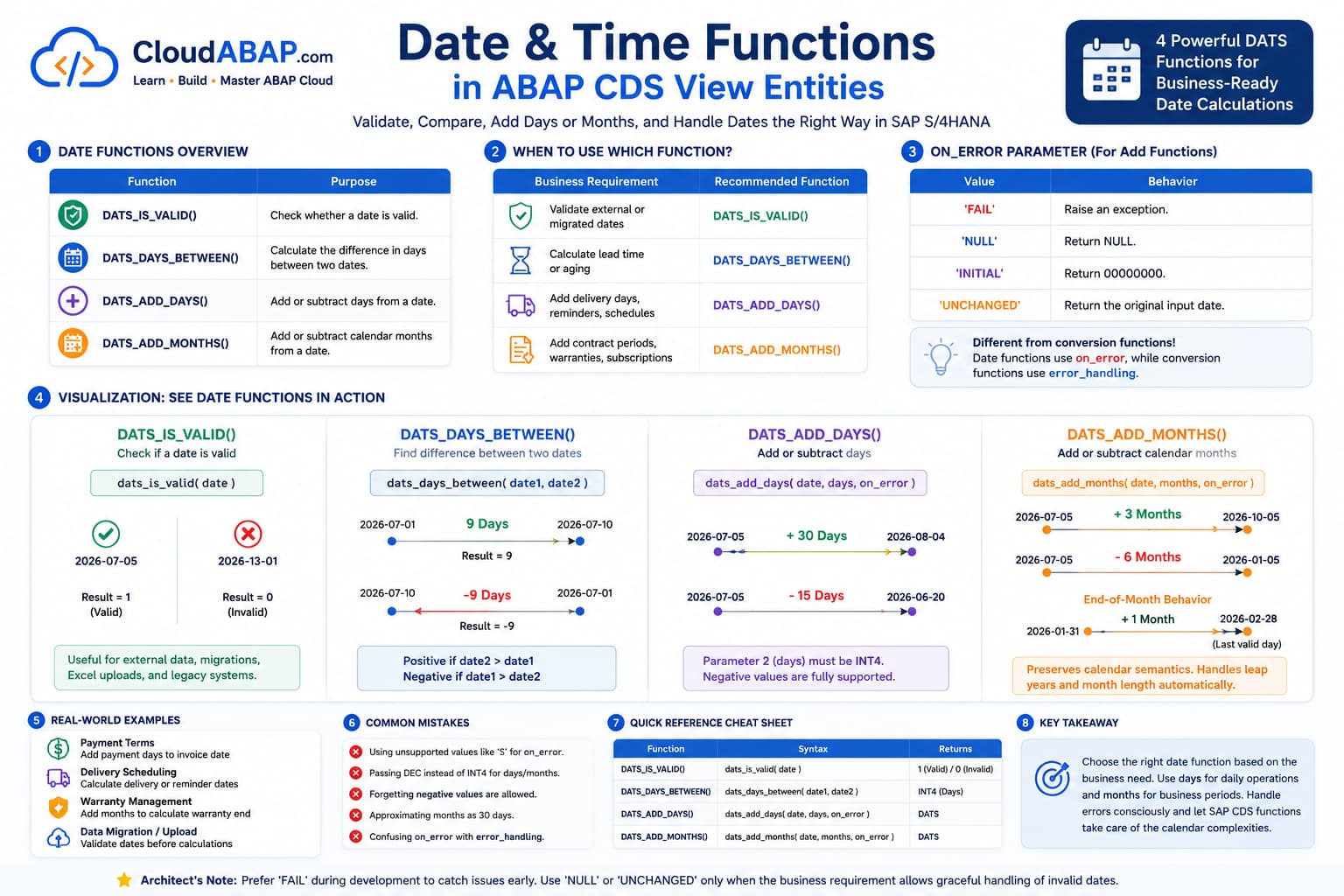
Almost every SAP application works with dates. Whether you're calculating payment due dates, delivery schedules, contract periods, warranty expiration dates, or reporting lead times, date arithmetic is part of everyday ABAP Cloud development.
ABAP CDS provides a small but powerful set of built-in date functions that execute directly in SAP HANA, allowing calculations to be performed without transferring data to the ABAP application server.
Although there are only four dedicated DATS functions, understanding when to use each one—and how they behave—is essential for building production-ready CDS View Entities.
Architect Perspective
Date calculations should always follow business semantics.For example, adding one month is not the same as adding thirty days. SAP's built-in date functions automatically handle leap years, different month lengths, and calendar rules.
Functions Covered in This Lesson
| Function | Purpose |
|---|---|
| DATS_IS_VALID() | Check whether a date is valid. |
| DATS_DAYS_BETWEEN() | Calculate the difference between two dates. |
| DATS_ADD_DAYS() | Add or subtract days. |
| DATS_ADD_MONTHS() | Add or subtract months. |
DATS_IS_VALID()
The DATS_IS_VALID() function verifies whether a value represents a valid SAP DATS value.
dats_is_valid( date )DATS_IS_VALID() Parameters
The following table describes all supported parameters for this function.
| Parameter | Required | Type | Default | Description | Example |
|---|---|---|---|---|---|
date | Required | DATS | — | Date to validate. | CreationDate |
| Input | Result |
|---|---|
| 20260705 | 1 |
| 20261301 | 0 |
| 20260229 | 0 (Not Leap Year) |
| 00000000 | 0 |
When Should You Use DATS_IS_VALID()?
Many developers ask:
If SAP already stores dates as DATS,
why do we even need DATS_IS_VALID()?
The answer depends on the source of the data.
For standard SAP interface views such as I_SalesDocument, I_BillingDocument, or I_PurchaseOrder, SAP guarantees that DATS fields are valid.
Therefore, calling DATS_IS_VALID() on these fields will almost always return 1.
Architect Perspective
In modern S/4HANA Public Cloud development, DATS_IS_VALID() is rarely required for SAP-managed business objects.Its real value appears when working with data that originates outside the SAP application.
Real-World Scenarios
Real Project Example: Data Migration
Real Project Example: Excel Upload
Real Project Example: External APIs
Real Project Example: Legacy Z Tables
Practical Example
case

    when dats_is_valid(
            DeliveryDate
         ) = 1

    then dats_days_between(

            CreationDate,

            DeliveryDate

         )

    else null

end as DeliveryLeadTime
Instead of raising runtime errors for invalid dates, the CDS View safely skips invalid records.
DATS_DAYS_BETWEEN()
The DATS_DAYS_BETWEEN() function calculates the number of days between two dates.
dats_days_between(

    date1,

    date2

)DATS_DAYS_BETWEEN() Parameters
The following table describes all supported parameters for this function.
| Parameter | Required | Type | Default | Description | Example |
|---|---|---|---|---|---|
date1 | Required | DATS | — | Starting date. | CreationDate |
date2 | Required | DATS | — | Ending date. | BillingDate |
Example
dats_days_between(

    CreationDate,

    BillingDate

) as LeadTime| Creation Date | Billing Date | Result |
|---|---|---|
| 20260701 | 20260710 | 9 |
| 20260710 | 20260701 | -9 |
💡 SAP Best Practice
Avoid wrapping DATS_DAYS_BETWEEN() with ABS() unless the business explicitly requires an unsigned difference.
DATS_ADD_DAYS()
The DATS_ADD_DAYS() function adds or subtracts a specified number of days from a date and returns the calculated result.
This function is commonly used for delivery schedules, payment due dates, shipment planning, reminder notifications, and logistics applications.
dats_add_days(

    date,

    days,

    on_error

)DATS_ADD_DAYS() Parameters
The following table describes all supported parameters for this function.
| Parameter | Required | Type | Default | Description | Example |
|---|---|---|---|---|---|
date | Required | DATS | — | Input date. | CreationDate |
days | Required | INT4 | — | Number of days to add or subtract. | 30 |
on_error | Required | CHAR | — | Determines how invalid dates are handled. | 'FAIL' |
Adding Days
dats_add_days(

    CreationDate,

    30,

    'FAIL'

) as DueDate| Creation Date | Days | Result |
|---|---|---|
| 20260705 | 30 | 20260804 |
Subtracting Days
Negative values are fully supported.
dats_add_days(

    CreationDate,

    -15,

    'FAIL'

) as ReminderDate| Creation Date | Days | Result |
|---|---|---|
| 20260705 | -15 | 20260620 |
Real Project Example: Delivery Reminder
DATS_ADD_MONTHS()
The DATS_ADD_MONTHS() function adds or subtracts complete calendar months rather than a fixed number of days.
dats_add_months(

    date,

    months,

    on_error

)DATS_ADD_MONTHS() Parameters
The following table describes all supported parameters for this function.
| Parameter | Required | Type | Default | Description | Example |
|---|---|---|---|---|---|
date | Required | DATS | — | Input date. | CreationDate |
months | Required | INT4 | — | Number of calendar months to add or subtract. | 3 |
on_error | Required | CHAR | — | Determines how invalid dates are handled. | 'FAIL' |
Example
dats_add_months(

    CreationDate,

    3,

    'FAIL'

) as WarrantyEndDate| Creation Date | Months | Result |
|---|---|---|
| 20260705 | +3 | 20261005 |
| 20260705 | -6 | 20260105 |
End-of-Month Behavior
One of the biggest advantages of DATS_ADD_MONTHS() is that it preserves calendar semantics.
31-Jan-2026

+ 1 Month

↓

28-Feb-2026
Since February does not contain a 31st day, SAP automatically returns the last valid day of the month.
Architect Perspective
This is why business applications should use DATS_ADD_MONTHS() instead of approximating a month as thirty days.Understanding the on_error Parameter
Unlike CURRENCY_CONVERSION(), which uses the error_handling parameter, date functions use the on_error parameter.
Although both control error handling, the supported values are completely different.
| Value | Behavior |
|---|---|
| 'FAIL' | Raise an exception. |
| 'NULL' | Return NULL. |
| 'INITIAL' | Return 00000000. |
| 'UNCHANGED' | Return the original input date. |
A Common Developer Mistake
dats_add_days(

    CreationDate,

    30,

    'S'

)Literal of parameter 3 has unallowed value 'S'Many developers assume that the third parameter behaves like the conversion functions.
However, date functions accept only the following literals:
'FAIL'
'NULL'
'INITIAL'
'UNCHANGED'
Complete Practice Example
@AccessControl.authorizationCheck: #NOT_REQUIRED
@EndUserText.label: 'Practice: Date Functions'

define view entity ZI_DATE_FUNC_PRAC
  as select from I_SalesDocument
{
    key SalesDocument,

    CreationDate,

    dats_is_valid(
        CreationDate
    ) as IsValid,

    dats_days_between(
        CreationDate,
        $session.system_date
    ) as DaysBetween,

    dats_add_days(
        CreationDate,
        30,
        'FAIL'
    ) as Plus30Days,

    dats_add_days(
        CreationDate,
        -15,
        'FAIL'
    ) as Minus15Days,

    dats_add_months(
        CreationDate,
        3,
        'FAIL'
    ) as Plus3Months,

    dats_add_months(
        CreationDate,
        -6,
        'FAIL'
    ) as Minus6Months

}
💡 SAP Best Practice
Use DATS_ADD_MONTHS() for business periods such as contracts, subscriptions, warranties, payment terms, and financial periods where calendar semantics matter.
❌ Common Mistakes
- Using 'S' or other unsupported values for the on_error parameter.
- Passing DEC instead of INT4 for the days or months parameter.
- Assuming negative values are not supported.
- Approximating one month as thirty days instead of using DATS_ADD_MONTHS().
- Confusing the on_error parameter with the error_handling parameter used by conversion functions.
Which Date Function Should You Use?
Each date function serves a different purpose. Choosing the correct function depends on the business requirement rather than personal preference.
| Business Requirement | Recommended Function | Reason |
|---|---|---|
| Validate external dates | DATS_IS_VALID() | Detect invalid dates before calculations. |
| Calculate lead time | DATS_DAYS_BETWEEN() | Returns the exact difference in days. |
| Add delivery days | DATS_ADD_DAYS() | Business requirement is expressed in days. |
| Add contract or warranty period | DATS_ADD_MONTHS() | Preserves calendar semantics. |
Real SAP Business Scenarios
Real Project Example: Payment Terms
Real Project Example: Warranty Management
Real Project Example: Delivery Performance
Real Project Example: Data Migration
Architect Best Practices
💡 SAP Best Practice
- Use DATS_ADD_MONTHS() for contracts, subscriptions, warranties, and payment periods instead of adding thirty days.
- Use DATS_ADD_DAYS() for logistics, shipping, production planning, reminders, and delivery scheduling.
- During development, prefer 'FAIL' so invalid dates are detected early.
- Use 'NULL' or 'UNCHANGED' only when the business requirement explicitly allows graceful error handling.
- Validate imported or migrated dates using DATS_IS_VALID() before performing calculations.
- Remember that DATS_DAYS_BETWEEN() returns negative values when the first date is later than the second.
- Never assume one month equals thirty days. Calendar months vary in length, and SAP automatically handles leap years and end-of-month adjustments.
Interview Questions
What are the built-in DATS functions available in ABAP CDS?
Answer: DATS_IS_VALID(), DATS_DAYS_BETWEEN(), DATS_ADD_DAYS(), and DATS_ADD_MONTHS().
Why is DATS_IS_VALID() rarely required on standard interface views such as I_SalesDocument?
Answer: Because SAP-managed business objects already guarantee valid DATS values. It is mainly useful for external integrations, migration programs, staging tables, and legacy systems.
Can DATS_ADD_DAYS() accept negative values?
Answer: Yes. Negative values subtract days from the supplied date.
Why should DATS_ADD_MONTHS() be preferred over adding 30 days?
Answer: Because months have different lengths. DATS_ADD_MONTHS() preserves calendar semantics and automatically handles leap years and end-of-month dates.
What is the difference between the error_handling parameter of CURRENCY_CONVERSION() and the on_error parameter of DATS_ADD_DAYS()?
Answer: CURRENCY_CONVERSION() uses FAIL_ON_ERROR, SET_TO_NULL, and KEEP_UNCONVERTED, whereas DATS_ADD_DAYS() uses FAIL, NULL, INITIAL, and UNCHANGED. Although both control error handling, they support different literals.
Date Functions Cheat Sheet
4 Functions • Date Validation • Date Arithmetic • SAP HANA Pushdown
Quick reference for the built-in DATS functions available in ABAP CDS View Entities.
| Function | Syntax | Purpose |
|---|---|---|
| DATS_IS_VALID() | dats_is_valid(date) | Validate a DATS value. |
| DATS_DAYS_BETWEEN() | dats_days_between(date1, date2) | Calculate the difference in days. |
| DATS_ADD_DAYS() | dats_add_days(date, days, on_error) | Add or subtract days. |
| DATS_ADD_MONTHS() | dats_add_months(date, months, on_error) | Add or subtract calendar months. |
Error Handling Reference
| Value | Behavior |
|---|---|
| 'FAIL' | Raise an exception. |
| 'NULL' | Return NULL. |
| 'INITIAL' | Return 00000000. |
| 'UNCHANGED' | Return the original input date. |
💡 Key Takeaway
Although ABAP CDS provides only four dedicated date functions, they cover the majority of business scenarios encountered in SAP applications. Understanding when to validate dates, calculate date differences, add days, or add calendar months is an essential skill for every ABAP Cloud developer.
Always select the function that matches the business requirement rather than approximating date calculations manually. SAP's built-in functions preserve calendar semantics, execute directly in SAP HANA, and produce reliable, production-ready results.
Watch the Complete ADT Walkthrough
In the accompanying video, we'll implement all four date functions in Eclipse ADT, examine their behavior with positive and negative values, explore end-of-month calculations, and demonstrate the different on_error handling strategies in real SAP scenarios.