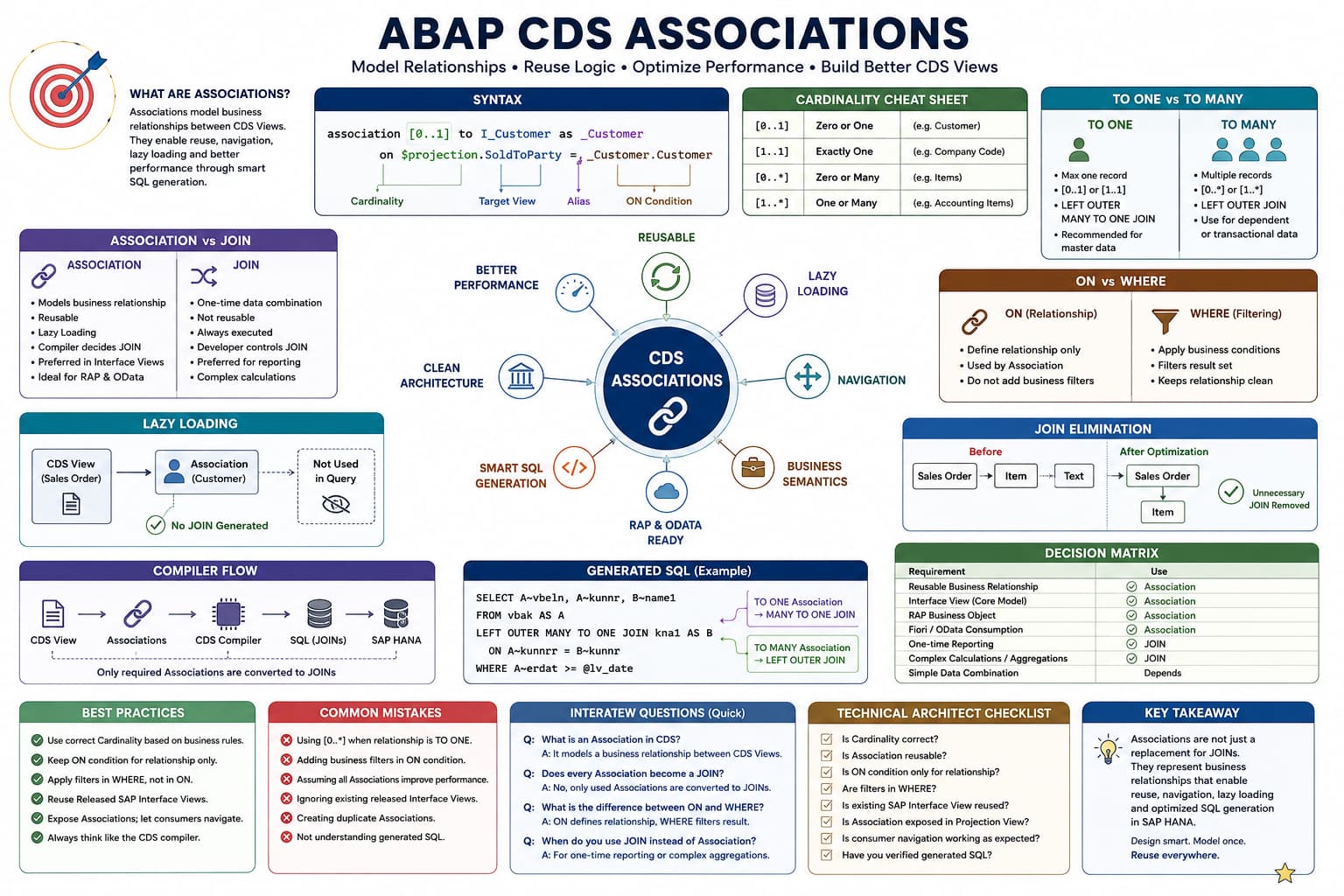
Association Masterclass
Lesson 5 of 15 – Association Cardinality
Until now, we've learned how to create Associations, navigate them, and understand when the CDS compiler generates SQL JOINs.
In this lesson, we'll answer one of the most misunderstood questions in ABAP CDS:
Why do we need Cardinality if the ON condition already defines the relationship?
Understanding the answer separates developers who merely write CDS Views from architects who design reusable Virtual Data Models.
Learning Objectives
By the end of this lesson you will be able to:
- Understand why Cardinality exists.
- Explain the business meaning of Cardinality.
- Understand how Cardinality influences the CDS compiler.
- Choose the correct Cardinality for real business scenarios.
- Prepare for TO ONE and TO MANY behavior.
Prerequisites
- Lessons 1–4 of this Association Masterclass.
- Understanding of Association Navigation.
- Basic knowledge of SQL JOINs.
Introduction
Whenever developers begin learning Associations, one of the first things they notice is the strange notation placed immediately after the association keyword.
association [0..1]

association [1..1]

association [0..*]

association [1..*]
Many developers simply memorize these values without understanding why they exist.
Unfortunately, this leads to incorrect Associations, unexpected query results, poor performance, and confusing compiler behavior.
Cardinality is much more than documentation. It tells both the developer and the CDS compiler what kind of relationship exists between two business objects.
Architect Perspective
Never think of Cardinality as syntax.Think of it as a business rule.
You're describing how many target business objects may exist for each source business object—not how SQL should behave.
Why Does Cardinality Exist?
Imagine two business objects:
Sales Order

↓

Customer
Ask yourself one question:
For one Sales Order, how many Customers can exist?
The answer is obvious.
One Sales Order belongs to exactly one Sold-To Customer.
Therefore, the business relationship itself already contains Cardinality.
CDS simply requires us to describe that business relationship explicitly.
Cardinality Represents Business Relationships
Cardinality does not describe SQL.
Cardinality describes reality.
| Business Relationship | Typical Cardinality |
|---|---|
| Sales Order → Customer | 0..1 |
| Sales Order → Company Code | 1..1 |
| Sales Order → Items | 0..* |
| Customer → Sales Orders | 0..* |
Notice that these values come from the business process—not from SQL.
Cardinality Is a Promise to the Compiler
When you specify a Cardinality, you're making a promise to the CDS compiler.
association [0..1] to I_Customer as _CustomerYou're effectively saying:
For every record of the current business object, there will never be more than one matching Customer.
The compiler can use this knowledge while validating navigation, optimizing generated SQL and enforcing Association semantics.
INSIDE THE CDS COMPILER
Reading Cardinality
💭 Compiler Thought Process
The developer declared that every source record has at most one matching target record.
Compiler Decision Flow
Read the Association definition.
Read the declared Cardinality.
Treat Cardinality as metadata describing the relationship.
Use this metadata during navigation validation.
Use it later while generating SQL.
Continue compiling the CDS View.
✅ Final Compiler Decision
Cardinality becomes part of the Association metadata and influences compiler decisions in later stages.
⚡ SQL Optimization Insight
The compiler trusts the Cardinality you declare. Incorrect Cardinality may lead to incorrect assumptions and unexpected behavior.
Understanding the Four Cardinalities
ABAP CDS supports four commonly used cardinalities. Each one describes a different type of business relationship between the source and target business objects.
| Cardinality | Business Meaning | Typical Example |
|---|---|---|
| [0..1] | Zero or one matching record. | Sales Order → Customer |
| [1..1] | Exactly one matching record. | Company Code → Currency |
| [0..*] | Zero, one or many matching records. | Sales Order → Items |
| [1..*] | One or more matching records. | Billing Document → Accounting Entries |
Choosing the Correct Cardinality
Selecting the correct Cardinality should always begin with the business process—not with the database design.
Sales Order

↓

Customer
Every Sales Order belongs to one Sold-To Customer.
association [0..1] to I_Customer as _CustomerSales Order
↓
Sales Order ItemsA Sales Order may contain multiple items.
association [0..*] to I_SalesDocumentItem as _ItemWhy TO MANY Associations Behave Differently
Associations that point to multiple records introduce additional complexity because the compiler can no longer assume that navigation returns a single record.
Consider the following Association:
association [0..*] to I_SalesDocumentItem as _ItemOne Sales Order may have one item, ten items or hundreds of items. Since multiple target records are possible, the compiler must treat this Association differently from a [0..1] Association.
Architect Perspective
This is one of the reasons many TO MANY Associations have restrictions when used in path expressions, filters and WHERE clauses.We'll study those restrictions in dedicated lessons later in this series.
Real SAP Examples
| Source CDS View | Target CDS View | Typical Cardinality |
|---|---|---|
| I_SalesDocument | I_Customer | [0..1] |
| I_SalesDocument | I_SalesDocumentItem | [0..*] |
| I_BillingDocument | I_Customer | [0..1] |
Real Project Example: Sales Order and Items
Sales Order 5000001234 may contain:
• Item 10
• Item 20
• Item 30
• Item 40
Since multiple items belong to the same Sales Order, the relationship must be modeled as [0..*].
On the other hand, the same Sales Order usually has only one Sold-To Customer, making [0..1] the correct choice for the Customer Association.
Architect Perspective
Technical Architect InsightIncorrect Cardinality is one of the most common design mistakes in custom CDS Views.
Never choose Cardinality simply because it "works."
Choose the Cardinality that accurately represents the business relationship. The CDS compiler and future consumers rely on this information when validating navigation and optimizing generated SQL.
💡 SAP Best Practice
"For one source business object, how many target business objects can exist?"
Let the business answer determine the Cardinality—not the technical implementation.
❌ Common Mistakes
- Memorizing Cardinality values without understanding the business relationship.
- Using [0..*] for every Association.
- Choosing Cardinality based on database tables instead of business semantics.
- Assuming Cardinality affects only documentation.
What does Cardinality represent in an Association?
Answer: Cardinality describes the business relationship between the source and target business objects by specifying how many target records may exist for each source record.
Does Cardinality describe SQL behavior or business relationships?
Answer: Cardinality primarily describes the business relationship. The CDS compiler then uses this metadata when validating Associations and generating SQL.
How do you determine the correct Cardinality when designing a new Association?
Answer: Start with the business process. Ask how many target business objects can exist for one source business object. The answer determines the Cardinality, not the database implementation.
💡 Key Takeaway
Cardinality is not just syntax—it is a declaration of the underlying business relationship.
The CDS compiler trusts the Cardinality you define and uses it during validation, navigation and SQL generation. Choosing the wrong Cardinality can lead to incorrect assumptions and unexpected runtime behavior.
In the next lesson, we'll explore how Cardinality directly influences generated SQL by comparing TO ONE and TO MANY Associations.