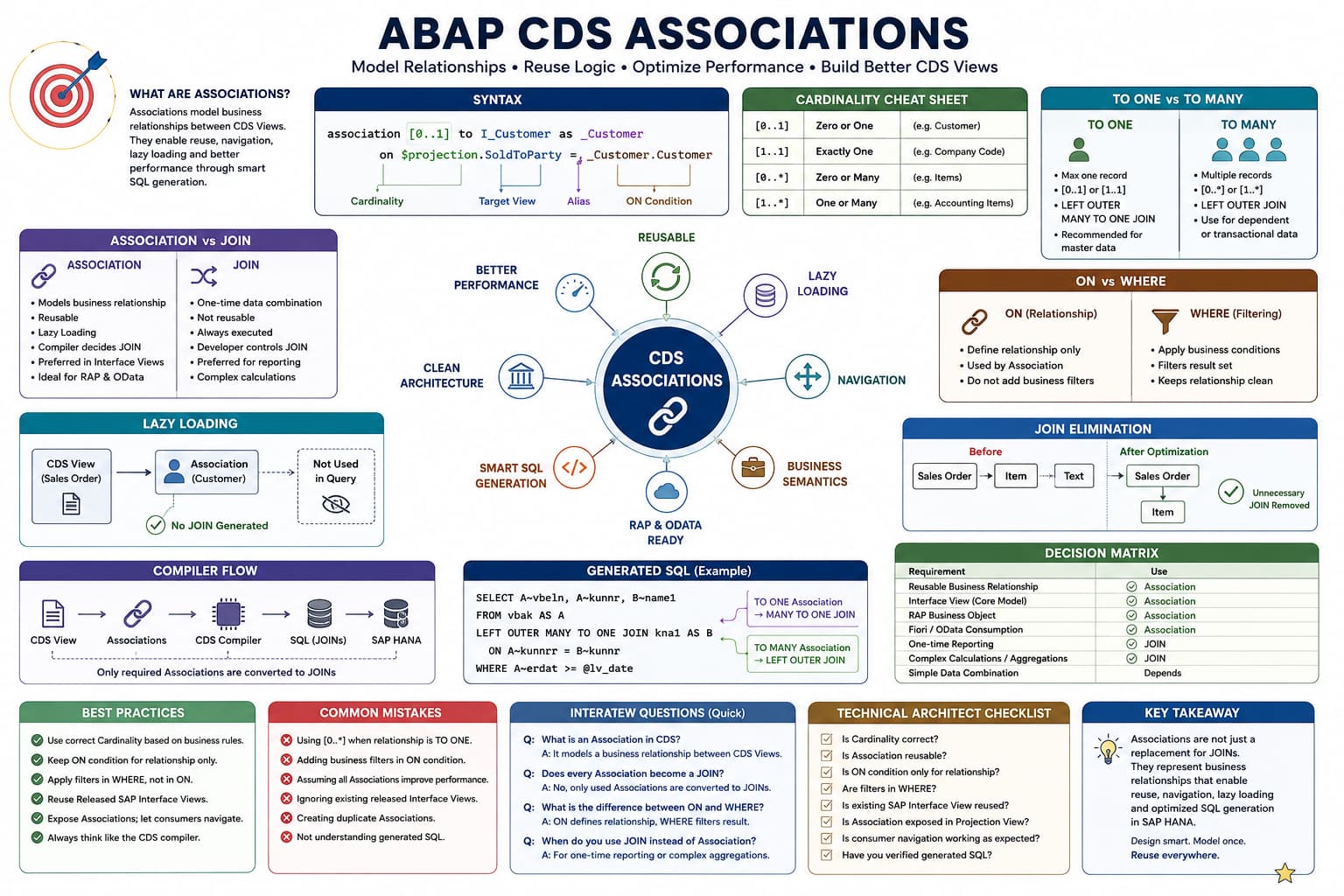
Association Masterclass
Lesson 3 of 15 – Association Navigation & Path Expressions
In the previous lesson, we created our first Association between two business objects. However, defining an Association alone does not retrieve any data from the target CDS View.
In this lesson, you'll learn how to navigate an Association using path expressions and understand why this simple syntax is one of the most powerful features of ABAP CDS.
Learning Objectives
By the end of this lesson you will be able to:
- Understand Association navigation.
- Use path expressions to retrieve related data.
- Navigate multiple fields from the same Association.
- Understand when the CDS compiler generates SQL JOINs.
- Prepare for lazy loading concepts in the next lesson.
Prerequisites
- Completion of Lesson 1 and Lesson 2.
- Understanding of basic Association syntax.
- Basic knowledge of CDS View Entities.
Introduction
Many developers believe that creating an Association automatically retrieves data from the target business object. This is one of the biggest misconceptions when learning ABAP CDS.
Remember what we learned in Lesson 2: an Association simply defines a reusable relationship between two CDS Views. Until that relationship is actually used, the target CDS View remains untouched.
So how do we tell SAP that we want data from the target business object?
The answer is Association Navigation, also known as a Path Expression.
Architect Perspective
Creating an Association does not retrieve data.Navigating an Association retrieves data.
This distinction is fundamental to understanding SAP's Virtual Data Model and is one of the most frequently asked interview questions on ABAP CDS.
What is Association Navigation?
Association Navigation means accessing fields from the target CDS View through the Association that you previously defined.
Instead of writing another SQL JOIN, you simply reference the Association alias followed by the required field.
_Customer.CustomerNameRead this expression as:
Navigate to the Customer business object and retrieve its CustomerName.
Understanding Path Expressions
A path expression consists of two parts separated by a period (.).
_Customer.CustomerName| Part | Meaning |
|---|---|
| _Customer | Association alias defined in the CDS View. |
| CustomerName | Field to retrieve from the target CDS View. |
Think of the period (.) as navigating from one business object to another.
Your First Association Navigation
In Lesson 2, we created the following Association:
association [0..1] to I_Customer as _Customer

on $projection.SoldToParty = _Customer.Customer
To retrieve the customer's name, simply navigate the Association.
define view entity ZI_SalesOrder

  as select from I_SalesDocument

  association [0..1] to I_Customer as _Customer

    on $projection.SoldToParty = _Customer.Customer

{

    key SalesDocument,

    SoldToParty,

    _Customer.CustomerName

}
Notice that no SQL JOIN has been written anywhere in the CDS View. Instead, we simply access the field through the Association alias.
Code Walkthrough
Let's understand what changed compared to the previous lesson.
_Customer.CustomerNameThis single line instructs the CDS compiler to navigate the Association and retrieve the CustomerName field from the target CDS View.
Although the syntax looks very simple, this is the exact moment where the compiler decides that the target business object is actually required.
Navigating Multiple Fields
Once an Association has been defined, you are not limited to retrieving a single field. You can navigate the same Association multiple times to access any fields exposed by the target CDS View.
{

    key SalesDocument,

    SoldToParty,

    _Customer.CustomerName,

    _Customer.Country,

    _Customer.CityName

}
Although three fields are retrieved from the Customer business object, you still write only one Association. The CDS compiler determines the SQL required to retrieve all requested fields.
Association Defined vs Association Navigated
The following examples demonstrate the difference between defining an Association and actually using it.
{

    key SalesDocument,

    SoldToParty

}
The Association exists, but no fields are accessed.
{

    key SalesDocument,

    SoldToParty,

    _Customer.CustomerName

}
By requesting _Customer.CustomerName, the Association is navigated and customer information becomes part of the query result.
Can Associations Be Navigated Multiple Times?
Yes. A single Association can be reused as many times as required within the same CDS View.
_Customer.CustomerName,

_Customer.Country,

_Customer.CityName,

_Customer.PostalCode
This is one of the major advantages of Associations over repeatedly writing SQL JOIN logic. The relationship is defined once and reused whenever required.
INSIDE THE CDS COMPILER
Association Navigation
💭 Compiler Thought Process
The CDS compiler has detected that a field from the target Association has been requested.
Compiler Decision Flow
Read the Association definition.
Validate the ON condition.
Detect the path expression (_Customer.CustomerName).
Determine that data from I_Customer is required.
Generate the required SQL JOIN.
Return the requested CustomerName field.
✅ Final Compiler Decision
Generate the SQL JOIN because the Association has been navigated through a path expression.
⚡ SQL Optimization Insight
Associations are lazy. SQL is generated only when the navigation requires data from the target business object.
Real Project Example: Sales Order Overview Application
At this stage, customer master data is not required, so the Association remains unused.
Later, the business requests that the Customer Name should also appear in the report. Instead of writing a new SQL JOIN, the developer simply adds:
_Customer.CustomerNameArchitect Perspective
An Association is reusable metadata describing a business relationship.A path expression is the instruction that tells the CDS compiler to use that relationship and retrieve data from the target business object.
Understanding the difference between these two concepts is essential for mastering SAP's Virtual Data Model.
💡 SAP Best Practice
This improves readability and allows SAP HANA to execute only the SQL that is genuinely needed.
❌ Common Mistakes
- Assuming that defining an Association automatically retrieves data.
- Expecting customer fields to appear without using a path expression.
- Creating duplicate Associations instead of reusing an existing one.
- Confusing Association aliases with normal CDS elements.
What is a path expression?
Answer: A path expression navigates an Association and retrieves fields from the target CDS View using the syntax _Association.Field.
When does the CDS compiler generate a SQL JOIN for an Association?
Answer: A SQL JOIN is generated only when a path expression accesses fields from the target Association.
What is the difference between defining an Association and navigating an Association?
Answer: Defining an Association creates reusable relationship metadata between business objects. Navigating the Association through a path expression instructs the CDS compiler to generate the SQL JOIN and retrieve data from the target CDS View.
💡 Key Takeaway
Associations define relationships between business objects, while path expressions use those relationships to retrieve data.
Simply defining an Association does not generate a SQL JOIN. The JOIN is generated only when the CDS compiler detects that fields from the target business object are actually required.
In the next lesson, we'll dive deeper into this compiler behavior and explore one of the most powerful concepts in ABAP CDS— Lazy Loading.