Why Do Aggregate Functions Exist?
In business applications we rarely want to display every individual transaction.
Instead, business users usually ask questions such as:
- Total Sales Amount
- Total Number of Orders
- Average Delivery Time
- Highest Sales Order Value
- Lowest Product Price
These questions cannot be answered by returning individual rows.
They require summarizing data across multiple records. This process is known as Aggregation.
Understanding Aggregation
Suppose the Sales Order Item table contains the following data.
Sales Order    Item    Net Amount

1001           10      200

1001           20      300

1001           30      500

1002           10      150
If the business asks:
What is the total value of Sales Order 1001?
Returning individual rows is not sufficient.
The database must calculate:
Sales Order    Total Amount

1001           1000

1002           150
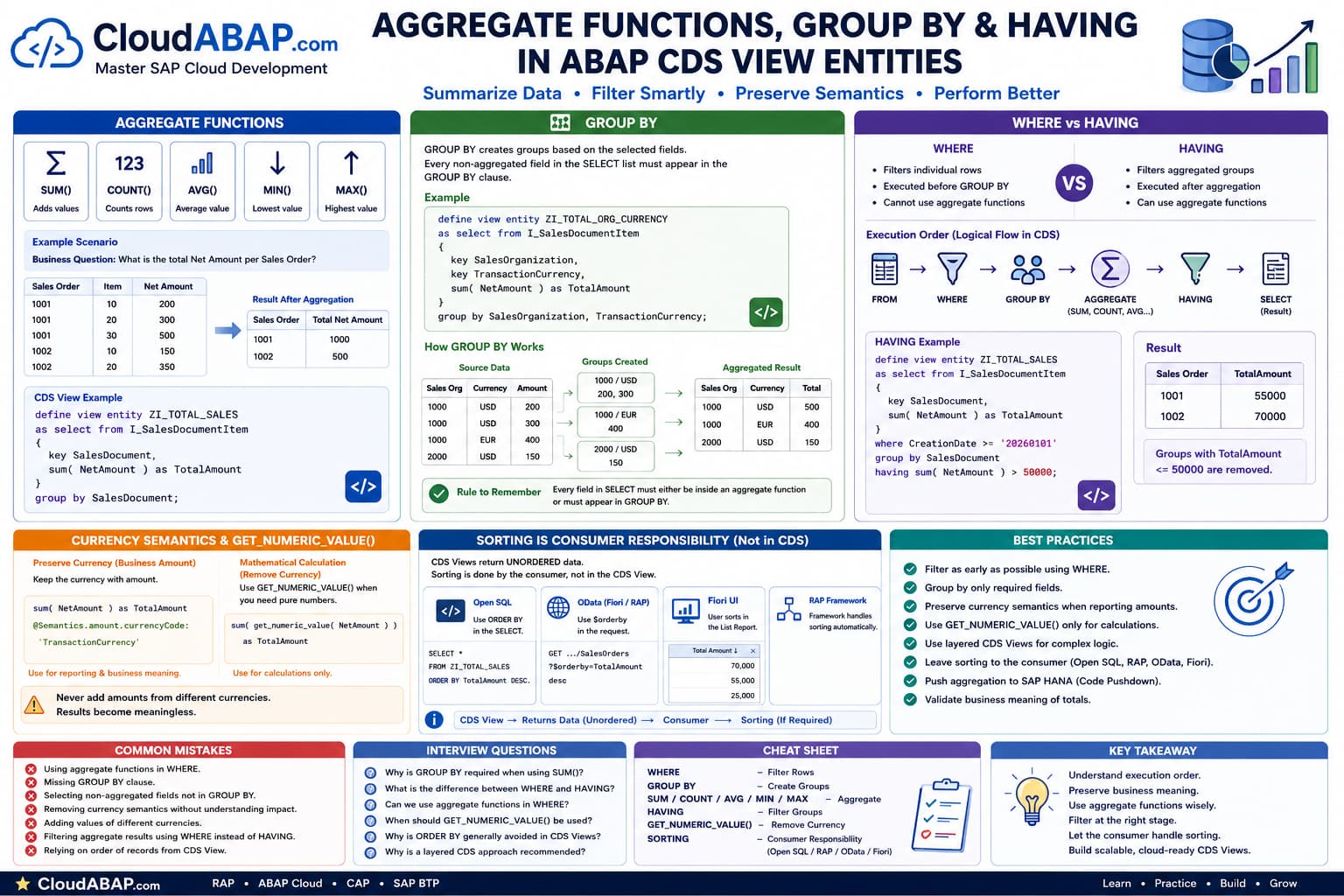
Aggregate Functions Available in ABAP CDS
| Function | Purpose | Example |
|---|---|---|
| SUM() | Adds values | Total Sales |
| COUNT() | Counts records | Number of Orders |
| AVG() | Average | Average Price |
| MIN() | Lowest Value | Lowest Discount |
| MAX() | Highest Value | Highest Revenue |
Your First Aggregate CDS View
define view entity ZI_TotalSales

  as select from I_SalesDocumentItem
{
    key SalesDocument,

    sum( NetAmount ) as TotalAmount
}
group by
    SalesDocument;
This CDS View groups all items belonging to the same Sales Document and calculates the total Net Amount.
INSIDE THE CDS COMPILER
How the Compiler Sees Aggregation
💭 Compiler Thought Process
Aggregation changes the shape of the result set. Multiple rows are combined into fewer rows based on the grouping columns.
Compiler Decision Flow
Read all source records.
Identify GROUP BY columns.
Create groups.
Apply aggregate functions (SUM, COUNT, AVG, MIN, MAX).
Return one row per group.
✅ Final Compiler Decision
Aggregation always returns fewer or equal rows than the source dataset.
⚡ SQL Optimization Insight
Aggregation is executed in SAP HANA and is highly optimized. Avoid transferring raw transactional data to ABAP when only summarized information is required.
Architect Perspective
Aggregate functions are one of the biggest reasons CDS Views exist.Instead of fetching millions of transactional records into ABAP and calculating totals manually, let SAP HANA perform the aggregation directly in the database.
This follows the Code Pushdown principle and significantly reduces network traffic and application server processing.
Understanding GROUP BY
The moment you introduce an aggregate function such as SUM(), COUNT(),AVG(), MIN() orMAX(), the database must know how the records should be grouped before performing the calculation.
This is exactly the purpose of the GROUP BY clause.
GROUP BY tells SAP HANA how to partition the source rows before calculating aggregate values.
Without GROUP BY
Consider the following data.
Sales Order    Item    Net Amount

1001           10      200

1001           20      300

1001           30      500

1002           10      150

1002           20      350
If we write:
define view entity ZI_TOTAL

  as select from I_SalesDocumentItem
{
    key SalesDocument,

    sum( NetAmount ) as TotalAmount
}
The compiler immediately raises an error.
Every non-aggregated field appearing in the SELECT list must also appear in the GROUP BY clause.
Correct GROUP BY Example
define view entity ZI_TOTAL

  as select from I_SalesDocumentItem
{
    key SalesDocument,

    sum( NetAmount ) as TotalAmount
}
group by
    SalesDocument;
Now SAP HANA creates one group for every Sales Document and calculates the total amount within each group.
How GROUP BY Creates Groups
1001    200

1001    300

1001    500

1002    150

1002    350
GROUP BY first separates the rows.
Group 1001

200

300

500

──────────

Group 1002

150

350
The aggregate function is then applied to each group individually.
Sales Order    Total

1001           1000

1002 500INSIDE THE CDS COMPILER
How GROUP BY Works
💭 Compiler Thought Process
Before any aggregate function executes, the compiler must organize the incoming rows into logical groups.
Compiler Decision Flow
Read source rows.
Identify GROUP BY columns.
Create one group for each unique combination.
Apply aggregate function to every group.
Return one row per group.
✅ Final Compiler Decision
Aggregation is impossible without knowing how rows should be grouped.
⚡ SQL Optimization Insight
Grouping is performed directly inside SAP HANA and is highly optimized for large datasets.
Multiple GROUP BY Columns
A group is not limited to a single column.
Multiple columns can be used to create more granular groups.
define view entity ZI_TOTAL

  as select from I_SalesDocumentItem
{
    key SalesOrganization,

    key TransactionCurrency,

    sum( NetAmount ) as TotalAmount
}
group by

    SalesOrganization,

    TransactionCurrency;
Here, SAP HANA creates one group for every unique combination of Sales Organization and Transaction Currency.
GROUP BY Uses Every Selected Non-Aggregated Field
This rule is one of the most important concepts in SQL and ABAP CDS.
{
    key SalesDocument,

    Material,

    sum( NetAmount ) as Total
}
group by

    SalesDocument;
The field Material appears in the SELECT list but is missing from GROUP BY.
SAP cannot determine which Material should be returned for each Sales Document because a Sales Order may contain many Materials.
group by

    SalesDocument,

    Material;
Architect Perspective
A useful rule to remember is:Every field in the SELECT list must either
• appear inside an aggregate function, or
• appear in the GROUP BY clause.
If neither condition is true, the compiler cannot determine which value should be returned.
Common GROUP BY Mistakes
| Mistake | Why It Is Wrong |
|---|---|
| Forgetting GROUP BY | Aggregate functions require grouping. |
| Missing selected fields in GROUP BY | The compiler cannot determine a unique value. |
| Adding unnecessary fields to GROUP BY | Creates too many groups and changes business results. |
WHERE vs HAVING
One of the most common questions in SQL and ABAP CDS is:
Why do we need HAVING when we already have WHERE?
The answer lies in understanding when each clause is executed.
The WHERE clause filters individual rows before any grouping or aggregation takes place, whereas the HAVING clause filters the aggregated groups after the aggregate functions have been calculated.
Execution Order
1. FROM

↓

2. WHERE

↓

3. GROUP BY

↓

4. Aggregate Functions

(SUM, COUNT, AVG...)

↓

5. HAVING

↓

6. SELECT
Understanding this execution order explains almost every rule related to aggregation in ABAP CDS.
INSIDE THE CDS COMPILER
Compiler Execution Order
💭 Compiler Thought Process
The compiler processes data step by step. It cannot filter aggregated values before those values have been calculated.
Compiler Decision Flow
Read source records.
Apply WHERE filter.
Create groups using GROUP BY.
Calculate aggregate values.
Apply HAVING filter.
Return the final result.
✅ Final Compiler Decision
WHERE works on rows. HAVING works on groups.
⚡ SQL Optimization Insight
Filtering early with WHERE reduces the number of rows that need to be grouped, improving performance.
Real Example
Assume the source data contains the following Sales Order Items.
Sales Order    Date         Net Amount

1001           2026-01-02      20000

1001           2026-01-05      30000

1002           2026-01-03      10000

1002           2026-01-07      15000
The business requirement is:
Show only Sales Orders created in 2026 whose total value exceeds 50,000.
Correct CDS Solution
define view entity ZI_TOTAL

  as select from I_SalesDocumentItem
{
    key SalesDocument,

    sum( NetAmount ) as TotalAmount
}
where

    CreationDate >= '20260101'

group by

    SalesDocument

having

    sum( NetAmount ) > 50000;
What Happens Internally?
Let's walk through the execution exactly as SAP HANA performs it.
WHERE

↓

Keep only rows created on or after

2026-01-01GROUP BY
↓
Create one group for each
Sales DocumentSUM()
↓
Calculate TotalAmount
for every groupHAVING
↓
Remove groups whose
TotalAmount <= 50000Why WHERE Cannot Replace HAVING
Many beginners attempt to write:
where

sum( NetAmount ) > 50000
This is impossible because the SUM() has not been calculated when the WHERE clause executes.
At the WHERE stage, the compiler is still processing individual rows.
Architect Perspective
A useful mental model is:WHERE filters transactions.
HAVING filters business summaries.
If your condition depends on an aggregate function such as SUM(), COUNT(), AVG(), MIN() or MAX(), it belongs in the HAVING clause.
WHERE vs HAVING Comparison
| WHERE | HAVING |
|---|---|
| Filters individual rows. | Filters aggregated groups. |
| Executed before GROUP BY. | Executed after aggregation. |
| Cannot use aggregate functions. | Uses aggregate functions such as SUM(), COUNT(), AVG(). |
| Reduces input rows. | Reduces output groups. |
Common Mistakes
| Mistake | Why It Is Incorrect |
|---|---|
| Using SUM() inside WHERE. | Aggregate values don't exist yet. |
| Filtering after aggregation using WHERE. | HAVING is designed for this purpose. |
| Using HAVING without understanding GROUP BY. | HAVING always operates on grouped results. |
A Real Code Review
Consider the following CDS View.
define view entity ZI_DEMO_AGGREGATE

  as select from I_SalesDocumentItem
{
    key SalesDocument,

    sum( get_numeric_value( NetAmount ) ) as TotalAmount
}
where

    CreationDate >= '20260101'

group by

    SalesDocument

having

    sum( NetAmount ) > 50000;
At first glance, this CDS looks perfectly valid.
However, from an ABAP Cloud and SAP Technical Architect perspective, there are several important design issues.
Issue 1 – Different Expressions in SELECT and HAVING
In the SELECT list we calculate:
sum( get_numeric_value( NetAmount ) )But the HAVING clause evaluates:
sum( NetAmount ) > 50000These are not the same expressions.
The SELECT removes currency semantics by calling GET_NUMERIC_VALUE(), whereas the HAVING clause still aggregates the original CURR field.
Although some releases accept this syntax, it is inconsistent and should be avoided.
Issue 2 – Loss of Currency Semantics
The original field NetAmount is a CURR field with an associated currency.
NetAmountAfter calling:
get_numeric_value( NetAmount )the result becomes a plain numeric value.
The currency information is intentionally removed.
The value is now suitable for mathematical calculations, but it is no longer a business amount.
Issue 3 – What Does 50,000 Mean?
Suppose your CDS returns:
Sales Order     Total

1001            55000

1002            70000
What exactly does the value 55,000 represent?
- 55,000 USD?
- 55,000 EUR?
- 55,000 INR?
Once currency semantics are removed, the business meaning disappears.
Issue 4 – Mixed Currency Problem
Imagine the following data.
Sales Order    Currency    Amount

1003           USD         20000

1003           EUR         40000
Aggregating these values using GET_NUMERIC_VALUE() produces:
Sales Order

1003

Total

60000
This total has no business meaning because two different currencies have been added together.
Architect Perspective
In I_SalesDocumentItem, all items of a Sales Document normally share the same Transaction Currency, so this situation is unlikely.Nevertheless, from an architectural perspective you should always think about currency consistency whenever amounts are aggregated.
Recommended Approach 1 – Preserve Currency
If the aggregated value is intended to remain a business amount, preserve the currency semantics.
define view entity ZI_DEMO_AGGREGATE

  as select from I_SalesDocumentItem
{
    key SalesDocument,

    TransactionCurrency,

    @Semantics.amount.currencyCode: 'TransactionCurrency'
    sum( NetAmount ) as TotalAmount
}
group by

    SalesDocument,

    TransactionCurrency

having

    sum( NetAmount ) > 50000;
This approach keeps the amount and its currency together, preserving the business meaning.
Recommended Approach 2 – Mathematical Calculations
If the requirement is purely mathematical, use GET_NUMERIC_VALUE(), but perform business filtering in a second CDS View.
define view entity ZI_DEMO_AGGREGATE

  as select from I_SalesDocumentItem
{
    key SalesDocument,

    sum(
        get_numeric_value( NetAmount )
    ) as TotalAmount
}
group by

SalesDocument;define view entity ZC_DEMO_AGGREGATE
as select from ZI_DEMO_AGGREGATE
{
*
}
where
TotalAmount > 50000;This layered approach is clean, reusable and aligns well with ABAP Cloud development principles.
INSIDE THE CDS COMPILER
Currency Semantics
💭 Compiler Thought Process
The compiler distinguishes between business amounts and mathematical values.
Compiler Decision Flow
Read the source data type.
Detect CURR semantics.
Apply GET_NUMERIC_VALUE().
Remove currency metadata.
Return a numeric result without business semantics.
✅ Final Compiler Decision
GET_NUMERIC_VALUE() is intended for calculations—not for representing business amounts.
⚡ SQL Optimization Insight
Whenever financial meaning matters, keep the currency field together with the aggregated amount.
Architect Recommendations
| Scenario | Recommendation |
|---|---|
| Financial reporting | Preserve currency semantics. |
| Mathematical calculations | Use GET_NUMERIC_VALUE(). |
| Filtering calculated totals | Prefer a layered CDS approach. |
| Mixed currencies | Never aggregate without considering business semantics. |
Where Should Sorting Be Performed?
| Consumer | Recommendation |
|---|---|
| Open SQL | |
| RAP Query Provider | ✅ Framework handles sorting. |
| OData | ✅ Use $orderby. |
| Fiori | ✅ User chooses sorting. |
| Interface CDS | ❌ Do not rely on ordering. |
Open SQL Example
If business logic requires a specific order, perform it in Open SQL.
SELECT *

FROM ZI_TOTAL

ORDER BY SalesDocument,
         TotalAmount DESC

INTO TABLE @DATA(lt_total).
This is the correct place to define ordering because the ABAP program is the consumer of the CDS View.
OData and RAP Example
Suppose a Fiori List Report displays the aggregated Sales Orders.
When the user clicks the Total Amount column header and selects Descending, the UI sends an OData request similar to:
GET

.../SalesOrders

?$orderby=TotalAmount desc
The OData framework and RAP automatically translate this into an efficient SQL statement.
The CDS View itself remains unchanged.
Summary of the Complete Aggregation Pipeline
| Clause | Purpose | Executed When? | Aggregate Functions? |
|---|---|---|---|
| WHERE | Filters individual rows. | Before GROUP BY | ❌ No |
| GROUP BY | Creates groups. | After WHERE | N/A |
| SUM, COUNT, AVG, MIN, MAX | Calculates aggregated values. | After GROUP BY | N/A |
| HAVING | Filters aggregated groups. | After aggregation | ✅ Yes |
Performance Best Practices
Aggregate functions are one of the biggest advantages of SAP HANA's Code Pushdown philosophy.
Instead of transferring millions of records to the application server and calculating totals in ABAP, SAP HANA performs the aggregation directly in the database.
However, good performance depends on how the CDS View is designed.
Architect Recommendations
| Recommendation | Reason |
|---|---|
| Filter rows using WHERE before aggregation. | Reduces the number of rows that need to be grouped. |
| Group only by required fields. | Prevents unnecessary groups and improves performance. |
| Preserve currency semantics whenever business amounts are reported. | Prevents meaningless totals. |
| Use layered CDS Views for complex calculations. | Improves readability and reuse. |
| Leave sorting to the consumer. | Aligns with RAP and SAP's Virtual Data Model. |
Common Mistakes
❌ Common Mistakes
- Using SUM() inside WHERE.
- Forgetting GROUP BY.
- Selecting non-aggregated fields that are not part of GROUP BY.
- Removing currency semantics without understanding the business impact.
- Adding values from different currencies together.
- Filtering aggregate results using WHERE instead of HAVING.
- Grouping by unnecessary columns.
- Performing aggregation in ABAP instead of SAP HANA.
Interview Questions
Why is GROUP BY required when using SUM()?
Answer: GROUP BY defines how rows should be grouped before aggregate functions are calculated. Without it, SAP cannot determine which rows belong together.
What is the difference between WHERE and HAVING?
Answer: WHERE filters individual rows before grouping, while HAVING filters aggregated groups after aggregate functions have been calculated.
When should GET_NUMERIC_VALUE() be used?
Answer: GET_NUMERIC_VALUE() should be used for mathematical calculations where currency semantics are intentionally removed. It should not be used when the result represents a business amount.
Why is a layered CDS approach recommended for complex aggregations?
Answer: Separating calculations from business filtering improves readability, reuse and maintainability while aligning with ABAP Cloud design principles.
INSIDE THE CDS COMPILER
Complete Aggregation Pipeline
💭 Compiler Thought Process
Aggregation is a sequential process. Every clause depends on the output of the previous one.
Compiler Decision Flow
Read source rows.
Apply WHERE filters.
Create groups using GROUP BY.
Calculate aggregate functions.
Filter groups using HAVING.
Return the aggregated result.
✅ Final Compiler Decision
Every clause has a specific responsibility. Understanding the execution order explains almost every rule related to aggregation.
⚡ SQL Optimization Insight
Push filtering and aggregation to SAP HANA whenever possible. Transfer only the summarized business data to the application layer.
Aggregation Cheat Sheet
| Clause / Function | Purpose |
|---|---|
| WHERE | Filter individual rows. |
| GROUP BY | Create logical groups. |
| SUM(), COUNT(), AVG(), MIN(), MAX() | Calculate aggregate values. |
| HAVING | Filter aggregated groups. |
| GET_NUMERIC_VALUE() | Remove currency semantics for mathematical calculations. |
Architect Perspective
Technical Architect AdviceAggregation is not simply about using SUM() or COUNT().
Good aggregation starts with understanding the business meaning of the data.
Ask yourself:
• What should be grouped?
• What should be filtered before aggregation?
• Should currency semantics be preserved?
• Does the result represent a business amount or only a mathematical value?
Answering these questions correctly leads to robust and maintainable CDS Views that align with SAP's recommended architecture.
💡 Key Takeaway
Aggregate functions allow SAP HANA to summarize business data efficiently using Code Pushdown.
Understanding the execution order of WHERE, GROUP BY, aggregate functions and HAVING is essential for building correct and performant CDS Views.
Preserve currency semantics whenever the result represents a business amount, use GET_NUMERIC_VALUE() only for mathematical calculations, and treat sorting as the responsibility of the consumer.
These principles will help you build scalable, reusable and cloud-ready CDS View Entities for SAP S/4HANA Public Cloud and RAP.
Congratulations 🎉
You've Completed the Aggregation Masterclass
You now understand:
- Aggregate Functions (SUM, COUNT, AVG, MIN, MAX)
- GROUP BY
- WHERE vs HAVING
- Execution Order
- Currency Semantics
- GET_NUMERIC_VALUE()
- Performance Best Practices
- Technical Architect Recommendations
These concepts form the foundation for building efficient, maintainable and semantically correct aggregation logic in ABAP CDS View Entities.