Association Masterclass
Lesson 1 of 15
This lesson introduces the fundamental concept of Associations, explains why SAP introduced them, and lays the foundation for the rest of the Association Masterclass.
Learning Objectives
By the end of this lesson, you will be able to:
- Understand why SAP introduced Associations in ABAP CDS.
- Explain the difference between an Association and a SQL JOIN.
- Understand how Associations model business relationships.
- Write your first Association in a CDS View Entity.
- Prepare for advanced topics such as Cardinality, Generated SQL, Path Expressions, and Performance.
Prerequisites
Before starting this lesson, you should already be familiar with:
- Basic SQL JOIN concepts.
- ABAP CDS View Entity syntax.
- Released Interface Views in SAP S/4HANA Public Cloud.
Introduction
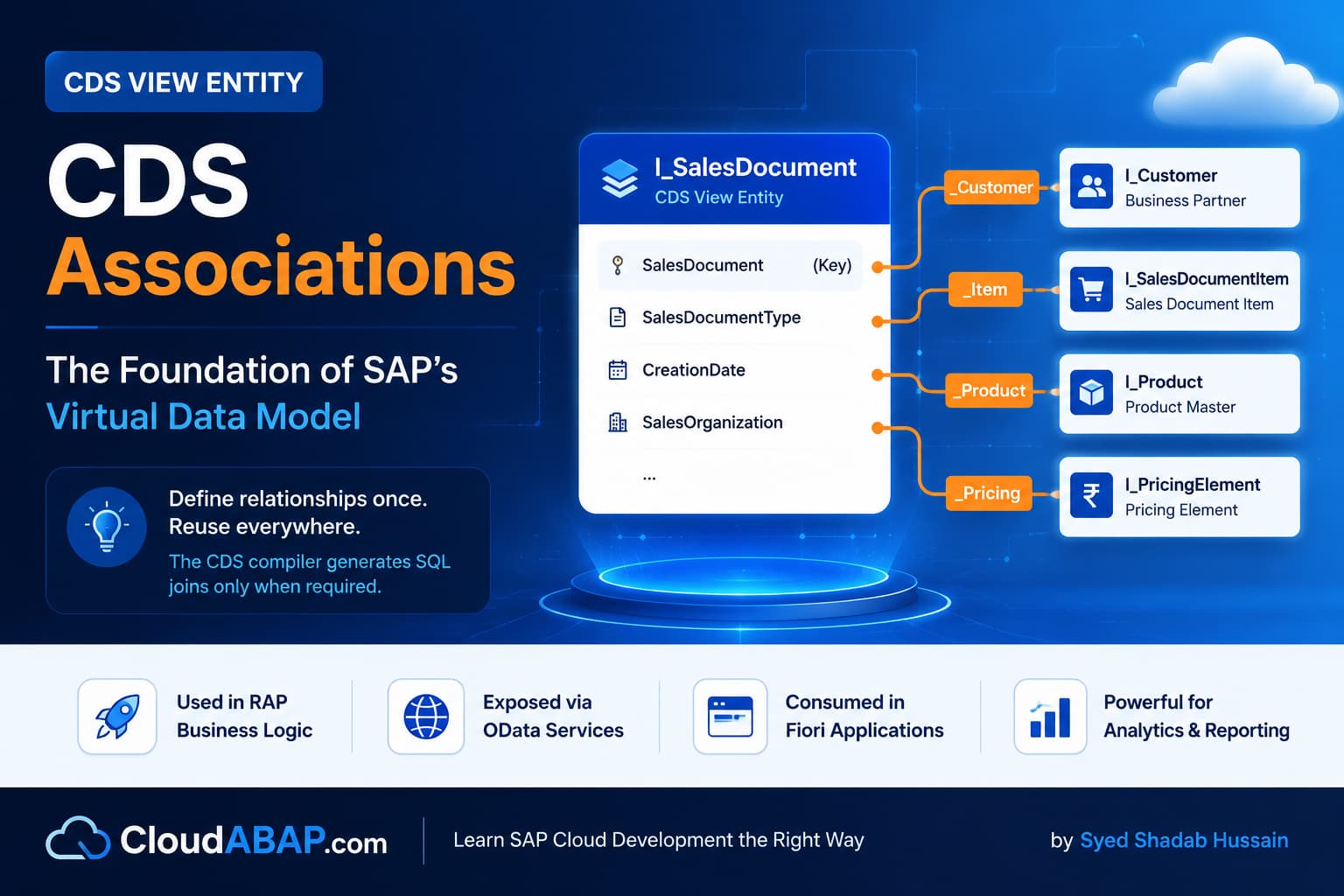
Associations are one of the most important concepts in modern ABAP CDS development. They are the foundation of SAP's Virtual Data Model (VDM) and are extensively used throughout SAP S/4HANA Public Cloud, RAP applications, and Fiori services.
If you browse SAP's released Interface Views such as I_SalesDocument, I_BillingDocument, I_PurchaseOrder, or I_Product, you will notice that SAP rarely writes explicit JOIN statements. Instead, relationships between business objects are defined using Associations.
Understanding Associations is therefore not optional. It is one of the core skills expected from every ABAP Cloud developer and SAP Technical Architect.
Architect Perspective
Most developers initially think that an Association is simply another way of writing a LEFT OUTER JOIN.This is the biggest misconception in ABAP CDS.
An Association defines a business relationship. It does not retrieve any data by itself. The actual SQL JOIN is generated later by the CDS compiler only when the relationship is navigated.
Why Did SAP Introduce Associations?
Before ABAP CDS, applications typically relied on explicit SQL JOINs whenever data from multiple tables was required.
SELECT ...

FROM VBAK

LEFT OUTER JOIN VBAP

ON VBAK.VBELN = VBAP.VBELN

LEFT OUTER JOIN KNA1

ON VBAK.KUNNR = KNA1.KUNNR

LEFT OUTER JOIN MAKT

ON VBAP.MATNR = MAKT.MATNR
Although this approach works, enterprise applications become increasingly difficult to maintain as every new consumer writes another set of JOIN statements.
Problems with Traditional SQL JOINs
| Problem | Impact |
|---|---|
| JOIN logic repeated in every CDS View. | Duplicate implementation and maintenance effort. |
| Large SQL statements. | Reduced readability. |
| Business relationships hidden inside SQL. | Poor reusability. |
| Changing a relationship requires modifying multiple views. | Higher maintenance cost. |
| Consumers often execute unnecessary JOINs. | Reduced performance. |
SAP's Solution
SAP introduced Associations to separate relationship definition from relationship usage.
Instead of repeatedly writing SQL JOIN statements, developers define the relationship once and allow the CDS compiler to generate the appropriate SQL only when required.
association [0..1] to I_Customer as _Customer

on $projection.SoldToParty = _Customer.Customer
Notice that no customer fields are selected yet. At this stage, the Association simply documents how a Sales Order is related to a Customer.
Association vs SQL JOIN
One of the biggest misconceptions among ABAP developers is assuming that an Association is simply another syntax for a LEFT OUTER JOIN. Although both concepts relate data from different business objects, they serve fundamentally different purposes.
| Association | SQL JOIN |
|---|---|
| Defines a reusable business relationship. | Immediately combines data from multiple data sources. |
| Lazy by nature. | Executed immediately. |
| No SQL is generated until navigation occurs. | SQL is generated as soon as the statement executes. |
| Can be reused by multiple consumers. | Must be rewritten wherever needed. |
| Preferred in SAP's Virtual Data Model (VDM). | Still useful for specific scenarios but less reusable. |
Real SAP Example
Consider the released Interface View I_SalesDocument. A sales document stores only the Sold-To Party number. Customer details reside in a separate business object.
define view entity ZI_SalesOrder

  as select from I_SalesDocument

  association [0..1] to I_Customer as _Customer

    on $projection.SoldToParty = _Customer.Customer

{

    key SalesDocument,

    SoldToParty

}
At this point, no customer information is retrieved. The CDS View simply records that a Sales Document has a relationship with a Customer.
Navigating an Association
Once a consumer requests a field from the association, the CDS compiler generates the appropriate SQL JOIN automatically.
define view entity ZI_SalesOrder

  as select from I_SalesDocument

  association [0..1] to I_Customer as _Customer

    on $projection.SoldToParty = _Customer.Customer

{

    key SalesDocument,

    SoldToParty,

    _Customer.CustomerName

}
Simply adding _Customer.CustomerName changes the SQL generated by the CDS compiler. We will examine this behavior in detail in Lesson 4 when we discuss lazy loading and generated SQL.
INSIDE THE CDS COMPILER
Association Is Defined but Not Navigated
💭 Compiler Thought Process
The developer created an Association between Sales Orders and Customers, but no customer fields are requested in the SELECT list.
Compiler Decision Flow
Association metadata is available in the CDS View.
No path expression (_Customer.<field>) is accessed.
Customer table is not required for the current result set.
The CDS compiler skips SQL JOIN generation.
✅ Final Compiler Decision
Execute the query using only the primary data source without generating a JOIN.
⚡ SQL Optimization Insight
Unused Associations do not generate SQL JOINs. This lazy behavior helps reduce unnecessary database processing and is one of the major advantages of Associations in SAP's Virtual Data Model.
Real Project Example: Why SAP Uses Associations Everywhere
This makes Interface Views reusable for multiple applications while allowing the CDS compiler to generate only the SQL that is actually required by each consumer.
💡 SAP Best Practice
Avoid writing explicit JOIN statements in Interface Views unless the relationship is truly local to that view or cannot be expressed through an Association.
❌ Common Mistakes
- Thinking an Association immediately executes a SQL JOIN.
- Assuming Associations always improve performance regardless of usage.
- Using Associations without understanding the underlying business relationship.
- Treating Associations as a replacement for every SQL JOIN.
Key Points to Remember
| Concept | Remember |
|---|---|
| Association | Defines a business relationship. |
| JOIN | Retrieves data. |
| Association Execution | No SQL until navigation. |
| Primary Benefit | Reusability and maintainability. |
| SAP Recommendation | Prefer Associations in Interface Views. |
What is an Association in ABAP CDS?
Answer: An Association defines a reusable relationship between two business objects. It does not retrieve data by itself.
What is the primary difference between an Association and a SQL JOIN?
Answer: An Association models a business relationship and allows the CDS compiler to generate SQL only when required. A SQL JOIN immediately combines data from multiple data sources.
Why does SAP recommend Associations throughout the Virtual Data Model?
Answer: Associations promote reuse, improve maintainability, support lazy SQL generation, reduce duplicated JOIN logic, and allow the CDS compiler to optimize generated SQL for different consumers.
💡 Key Takeaway
Associations are not another way of writing JOINs. They are reusable relationship definitions that describe how business objects are connected. The CDS compiler later decides whether those relationships need to become SQL JOINs based on how the Association is used.
Understanding this distinction is the foundation for every advanced Association topic that follows, including Cardinality, Generated SQL, Path Expressions, and Performance Optimization.