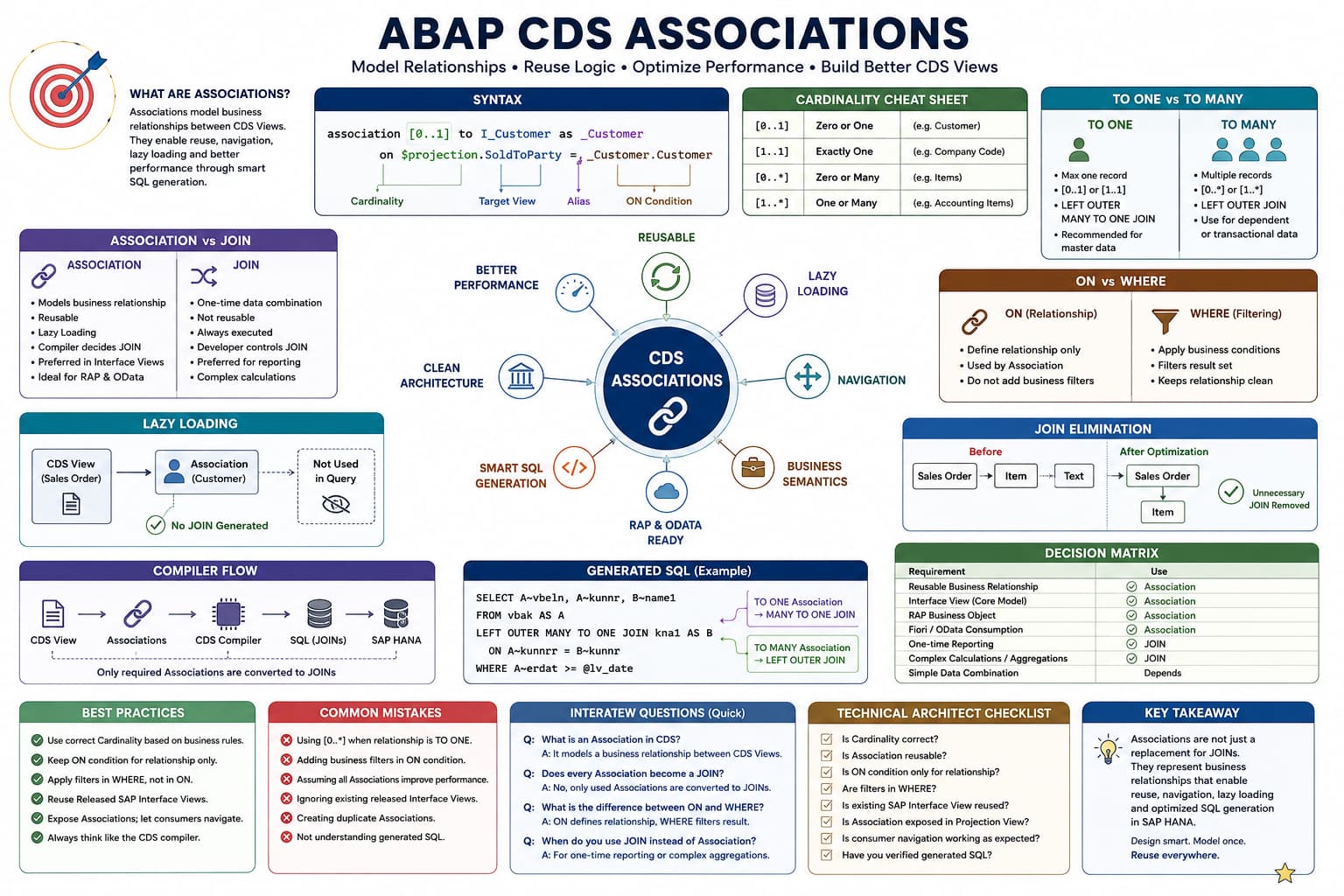
Association Masterclass
Lesson 10 of 10 – Performance, Best Practices & Technical Architect Guide
Congratulations! You've completed the Association Masterclass.
This final lesson brings everything together from a Technical Architect's perspective.
The question is no longer:
"How do I create an Association?"
The question becomes:
"Should I use an Association at all?"
Answering that question correctly is what separates an ABAP developer from an SAP Technical Architect.
Learning Objectives
- Understand the real performance characteristics of Associations.
- Know when Associations are the right choice.
- Know when explicit SQL JOINs are a better solution.
- Learn SAP recommended design patterns.
- Build reusable Interface Views like SAP.
The Biggest Myth About Associations
Associations are always faster than SQL JOINs.
This statement is false.
Associations do not magically make SQL faster.
Associations improve architecture.
The CDS compiler may then generate better SQL because it understands business relationships and can eliminate unnecessary JOINs.
Performance is therefore a consequence of better modelling—not of the Association keyword itself.
Architect Perspective
Never choose Associations because you believe they are faster.Choose Associations because they correctly model business relationships.
Better performance is often a side effect—not the primary objective.
When Should You Use Associations?
| Scenario | Recommendation |
|---|---|
| Interface Views | ✅ Always use Associations where relationships exist. |
| RAP Business Objects | ✅ Preferred. |
| Projection Views | ✅ Reuse existing Associations. |
| Reusable Business Models | ✅ Strongly Recommended. |
When Should You Use Explicit JOINs?
Associations are not the solution for every problem.
There are scenarios where an explicit SQL JOIN is simpler and more appropriate.
| Scenario | Recommendation |
|---|---|
| One-off reporting CDS | Explicit JOIN may be simpler. |
| Heavy aggregation | JOIN often provides clearer SQL. |
| Temporary reporting logic | Associations may provide little benefit. |
| No future reuse expected | Explicit JOIN is acceptable. |
Decision Matrix
| Question | Choose |
|---|---|
| Is this business relationship reusable? | Association |
| Is this a one-off query? | JOIN |
| Will multiple applications consume this CDS? | Association |
| Is reuse unlikely? | JOIN |
INSIDE THE CDS COMPILER
Architect's Decision
💭 Compiler Thought Process
Should this relationship become reusable business metadata or remain query-specific SQL?
Compiler Decision Flow
Is this relationship reusable?
Will multiple consumers need it?
Does it represent a genuine business relationship?
If yes, create an Association.
Otherwise, an explicit JOIN may be the better design.
✅ Final Compiler Decision
Use Associations to model reusable business relationships—not simply because they exist.
⚡ SQL Optimization Insight
Good architecture usually leads to good performance. The reverse is not always true.
SAP's Recommended CDS Architecture
One of the biggest mistakes developers make is trying to build every requirement inside a single CDS View.
SAP recommends separating responsibilities across different CDS View layers so that each layer has a clear purpose.
Database Tables

        ↓

Interface Views (Business Model)

        ↓

Projection Views

        ↓

Consumption Views

        ↓

Fiori Apps / RAP / OData / Analytics
Associations belong primarily in the Interface View, where they define reusable business relationships.
Responsibilities of Each Layer
| Layer | Responsibility |
|---|---|
| Interface View | Define business objects and reusable Associations. |
| Projection View | Expose only the required fields and Associations. |
| Consumption View | Add UI, analytical and application-specific annotations. |
A Poor Design
Consider the following situation.
Sales Order

+ Customer

+ Items

+ Product

+ Plant

+ Address

+ Billing

+ Pricing

+ UI Logic

+ Analytics

+ Filters

+ Calculations
Although this approach may work initially, it quickly becomes difficult to maintain.
Every new application now depends on the same monolithic CDS View, even if it requires only a small subset of the available data.
A Better Design
ZI_SalesOrder

├── _Customer

├── _Item

├── _Billing

├── _Partner

└── _Pricing

        ↓

ZC_SalesOrderApp

        ↓

Fiori

RAP

OData

Analytics
The Interface View focuses only on modelling business relationships.
Each consumer decides which Associations it wants to navigate.
This keeps the Interface View reusable while allowing applications to remain lightweight.
Common Design Mistakes
| Mistake | Better Approach |
|---|---|
| Repeating the same JOIN in multiple CDS Views. | Define the Association once in the Interface View. |
| Creating very large Consumption Views. | Keep Consumption Views application-specific. |
| Mixing UI logic with business modelling. | Separate modelling from presentation. |
| Creating duplicate Associations. | Reuse existing released Interface Views whenever possible. |
Performance Myths vs Reality
| Myth | Reality |
|---|---|
| Associations are always faster. | Performance depends on the generated SQL and execution plan. |
| More Associations make a CDS View slower. | Unused Associations are not necessarily converted into JOINs. |
| JOINs are bad. | Explicit JOINs are appropriate for many reporting scenarios. |
| Associations eliminate every JOIN. | Associations eventually become JOINs when navigation requires them. |
INSIDE THE CDS COMPILER
Architectural Thinking
💭 Compiler Thought Process
The compiler cannot fix a poorly designed data model. Good modelling decisions come first.
Compiler Decision Flow
Identify the core business object.
Define reusable business relationships.
Keep Interface Views generic.
Move application-specific logic to Projection or Consumption Views.
Allow consumers to navigate only what they need.
✅ Final Compiler Decision
A well-layered CDS architecture is easier to maintain, easier to extend and usually produces better optimized SQL.
⚡ SQL Optimization Insight
Design for reuse first. Performance tuning becomes much easier when responsibilities are clearly separated.
Architect Perspective
Technical Architect InsightWhen reviewing a CDS implementation, don't start by asking whether it uses Associations or JOINs.
Start by asking whether the business model has been designed correctly.
If the modelling is correct, choosing between an Association and an explicit JOIN becomes much simpler because each serves a different architectural purpose.
Association Design Checklist
Before activating any CDS View, go through the following checklist. This is very similar to the review process followed by SAP Technical Architects during code reviews.
| Question | ✓ |
|---|---|
| Does the Association represent a real business relationship? | □ |
| Is the Cardinality correct? | □ |
| Is the ON condition defining only the relationship? | □ |
| Are business filters placed in WHERE instead of ON? | □ |
| Can this Association be reused by another CDS View? | □ |
| Is there already a released SAP Interface View providing this Association? | □ |
Association vs JOIN Decision Matrix
| Requirement | Recommended Choice |
|---|---|
| Reusable business relationship | ✅ Association |
| Interface View | ✅ Association |
| RAP Business Object | ✅ Association |
| One-time reporting CDS | ✅ JOIN |
| Complex reporting query | Usually JOIN |
| Shared business model | Association |
Top 10 Best Practices
- Model business relationships, not SQL JOINs.
- Choose Cardinality based on business semantics.
- Keep ON conditions limited to relationship logic.
- Apply business filters using WHERE.
- Reuse released SAP Interface Views whenever possible.
- Prefer Associations in Interface Views.
- Expose Associations instead of recreating them.
- Allow consumers to navigate only the data they require.
- Don't assume Associations always improve performance.
- Always think like the CDS compiler.
Top 10 Common Mistakes
❌ Common Mistakes
- Using [0..*] when the relationship is actually TO ONE.
- Using ON conditions to implement business filtering.
- Thinking Associations replace every SQL JOIN.
- Ignoring released SAP Interface Views.
- Creating duplicate business relationships.
- Using Associations where a simple JOIN would be clearer.
- Designing Interface Views for one application only.
- Repeating JOIN logic across multiple CDS Views.
- Not understanding generated SQL.
- Treating Associations as syntax instead of business metadata.
Interview Questions (Quick Revision)
Why were Associations introduced in ABAP CDS?
Answer: To model reusable business relationships instead of repeatedly writing SQL JOINs.
Does every Association become a JOIN?
Answer: No. The CDS compiler generates JOINs only for navigated Associations required by the consumer.
Why are TO MANY Associations restricted in certain scenarios?
Answer: Because multiple matching target records create ambiguous semantics that the compiler cannot resolve deterministically.
When would you intentionally choose a SQL JOIN instead of an Association?
Answer: For one-off reporting, heavy aggregation or query-specific logic where relationship reuse is not required.
What is the primary purpose of an Interface View?
Answer: To model reusable business objects and their relationships so that Projection Views, RAP services and analytical applications can consume the same business model.
INSIDE THE CDS COMPILER
Final Mental Model
💭 Compiler Thought Process
Forget SQL for a moment. Start by understanding the business objects and how they relate to each other.
Compiler Decision Flow
Identify the root business object.
Define genuine business relationships.
Choose the correct Cardinality.
Expose reusable Associations.
Let consumers navigate what they need.
Allow the CDS compiler to generate optimized SQL.
✅ Final Compiler Decision
Good CDS design begins with business modelling and ends with efficient SQL generation.
⚡ SQL Optimization Insight
When you consistently think in terms of business relationships rather than JOIN statements, your CDS models become easier to reuse, maintain and optimize.
Architect Perspective
Final Advice from a Technical ArchitectDevelopers write CDS Views.
Senior developers design reusable CDS models.
Technical Architects design business object graphs.
If you master Associations, Cardinality, Navigation and the CDS compiler's behavior, you'll naturally begin designing solutions the same way SAP designs its released Virtual Data Model.
💡 Key Takeaway
Associations are far more than a replacement for SQL JOINs.
They represent reusable business relationships that enable SAP's Virtual Data Model, RAP and S/4HANA Public Cloud architecture.
Throughout this masterclass you've learned not only the syntax, but also how the CDS compiler interprets Associations, generates SQL, validates Cardinality and optimizes execution.
Mastering these concepts will help you build cleaner, reusable and future-proof CDS Views that align with SAP's recommended architecture.
Congratulations 🎉
You've Successfully Completed the CloudABAP Association Masterclass
You now understand:
- Why SAP introduced Associations
- How Cardinality affects navigation
- Lazy Loading and Join Elimination
- Association vs JOIN
- ON vs WHERE
- Generated SQL
- Nested and reusable Associations
- SAP Virtual Data Model design principles
- Performance and architectural best practices
You're now equipped to design enterprise-grade CDS View Entities following SAP's recommended architecture for ABAP Cloud and S/4HANA Public Cloud.