Row Store vs Column Store
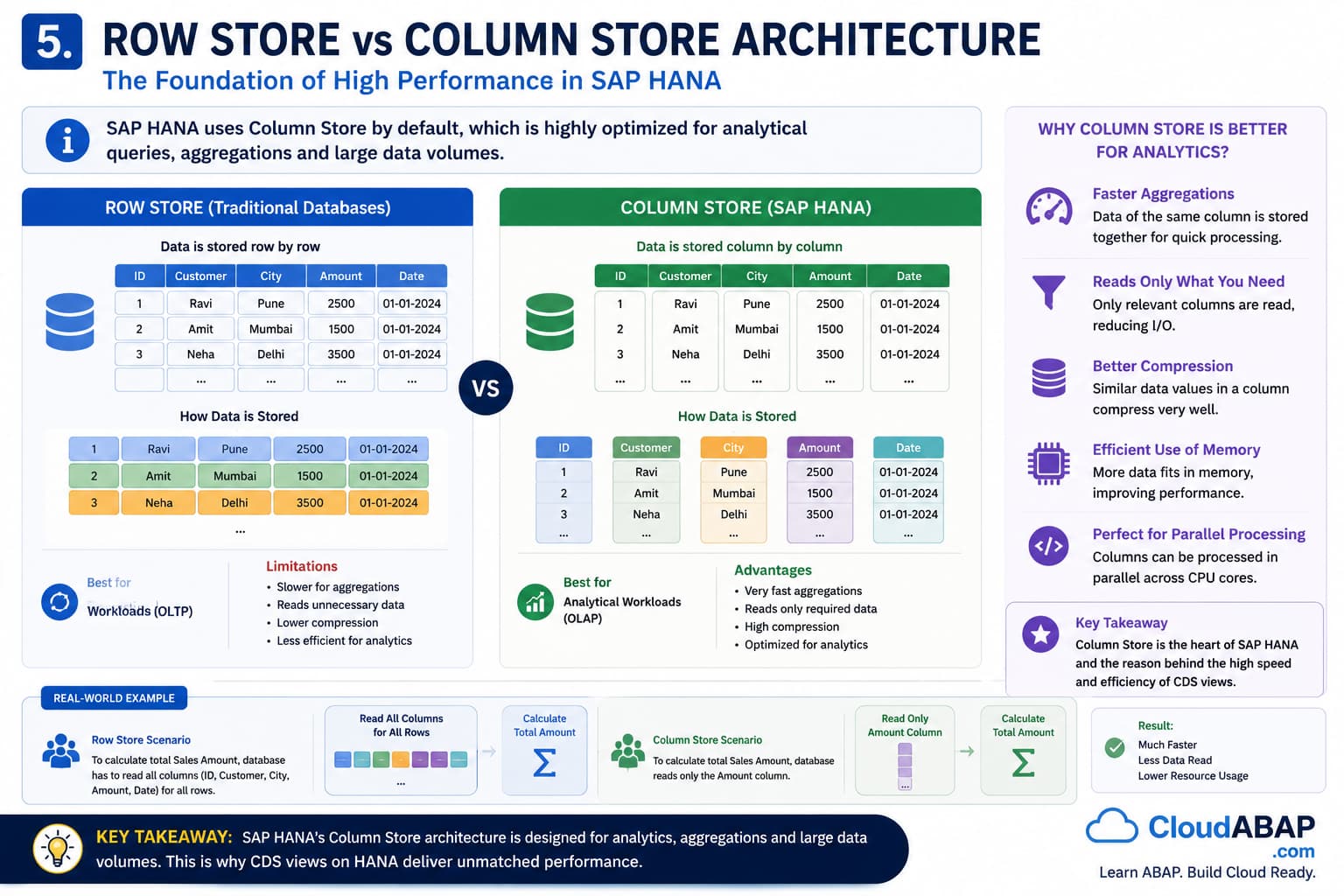
One of the biggest innovations introduced by SAP HANA is its extensive use of Column Store technology.
Traditional databases primarily store data in a row-based format, while SAP HANA uses a column-based storage model for most business application data.
Although both approaches store the same information, the way data is physically organized has a significant impact on performance.
Understanding the difference between Row Store and Column Store helps explain why SAP HANA can execute CDS queries, analytics, and aggregations much faster than traditional databases.
Understanding Row-Based Storage
In a Row Store database, all values belonging to a record are stored together.
Consider the following employee data:
Employee Data
| Employee ID | Name | Department | Salary |
|---|---|---|---|
| 1001 | John | Finance | 80000 |
| 1002 | Sarah | Sales | 70000 |
| 1003 | David | Finance | 85000 |
A Row Store saves the data as:
- 1001 | John | Finance | 80000
- 1002 | Sarah | Sales | 70000
- 1003 | David | Finance | 85000
Each row is stored sequentially. When the database retrieves a complete record, Row Store performs very efficiently because all required values are physically located together.
Advantages and Limitations of Row Store
Row Store works particularly well for transactional processing.
Advantages include:
- Efficient single-record lookups
- Fast inserts and updates
- Suitable for transactional processing
- Ideal for configuration and master data tables
Problems arise when applications need only a few columns from very large tables.
Consider the query: SELECT SUM( Salary )
Even though only one column is required, the database still scans every row and reads unnecessary data.
As datasets grow larger, this becomes increasingly inefficient.
Understanding Column-Based Storage
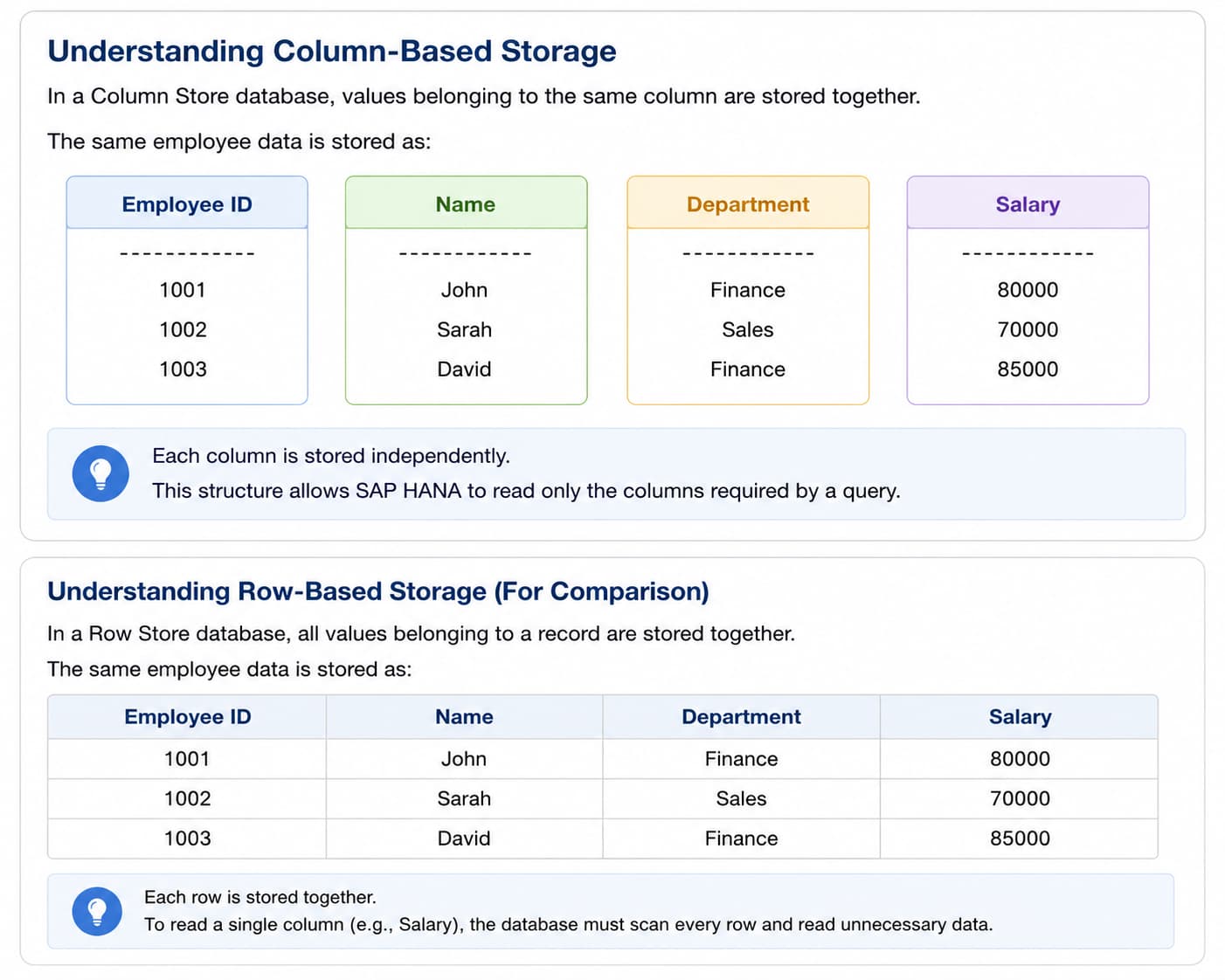
In a Column Store database, values belonging to the same column are stored together.
The same employee data is organized as:
| Employee ID | Name | Department | Salary |
|---|---|---|---|
| 1001 | John | Finance | 80000 |
| 1002 | Sarah | Sales | 70000 |
| 1003 | David | Finance | 85000 |
Each column is stored independently.
This structure allows SAP HANA to read only the columns required by a query.
Architect Perspective
In a Column Store database, SAP HANA physically stores all values of a column together. For example, all Salary values are stored together, all Department values are stored together, and so on.Therefore, when a CDS query requests only Salary data, SAP HANA can read just the Salary column without scanning Names, Departments, or Employee IDs.
Suppose a report needs: SELECT SUM( Salary )
SAP HANA reads only the Salary column.
It does not need to read:
- Employee IDs
- Names
- Departments
This significantly reduces the amount of data processed.
Why Column Store Is Perfect for CDS
Most CDS Views are used for:
- Reporting
- Analytics
- Dashboards
- Aggregations
- Search Scenarios
- Fiori Applications
These use cases typically access only a subset of available columns.
Because SAP HANA can read only the required columns, CDS queries execute far more efficiently than traditional row-based approaches.
This is one of the key reasons SAP selected Column Store as the default storage model for SAP HANA business data.
Row Store vs Column Store Comparison
| Characteristic | Row Store | Column Store |
|---|---|---|
| Data Organization | Complete records together | Values grouped by column |
| Single Record Access | Excellent | Good |
| Aggregations | Slower | Very Fast |
| Analytics | Limited | Excellent |
| Compression | Lower | Higher |
| CDS Performance | Moderate | Optimized |
Real Project Example: Purchase Register Application
Consider a Purchase Register containing 50 million records.
A finance user wants to calculate:
- Total Tax Amount
- Total Invoice Value
- Total Taxable Value
Only three columns are needed.
Row Store Database
- Every row must be scanned.
- Unnecessary columns are read.
- More data must be processed.
SAP HANA Column Store
- Only the required columns are accessed.
- Aggregations execute directly on those columns.
- Processing time is significantly reduced.
The result is faster reporting and better scalability.
When Does SAP HANA Use Row Store?
Although Column Store is the primary storage format, SAP HANA still supports Row Store.
Typical examples include:
- Technical Tables
- Configuration Tables
- Small Lookup Tables
- Frequently Updated Tables
These scenarios benefit from Row Store's efficient write performance.
SAP HANA therefore combines the strengths of both storage models.
Architect Perspective
Column Store is one of the most important reasons CDS performs so well on SAP HANA.CDS queries frequently execute aggregations, filters, joins and analytical calculations against large datasets. Column Store minimizes unnecessary data reads and enables SAP HANA to process only the relevant business information.
Understanding Column Store is essential for architects designing scalable RAP, Embedded Analytics and Fiori applications.
Interview Questions
What is the primary difference between Row Store and Column Store?
Answer: Row Store stores complete records together, whereas Column Store stores values of the same column together.
Why is Column Store faster for analytical queries?
Answer: Column Store reads only the required columns instead of entire rows, significantly reducing data access and improving aggregation performance.
Why is Column Store important for CDS performance?
Answer: Most CDS queries involve filtering, aggregations, analytics and reporting scenarios. Column Store enables SAP HANA to process only relevant columns, reducing I/O and maximizing Code Pushdown efficiency.
💡 Key Takeaway
Traditional databases optimize for storing complete records, whereas SAP HANA Column Store optimizes for processing business information.
Because CDS queries typically access only a subset of columns and perform aggregations, Column Store enables SAP HANA to process large datasets dramatically faster than traditional row-based databases.